
101 lines
No EOL
3.3 KiB
Markdown
101 lines
No EOL
3.3 KiB
Markdown
<h1><a href="https://github.com/aceberg/WatchYourLAN">
|
|
<img src="https://raw.githubusercontent.com/aceberg/WatchYourLAN/main/assets/logo.png" width="20" />
|
|
</a>WatchYourLAN</h1>
|
|
<br/>
|
|
|
|
[](https://github.com/aceberg/WatchYourLAN/actions/workflows/main-docker-all.yml)
|
|
[](https://goreportcard.com/report/github.com/aceberg/WatchYourLAN)
|
|
[](https://codeclimate.com/github/aceberg/WatchYourLAN/maintainability)
|
|

|
|

|
|
|
|
Lightweight network IP scanner with web GUI
|
|
> [!WARNING]
|
|
> This README is about version 2.0, which is going to be released soon. There will be BREAKING CHANGES! Version 1.0 can be found in this brunch: [v1](https://github.com/aceberg/WatchYourLAN/tree/v1)
|
|
|
|
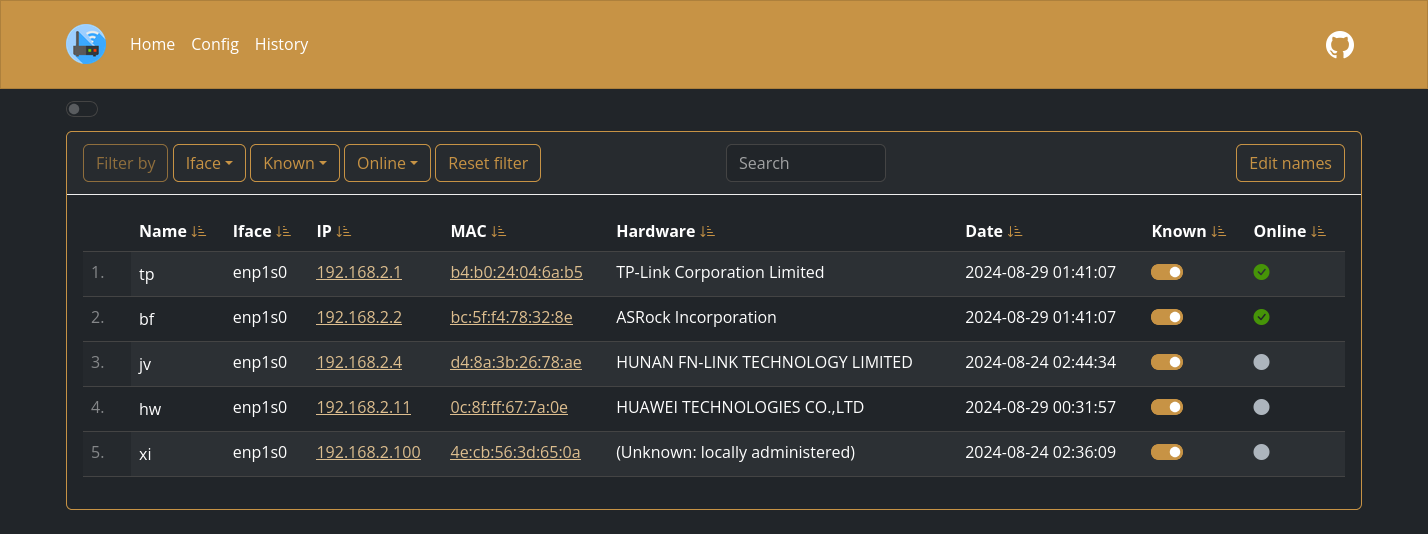
|
|
|
|
## Quick start
|
|
|
|
<details>
|
|
<summary>Expand</summary>
|
|
|
|
Replace `$YOURTIMEZONE` with correct time zone and `$YOURIFACE` with network interface you want to scan. Network mode must be `host`. Set `$DOCKERDATAPATH` for container to save data:
|
|
|
|
```sh
|
|
docker run --name wyl \
|
|
-e "IFACES=$YOURIFACE" \
|
|
-e "TZ=$YOURTIMEZONE" \
|
|
--network="host" \
|
|
-v $DOCKERDATAPATH/wyl:/data/WatchYourLAN \
|
|
aceberg/watchyourlan
|
|
```
|
|
Web GUI should be at http://localhost:8840
|
|
|
|
</details>
|
|
|
|
## Config
|
|
<details>
|
|
<summary>Expand</summary>
|
|
|
|
Configuration can be done through config file or environment variables
|
|
|
|
| Variable | Description | Default |
|
|
| -------- | ----------- | ------- |
|
|
| COLOR | Background color: light or dark | dark |
|
|
|
|
</details>
|
|
|
|
## Config file
|
|
|
|
<details>
|
|
<summary>Expand</summary>
|
|
|
|
|
|
</details>
|
|
|
|
## Options
|
|
|
|
<details>
|
|
<summary>Expand</summary>
|
|
|
|
| Key | Description | Default |
|
|
| -------- | ----------- | ------- |
|
|
| -c | Path to config file | /data/config.yaml |
|
|
| -n | Path to node modules (see below) | "" |
|
|
|
|
</details>
|
|
|
|
## Local network only
|
|
<details>
|
|
<summary>Expand</summary>
|
|
|
|
By default, this app pulls themes, icons and fonts from the internet. But, in some cases, it may be useful to have an independent from global network setup. I created a separate [image](https://github.com/aceberg/my-dockerfiles/tree/main/node-bootstrap) with all necessary modules and fonts.
|
|
Run with Docker:
|
|
```sh
|
|
docker run --name node-bootstrap \
|
|
-p 8850:8850 \
|
|
aceberg/node-bootstrap
|
|
```
|
|
```sh
|
|
docker run --name wyl \
|
|
-e "IFACE=$YOURIFACE" \
|
|
-e "TZ=$YOURTIMEZONE" \
|
|
--network="host" \
|
|
-v $DOCKERDATAPATH/wyl:/data \
|
|
aceberg/watchyourlan -n "http://$YOUR_IP:8850"
|
|
```
|
|
Or use [docker-compose](docker-compose-local.yml)
|
|
|
|
</details>
|
|
|
|
## Thanks
|
|
<details>
|
|
<summary>Expand</summary>
|
|
|
|
- All go packages listed in [dependencies](https://github.com/aceberg/WatchYourLAN/network/dependencies)
|
|
- Favicon and logo: [Access point icons created by Freepik - Flaticon](https://www.flaticon.com/free-icons/access-point)
|
|
- [Bootstrap](https://getbootstrap.com/)
|
|
- Themes: [Free themes for Bootstrap](https://bootswatch.com)
|
|
|
|
</details> |