
131 lines
5.9 KiB
Markdown
131 lines
5.9 KiB
Markdown
# YTPTube
|
|
|
|

|
|

|
|

|
|

|
|
|
|
**YTPTube** is a web-based GUI for [yt-dlp](https://github.com/yt-dlp/yt-dlp), designed to make downloading videos from
|
|
video platforms easier and user-friendly. It supports downloading playlists, channels, live streams and
|
|
includes features like scheduling downloads, sending notifications, and built-in video player.
|
|
|
|
# Screenshots
|
|
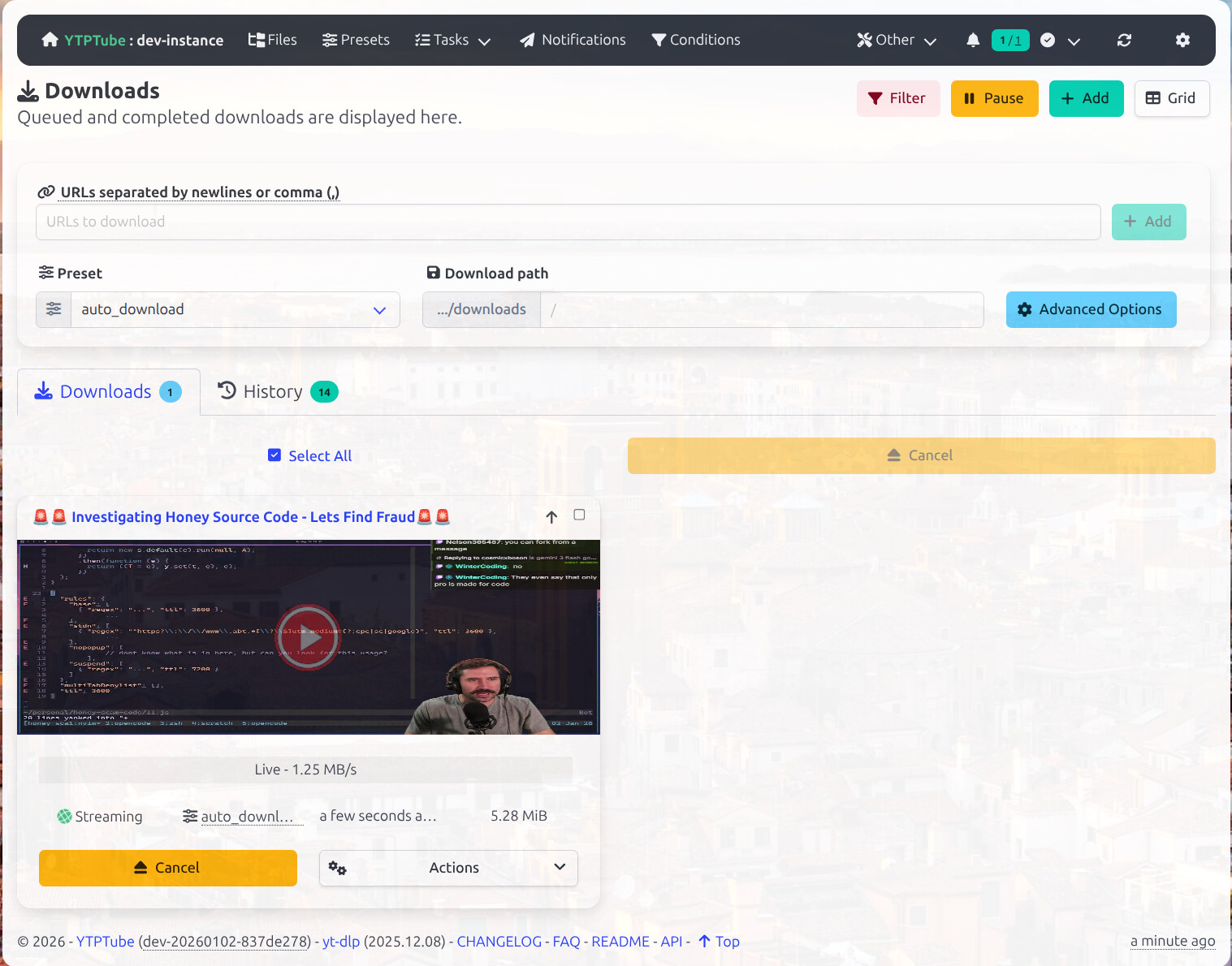
Example of the regular view interface.
|
|
|
|
|
|
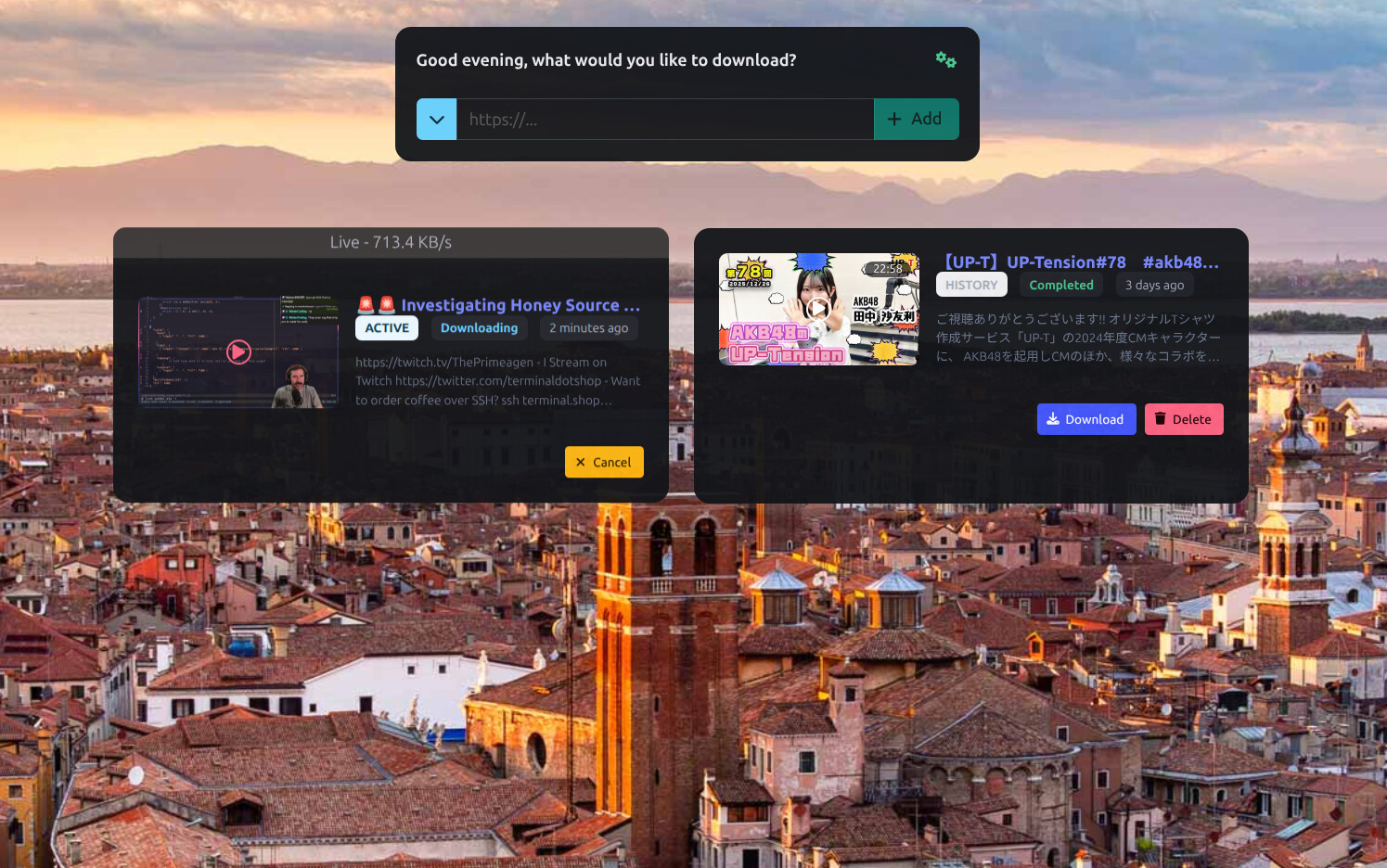
Example of the Simple mode interface.
|
|
|
|
|
|
# YTPTube Features.
|
|
|
|
* Multi-download support.
|
|
* Random beautiful background.
|
|
* Handles live and upcoming streams.
|
|
* A dual view mode for both technical and non-technical users.
|
|
* Schedule channels or playlists to be downloaded automatically with support for creating custom download feeds from non-supported sites. See [Feeds documentation](FAQ.md#how-can-i-monitor-sites-without-rss-feeds).
|
|
* Send notification to targets based on selected events. includes [Apprise](https://github.com/caronc/apprise?tab=readme-ov-file#readme) support.
|
|
* Support per link options.
|
|
* Support for limits per extractor and overall global limit.
|
|
* Queue multiple URLs at once.
|
|
* Powerful presets system for applying `yt-dlp` options. with a pre-made preset for media servers users.
|
|
* A simple file browser.
|
|
* A built in video player **with support for sidecar external subtitles**. `Require ffmpeg to be in PATH in non-docker setups`.
|
|
* Basic authentication support.
|
|
* Supports `curl-cffi`. See [yt-dlp documentation](https://github.com/yt-dlp/yt-dlp?tab=readme-ov-file#impersonation). `In docker only`.
|
|
* Bundled `pot provider plugin`. See [yt-dlp documentation](https://github.com/yt-dlp/yt-dlp/wiki/PO-Token-Guide). `In docker only`.
|
|
* Support using [flaresolverr/flaresolverr](https://github.com/flaresolverr/flaresolverr) to bypass Cloudflare protections for yt-dlp and internal http client. See [related FAQ](FAQ.md#how-to-bypass-cf-challenges).
|
|
* Automatic updates for `yt-dlp` and custom `pip` packages. `In docker only`.
|
|
* Conditions feature to apply custom options based on `yt-dlp` returned info.
|
|
* Custom browser extensions, bookmarklets and iOS shortcuts to send links to YTPTube instance.
|
|
* A bundled executable version for Windows, macOS and Linux. `MacOS version is untested`.
|
|
* Use playwright or selenium for extractors that require a browser. see [related FAQ](FAQ.md#how-to-use-the-browser-extractor).
|
|
|
|
Please read the [FAQ](FAQ.md) for more information.
|
|
|
|
# Installation
|
|
|
|
> [!IMPORTANT]
|
|
> By default YTPTube runs without authentication. If you expose it to the internet, **enable auth**. See [security recommendations](FAQ.md#security-recommendations).
|
|
|
|
## Run using docker command
|
|
|
|
```bash
|
|
mkdir -p ./{config,downloads/{files,tmp}} && docker run -itd --rm --user "${UID}:${UID}" --name ytptube \
|
|
-e YTP_TEMP_PATH=/downloads/tmp -e YTP_DOWNLOAD_PATH=/downloads/files \
|
|
-p 8081:8081 -v ./config:/config:rw -v ./downloads:/downloads:rw \
|
|
ghcr.io/arabcoders/ytptube:latest
|
|
```
|
|
|
|
## Run using podman
|
|
|
|
```bash
|
|
mkdir -p ./{config,downloads/{files,tmp}} && podman run -itd --rm --userns=keep-id --name ytptube \
|
|
-e YTP_TEMP_PATH=/downloads/tmp -e YTP_DOWNLOAD_PATH=/downloads/files \
|
|
-p 8081:8081 -v ./config:/config:rw -v ./downloads:/downloads:rw \
|
|
arabcoders/ytptube:latest
|
|
```
|
|
|
|
Then you can access the WebUI at `http://localhost:8081`.
|
|
|
|
## Using compose file
|
|
|
|
The following is an example of a `compose.yaml` file that can be used to run YTPTube.
|
|
|
|
```yaml
|
|
services:
|
|
ytptube:
|
|
user: "${UID:-1000}:${UID:-1000}" # change this to your user id and group id.
|
|
# comment out the above line and uncomment the below line if you are using podman-compose.
|
|
#userns_mode: keep-id
|
|
image: ghcr.io/arabcoders/ytptube:latest
|
|
container_name: ytptube
|
|
restart: unless-stopped
|
|
environment:
|
|
- YTP_TEMP_PATH=/downloads/tmp
|
|
- YTP_DOWNLOAD_PATH=/downloads/files
|
|
ports:
|
|
- "8081:8081"
|
|
volumes:
|
|
- ./config:/config:rw
|
|
- ./downloads:/downloads:rw
|
|
```
|
|
|
|
> [!IMPORTANT]
|
|
> Make sure to change the `user` line to match your user id and group id in docker setups, or use `userns_mode: keep-id` in podman setups.
|
|
|
|
```bash
|
|
mkdir -p ./{config,downloads/{files,tmp}} && docker compose -f compose.yaml up -d
|
|
```
|
|
|
|
Then you can access the WebUI at `http://localhost:8081`.
|
|
|
|
## Unraid
|
|
|
|
For `Unraid` users You can install the `Community Applications` plugin, and search for **ytptube** it comes
|
|
pre-configured.
|
|
|
|
# API Documentation
|
|
|
|
For simple API documentation, you can refer to the [API documentation](API.md).
|
|
|
|
# Disclaimer
|
|
|
|
This project is not affiliated with yt-dlp or any other service.
|
|
|
|
This is a personal project designed to make downloading videos from the internet more convenient for me. It is not
|
|
intended for piracy or any unlawful use. This project was built primarily for my own use and preferences.
|
|
|
|
AI-assisted tools are used in this project. If you are uncomfortable with this, you should not use this project.
|
|
|
|
Contributions are welcome, but I may decline changes that do not interest me or do not align with my vision for this
|
|
project. Unsolicited pull requests will be closed. For suggestions or feature requests, please open a discussion or
|
|
join the Discord server.
|
|
|
|
# Social contact
|
|
|
|
If you have short or quick questions, you are free to join my [discord server](https://discord.gg/G3GpVR8xpb) and ask
|
|
the question. keep in mind it's solo project, as such it might take me a bit of time to reply.
|
|
|
|
# Donation
|
|
|
|
If you feel like donating and appreciate my work, you can do so by donating to children charity. For example [Make-A-Wish](https://worldwish.org).
|