
223 lines
8.7 KiB
Markdown
223 lines
8.7 KiB
Markdown
<h1><a href="https://github.com/aceberg/WatchYourLAN">
|
|
<img src="https://raw.githubusercontent.com/aceberg/WatchYourLAN/main/assets/logo.png" width="20" />
|
|
</a>WatchYourLAN</h1>
|
|
<br/>
|
|
|
|
[](https://github.com/aceberg/WatchYourLAN/actions/workflows/main-docker-all.yml)
|
|
[](https://goreportcard.com/report/github.com/aceberg/WatchYourLAN)
|
|
[](https://hub.docker.com/r/aceberg/watchyourlan)
|
|
[](https://github.com/aceberg/WatchYourLAN/discussions)
|
|
|
|
<a href="https://trendshift.io/repositories/11642" target="_blank"><img src="https://trendshift.io/api/badge/repositories/11642" alt="aceberg%2FWatchYourLAN | Trendshift" style="width: 250px; height: 55px;" width="250" height="55"/></a>
|
|
|
|
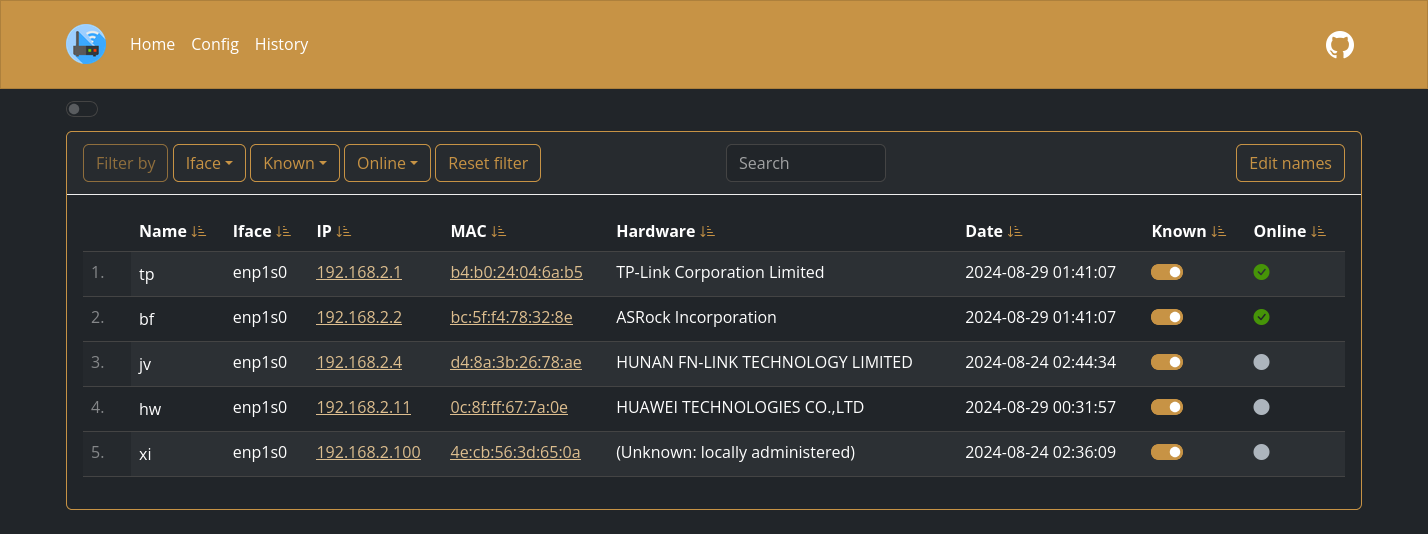
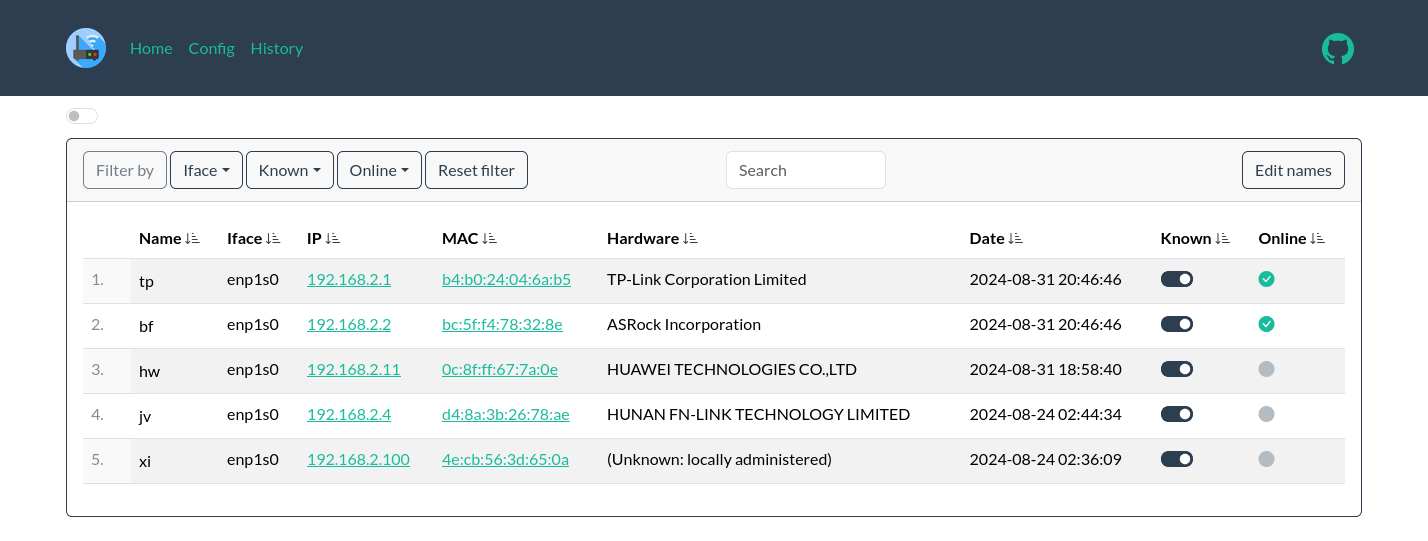
Lightweight network IP scanner with web GUI. Features:
|
|
- Send notification when new host is found
|
|
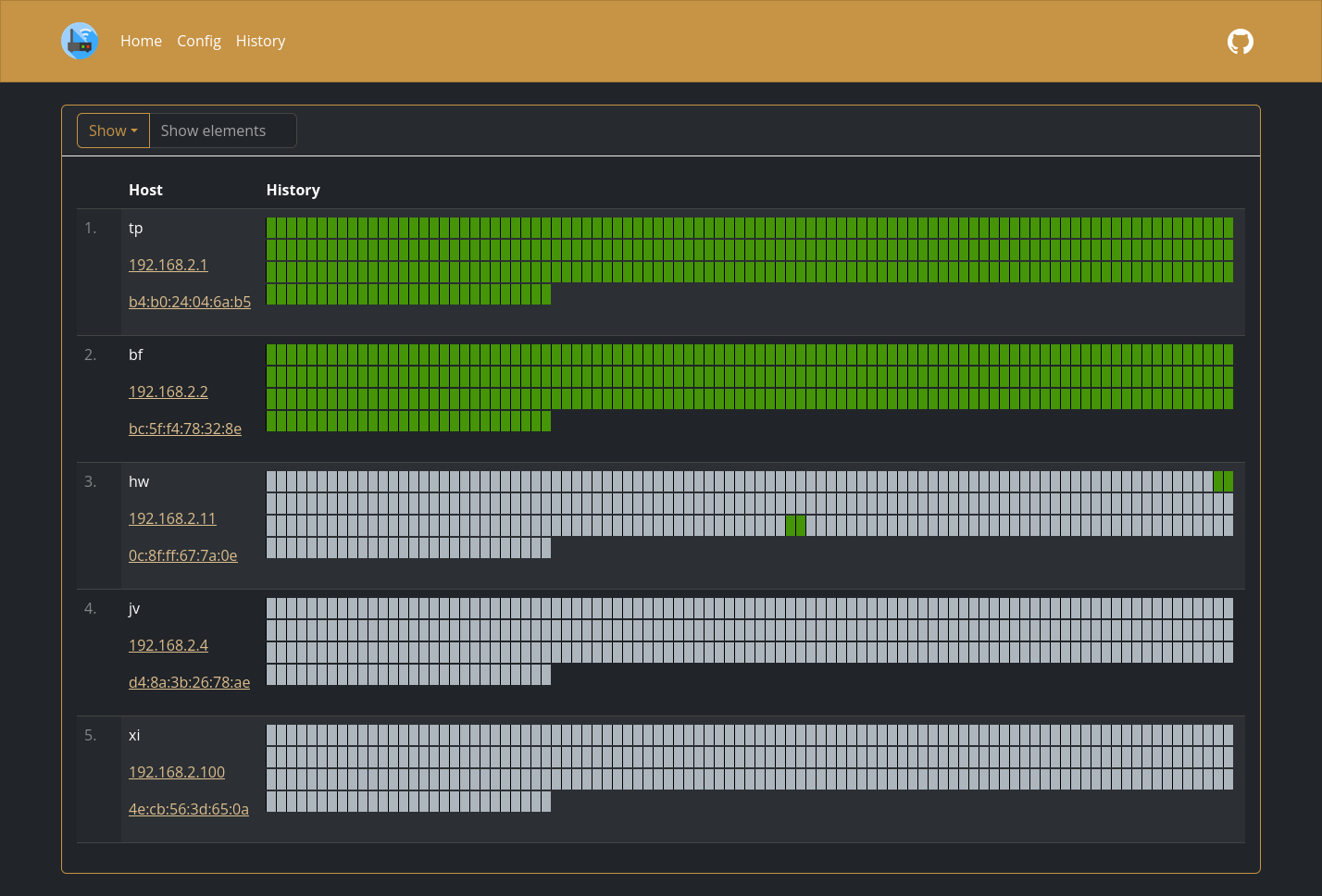
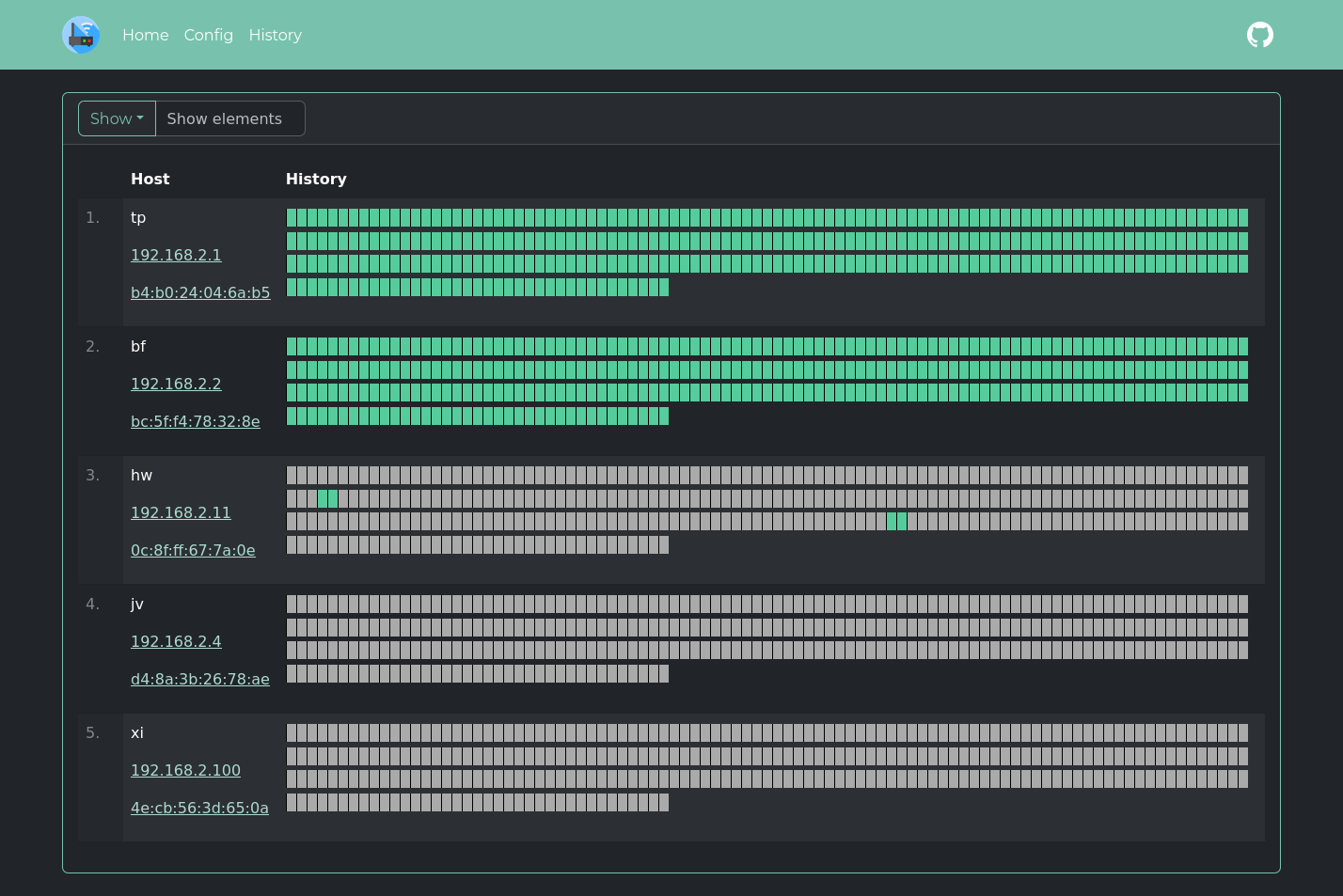
- Monitor hosts online/offline history
|
|
- Keep a list of all hosts in the network
|
|
- Send data to `InfluxDB2` or `Prometheus` to make a `Grafana` dashboard
|
|
|
|
> [!IMPORTANT]
|
|
> Please, consider making a [donation](https://github.com/aceberg#donate). Even $10 will make a difference to me.
|
|
|
|
|
|
|
|
## More screenshots
|
|
|
|
<details>
|
|
<summary>Expand</summary>
|
|
|
|
|
|
|
|
|
|

|
|
</details>
|
|
|
|
## Quick start
|
|
|
|
<details>
|
|
<summary>Expand</summary>
|
|
|
|
Replace `$YOURTIMEZONE` with correct time zone and `$YOURIFACE` with network interface you want to scan. Network mode must be `host`. Set `$DOCKERDATAPATH` for container to save data:
|
|
|
|
```sh
|
|
docker run --name wyl \
|
|
-e "IFACES=$YOURIFACE" \
|
|
-e "TZ=$YOURTIMEZONE" \
|
|
--network="host" \
|
|
-v $DOCKERDATAPATH/wyl:/data/WatchYourLAN \
|
|
aceberg/watchyourlan
|
|
```
|
|
Web GUI should be at http://localhost:8840
|
|
|
|
</details>
|
|
|
|
## Auth
|
|
|
|
<details>
|
|
<summary>Expand</summary>
|
|
|
|
**WatchYourLAN** does not have built-in auth option. But you can use it with SSO tools like Authelia, or my simple auth app [ForAuth](https://github.com/aceberg/ForAuth).
|
|
Here is an example [docker-compose-auth.yml](https://github.com/aceberg/WatchYourLAN/blob/main/docker-compose-auth.yml).
|
|
|
|
> :warning: **WARNING!**
|
|
> Please, don't forget that WYL needs `host` network mode to work. So, WYL port will be exposed in this setup. You need to limit access to it with firewall or other measures.
|
|
|
|
</details>
|
|
|
|
## Install on Linux
|
|
|
|
<details>
|
|
<summary>Expand</summary>
|
|
|
|
All binary packages can be found in [latest](https://github.com/aceberg/WatchYourLAN/releases/latest) release. There are `.deb`, `.rpm`, `.apk` (Alpine Linux) and `.tar.gz` files.
|
|
|
|
Supported architectures: `amd64`, `i386`, `arm_v5`, `arm_v6`, `arm_v7`, `arm64`.
|
|
Dependencies: `arp-scan`, `tzdata`.
|
|
|
|
For `amd64` there is a `deb` repo [available](https://github.com/aceberg/ppa)
|
|
|
|
</details>
|
|
|
|
## Config
|
|
<details>
|
|
<summary>Expand</summary>
|
|
|
|
Configuration can be done through config file, GUI or environment variables. Variable names is `config_v2.yaml` file are the same, but in lowcase.
|
|
|
|
### Basic config
|
|
| Variable | Description | Default |
|
|
| -------- | ----------- | ------- |
|
|
| TZ | Set your timezone for correct time | |
|
|
| HOST | Listen address | 0.0.0.0 |
|
|
| PORT | Port for web GUI | 8840 |
|
|
| THEME | Any theme name from https://bootswatch.com in lowcase or [additional](https://github.com/aceberg/aceberg-bootswatch-fork) | sand |
|
|
| COLOR | Background color: light or dark | dark |
|
|
| NODEPATH | Path to local node modules | |
|
|
| SHOUTRRR_URL | WatchYourLAN uses [Shoutrrr](https://github.com/nicholas-fedor/shoutrrr) to send notifications. It is already integrated, just needs a correct URL. Examples for Discord, Email, Gotify, Matrix, Ntfy, Pushover, Slack, Telegram, Generic Webhook and etc are [here](https://nicholas-fedor.github.io/shoutrrr/) | |
|
|
|
|
### Scan settings
|
|
| Variable | Description | Default |
|
|
| -------- | ----------- | ------- |
|
|
| IFACES | Interfaces to scan. Could be one or more, separated by space. See [docs/VLAN_ARP_SCAN.md](https://github.com/aceberg/WatchYourLAN/blob/main/docs/VLAN_ARP_SCAN.md). | |
|
|
| TIMEOUT | Time between scans (seconds) | 120 |
|
|
| ARP_ARGS | Arguments for `arp-scan`. Enable `debug` log level to see resulting command. (Example: `-r 1`). See [docs/VLAN_ARP_SCAN.md](https://github.com/aceberg/WatchYourLAN/blob/main/docs/VLAN_ARP_SCAN.md). | |
|
|
| ARP_STRS ARP_STRS_JOINED | See [docs/VLAN_ARP_SCAN.md](https://github.com/aceberg/WatchYourLAN/blob/main/docs/VLAN_ARP_SCAN.md). | |
|
|
| LOG_LEVEL | Log level: `debug`, `info`, `warn` or `error` | info |
|
|
| TRIM_HIST | Remove history after (hours) | 48 |
|
|
| HIST_IN_DB | DEPRECATED since 2.1.3. Now History is always stored in DB. Use TRIM_HIST to reduce DB size | |
|
|
| USE_DB | Either `sqlite` or `postgres` | sqlite |
|
|
| PG_CONNECT | Address to connect to PostgreSQL. (Example: `postgres://username:password@192.168.0.1:5432/dbname?sslmode=disable`). Full list of URL parameters [here](https://pkg.go.dev/github.com/lib/pq#hdr-Connection_String_Parameters) | |
|
|
|
|
### InfluxDB2 config
|
|
This config matches Grafana's config for InfluxDB data source
|
|
|
|
| Variable | Description | Default | Example |
|
|
| -------- | ----------- | ------- | ------- |
|
|
| INFLUX_ENABLE | Enable export to InfluxDB2 | false | true |
|
|
| INFLUX_SKIP_TLS | Skip TLS Verify | false | true |
|
|
| INFLUX_ADDR | Address:port of InfluxDB2 server | | https://192.168.2.3:8086/ |
|
|
| INFLUX_BUCKET | InfluxDB2 bucket | | test |
|
|
| INFLUX_ORG | InfluxDB2 org | | home |
|
|
| INFLUX_TOKEN | Secret token, generated by InfluxDB2 | | |
|
|
|
|
### Prometheus config
|
|
This config configures the Prometheus data source
|
|
|
|
| Variable | Description | Default | Example |
|
|
| -------- | ----------- | ------- | ------- |
|
|
| PROMETHEUS_ENABLE | Enable the Prometheus `/metrics` endpoint | false | true |
|
|
|
|
</details>
|
|
|
|
## Config file
|
|
|
|
<details>
|
|
<summary>Expand</summary>
|
|
|
|
Config file name is `config_v2.yaml`. Example:
|
|
|
|
```yaml
|
|
arp_args: ""
|
|
color: dark
|
|
host: 0.0.0.0
|
|
ifaces: enp4s0
|
|
influx_addr: ""
|
|
influx_bucket: ""
|
|
influx_enable: false
|
|
influx_org: ""
|
|
influx_skip_tls: false
|
|
influx_token: ""
|
|
log_level: info
|
|
nodepath: ""
|
|
pg_connect: ""
|
|
port: "8840"
|
|
prometheus_enable: false
|
|
shoutrrr_url: "gotify://192.168.0.1:8083/AwQqpAae.rrl5Ob/?title=Unknown host detected&DisableTLS=yes"
|
|
theme: sand
|
|
timeout: 60
|
|
trim_hist: 48
|
|
use_db: sqlite
|
|
```
|
|
|
|
</details>
|
|
|
|
## Options
|
|
|
|
<details>
|
|
<summary>Expand</summary>
|
|
|
|
| Key | Description | Default |
|
|
| -------- | ----------- | ------- |
|
|
| -d | Path to config dir | /data/WatchYourLAN |
|
|
| -n | Path to node modules (see below) | |
|
|
|
|
</details>
|
|
|
|
## Local network only
|
|
<details>
|
|
<summary>Expand</summary>
|
|
|
|
By default, this app pulls themes, icons and fonts from the internet. But, in some cases, it may be useful to have an independent from global network setup. I created a separate [image](https://github.com/aceberg/my-dockerfiles/tree/main/node-bootstrap) with all necessary modules and fonts.
|
|
Run with Docker:
|
|
```sh
|
|
docker run --name node-bootstrap \
|
|
-p 8850:8850 \
|
|
aceberg/node-bootstrap
|
|
```
|
|
```sh
|
|
docker run --name wyl \
|
|
-e "IFACES=$YOURIFACE" \
|
|
-e "TZ=$YOURTIMEZONE" \
|
|
--network="host" \
|
|
-v $DOCKERDATAPATH/wyl:/data/WatchYourLAN \
|
|
aceberg/watchyourlan -n "http://$YOUR_IP:8850"
|
|
```
|
|
Or use [docker-compose](docker-compose.yml)
|
|
|
|
</details>
|
|
|
|
## API & Integrations
|
|
|
|
<details>
|
|
<summary>Expand</summary>
|
|
|
|
### API
|
|
Moved to [docs/API.md](https://github.com/aceberg/WatchYourLAN/blob/main/docs/API.md)
|
|
|
|
### Integrations
|
|
- [ArchLinux (AUR)](https://aur.archlinux.org/packages/watch-your-lan) by `gilcu3`
|
|
- [Python API client](https://github.com/drwahl/py-watchyourlanclient) by [drwahl](https://github.com/drwahl)
|
|
- [Umbrel](https://apps.umbrel.com/app/watch-your-lan) by [Jasper](https://github.com/ceramicwhite)
|
|
- [YunoHost](https://apps.yunohost.org/app/watchyourlan)
|
|
</details>
|
|
|
|
## Thanks
|
|
<details>
|
|
<summary>Expand</summary>
|
|
|
|
- All go packages listed in [dependencies](https://github.com/aceberg/WatchYourLAN/network/dependencies)
|
|
- Favicon and logo: [Access point icons created by Freepik - Flaticon](https://www.flaticon.com/free-icons/access-point)
|
|
- [Bootstrap](https://getbootstrap.com/)
|
|
- Themes: [Free themes for Bootstrap](https://bootswatch.com)
|
|
|
|
</details>
|