
453 lines
18 KiB
Markdown
453 lines
18 KiB
Markdown

|
||
|
||
# Orpheus-FASTAPI
|
||
|
||
[](https://github.com/Lex-au/Orpheus-FastAPI/blob/main/LICENSE.txt)
|
||
|
||
High-performance Text-to-Speech server with OpenAI-compatible API, multilingual support with 24 voices, emotion tags, and modern web UI. Optimized for RTX GPUs.
|
||
|
||
## Changelog
|
||
|
||
**v1.3.1** (2025-07-05)
|
||
- 🐳 ROCm Docker implementation contributed by [@wizardeur](https://github.com/wizardeur) – many thanks for your contribution ❤️
|
||
|
||
**v1.3.0** (2025-04-18)
|
||
- 🌐 Added comprehensive multilingual support with 16 new voice actors across 7 languages
|
||
- 🗣️ New voice actors include:
|
||
- French: pierre, amelie, marie
|
||
- German: jana, thomas, max
|
||
- Korean: 유나, 준서
|
||
- Hindi: ऋतिका
|
||
- Mandarin: 长乐, 白芷
|
||
- Spanish: javi, sergio, maria
|
||
- Italian: pietro, giulia, carlo
|
||
- 🔄 Enhanced UI with dynamic language selection and voice filtering
|
||
- 🚀 Released language-specific optimized models:
|
||
- [Italian & Spanish Model](https://huggingface.co/lex-au/Orpheus-3b-Italian_Spanish-FT-Q8_0.gguf)
|
||
- [Korean Model](https://huggingface.co/lex-au/Orpheus-3b-Korean-FT-Q8_0.gguf)
|
||
- [French Model](https://huggingface.co/lex-au/Orpheus-3b-French-FT-Q8_0.gguf)
|
||
- [Hindi Model](https://huggingface.co/lex-au/Orpheus-3b-Hindi-FT-Q8_0.gguf)
|
||
- [Mandarin Model](https://huggingface.co/lex-au/Orpheus-3b-Chinese-FT-Q8_0.gguf)
|
||
- [German Model](https://huggingface.co/lex-au/Orpheus-3b-German-FT-Q8_0.gguf)
|
||
- 🐳 Docker Compose users: To use a language-specific model, edit the `.env` file before installation and change `ORPHEUS_MODEL_NAME` to match the desired model repo ID (e.g., `Orpheus-3b-French-FT-Q8_0.gguf`)
|
||
- An additional Docker Compose installation path is now available, specifically for CPU-bound scenarios. This contribution comes from [@alexjyong](https://github.com/alexjyong) - thank you!
|
||
|
||
**v1.2.0** (2025-04-12)
|
||
- ❤️ Added optional Docker Compose support with GPU-enabled `llama.cpp` server and Orpheus-FastAPI integration
|
||
- 🐳 Docker implementation contributed by [@richardr1126](https://github.com/richardr1126) – huge thanks for the clean setup and orchestration work!
|
||
- 🧱 Native install path remains unchanged for non-Docker users
|
||
|
||
**v1.1.0** (2025-03-23)
|
||
- ✨ Added long-form audio support with sentence-based batching and crossfade stitching
|
||
- 🔊 Improved short audio quality with optimized token buffer handling
|
||
- 🔄 Enhanced environment variable support with .env file loading (configurable via UI)
|
||
- 🖥️ Added automatic hardware detection and optimization for different GPUs
|
||
- 📊 Implemented detailed performance reporting for audio generation
|
||
- ⚠️ Note: Python 3.12 is not supported due to removal of pkgutil.ImpImporter
|
||
|
||
[GitHub Repository](https://github.com/Lex-au/Orpheus-FastAPI)
|
||
|
||
## Model Collection
|
||
|
||
🚀 **NEW:** Try the quantized models for improved performance!
|
||
- **Q2_K**: Ultra-fast inference with 2-bit quantization
|
||
- **Q4_K_M**: Balanced quality/speed with 4-bit quantization (mixed)
|
||
- **Q8_0**: Original high-quality 8-bit model
|
||
|
||
[Browse the Orpheus-FASTAPI Model Collection on HuggingFace](https://huggingface.co/collections/lex-au/orpheus-fastapi-67e125ae03fc96dae0517707)
|
||
|
||
## Voice Demos
|
||
|
||
Listen to sample outputs with different voices and emotions:
|
||
- [Default Test Sample](https://lex-au.github.io/Orpheus-FastAPI/DefaultTest.mp3) - Standard neutral tone
|
||
- [Leah Happy Sample](https://lex-au.github.io/Orpheus-FastAPI/LeahHappy.mp3) - Cheerful, upbeat demo
|
||
- [Tara Sad Sample](https://lex-au.github.io/Orpheus-FastAPI/TaraSad.mp3) - Emotional, melancholic demo
|
||
- [Zac Contemplative Sample](https://lex-au.github.io/Orpheus-FastAPI/ZacContemplative.mp3) - Thoughtful, measured tone
|
||
|
||
## User Interface
|
||
|
||
|
||
|
||
## Features
|
||
|
||
- **OpenAI API Compatible**: Drop-in replacement for OpenAI's `/v1/audio/speech` endpoint
|
||
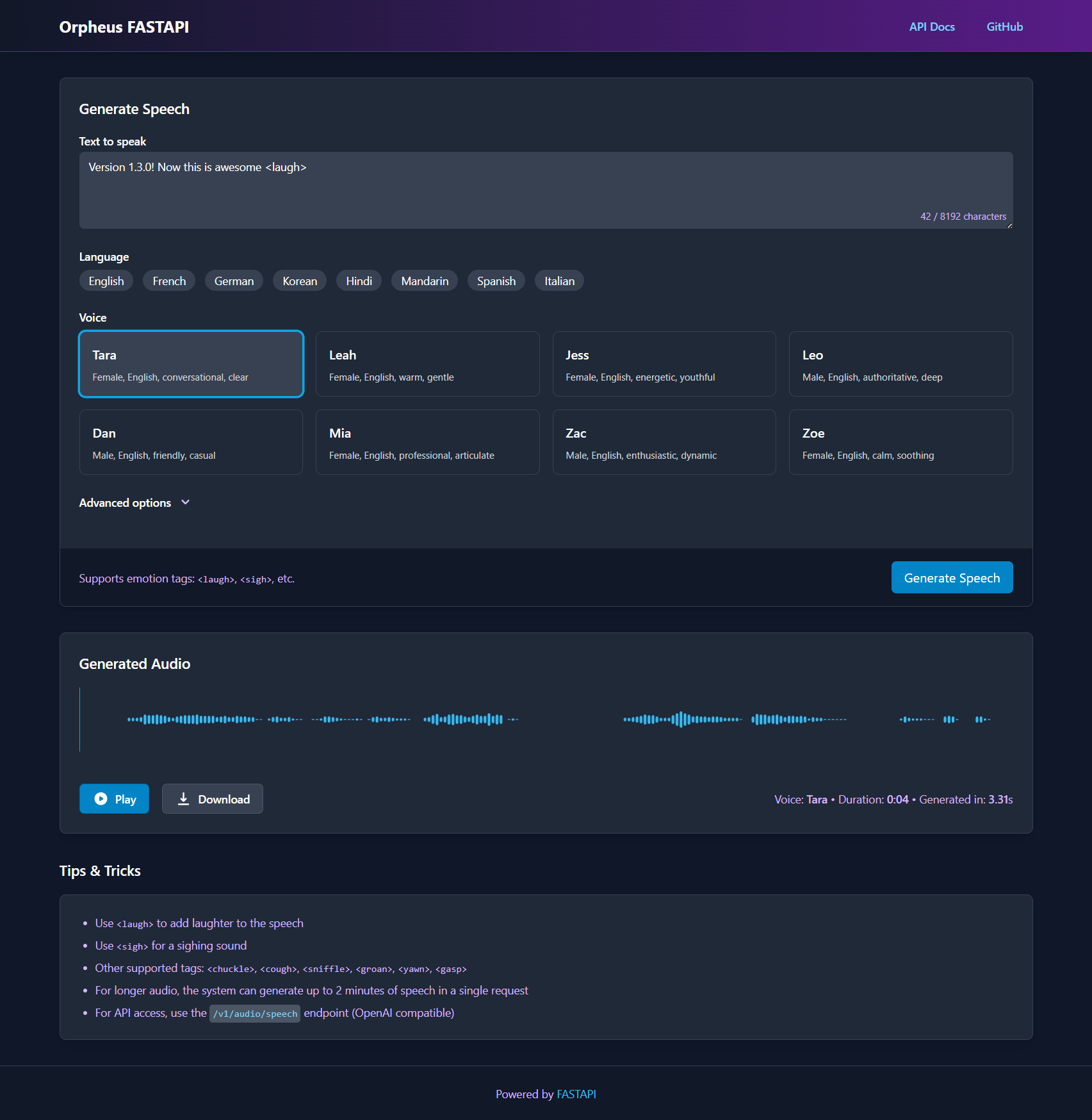
- **Modern Web Interface**: Clean, responsive UI with waveform visualization
|
||
- **High Performance**: Optimized for RTX GPUs with parallel processing
|
||
- **Multilingual Support**: 24 different voices across 8 languages (English, French, German, Korean, Hindi, Mandarin, Spanish, Italian)
|
||
- **Emotion Tags**: Support for laughter, sighs, and other emotional expressions
|
||
- **Unlimited Audio Length**: Generate audio of any length through intelligent batching
|
||
- **Smooth Transitions**: Crossfaded audio segments for seamless listening experience
|
||
- **Web UI Configuration**: Configure all server settings directly from the interface
|
||
- **Dynamic Environment Variables**: Update API endpoint, timeouts, and model parameters without editing files
|
||
- **Server Restart**: Apply configuration changes with one-click server restart
|
||
|
||
## Project Structure
|
||
|
||
```
|
||
Orpheus-FastAPI/
|
||
├── app.py # FastAPI server and endpoints
|
||
├── docker-compose.yml # Docker compose configuration
|
||
├── Dockerfile.gpu # GPU-enabled Docker image
|
||
├── requirements.txt # Dependencies
|
||
├── static/ # Static assets (favicon, etc.)
|
||
├── outputs/ # Generated audio files
|
||
├── templates/ # HTML templates
|
||
│ └── tts.html # Web UI template
|
||
└── tts_engine/ # Core TTS functionality
|
||
├── __init__.py # Package exports
|
||
├── inference.py # Token generation and API handling
|
||
└── speechpipe.py # Audio conversion pipeline
|
||
```
|
||
|
||
## Setup
|
||
|
||
### Prerequisites
|
||
|
||
- Python 3.8-3.11 (Python 3.12 is not supported due to removal of pkgutil.ImpImporter)
|
||
- CUDA-compatible or ROCm-compatible GPU (recommended: RTX series for best performance)
|
||
- Using docker compose or separate LLM inference server running the Orpheus model (e.g., LM Studio or llama.cpp server)
|
||
- For Docker GPU Support, ensure you're using an Nvidia GPU on either Linux or Windows with CUDA 12.4 or greater and NVIDIA Container Toolkit installed
|
||
|
||
### 🐳 Docker compose
|
||
|
||
The docker compose file orchestrates the Orpheus-FastAPI for audio and a llama.cpp inference server for the base model token generation. The GGUF model is downloaded with the model-init service.
|
||
There are three versions, two for machines that have access to GPU support `docker-compose-gpu.yaml`, `docker-compose-gpu-rocm.yml` and one for CPU support only: `docker-compose-cpu.yaml`
|
||
|
||
```bash
|
||
cp .env.example .env # Create your .env file from the example
|
||
copy .env.example .env # For Windows CMD
|
||
```
|
||
|
||
For multilingual models, edit the `.env` file and change the model name:
|
||
```
|
||
# Change this line in .env to use a language-specific model
|
||
ORPHEUS_MODEL_NAME=Orpheus-3b-French-FT-Q8_0.gguf # Example for French
|
||
```
|
||
|
||
Then start the services:
|
||
|
||
For CUDA GPU support run
|
||
```bash
|
||
docker compose -f docker-compose-gpu.yml up
|
||
```
|
||
|
||
For ROCm GPU support run
|
||
```bash
|
||
docker compose -f docker-compose-gpu-rocm.yml up
|
||
```
|
||
|
||
For CPU support run:
|
||
```bash
|
||
docker compose -f docker-compose-cpu.yml up
|
||
```
|
||
|
||
The system will automatically download the specified model from Hugging Face before starting the service.
|
||
|
||
### FastAPI Service Native Installation
|
||
|
||
1. Clone the repository:
|
||
```bash
|
||
git clone https://github.com/Lex-au/Orpheus-FastAPI.git
|
||
cd Orpheus-FastAPI
|
||
```
|
||
|
||
2. Create a Python virtual environment:
|
||
```bash
|
||
# Using venv (Python's built-in virtual environment)
|
||
python -m venv venv
|
||
source venv/bin/activate # On Windows: venv\Scripts\activate
|
||
|
||
# Or using conda
|
||
conda create -n orpheus-tts python=3.10
|
||
conda activate orpheus-tts
|
||
```
|
||
|
||
3. Install PyTorch with CUDA support:
|
||
```bash
|
||
pip3 install torch torchvision torchaudio --index-url https://download.pytorch.org/whl/cu124
|
||
```
|
||
or
|
||
Install PyTorch with ROCm support:
|
||
```bash
|
||
pip3 install --pre torch torchvision torchaudio --index-url https://download.pytorch.org/whl/nightly/rocm6.4/
|
||
```
|
||
|
||
4. Install other dependencies:
|
||
```bash
|
||
pip3 install -r requirements.txt
|
||
```
|
||
|
||
5. Set up the required directories:
|
||
```bash
|
||
# Create directories for outputs and static files
|
||
mkdir -p outputs static
|
||
```
|
||
|
||
### Starting the Server
|
||
|
||
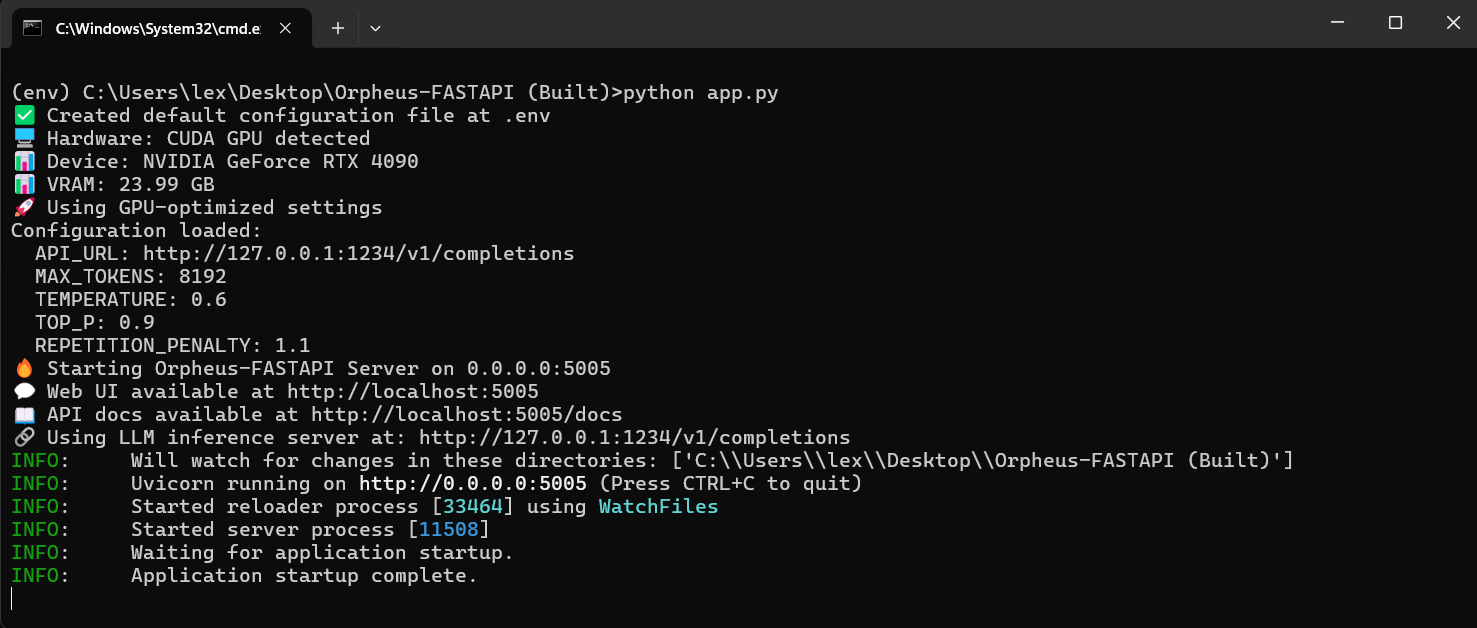
Run the FastAPI server:
|
||
```bash
|
||
python app.py
|
||
```
|
||
|
||
Or with specific host/port:
|
||
```bash
|
||
uvicorn app:app --host 0.0.0.0 --port 5005 --reload
|
||
```
|
||
|
||
|
||
|
||
Access:
|
||
- Web interface: http://localhost:5005/ (or http://127.0.0.1:5005/)
|
||
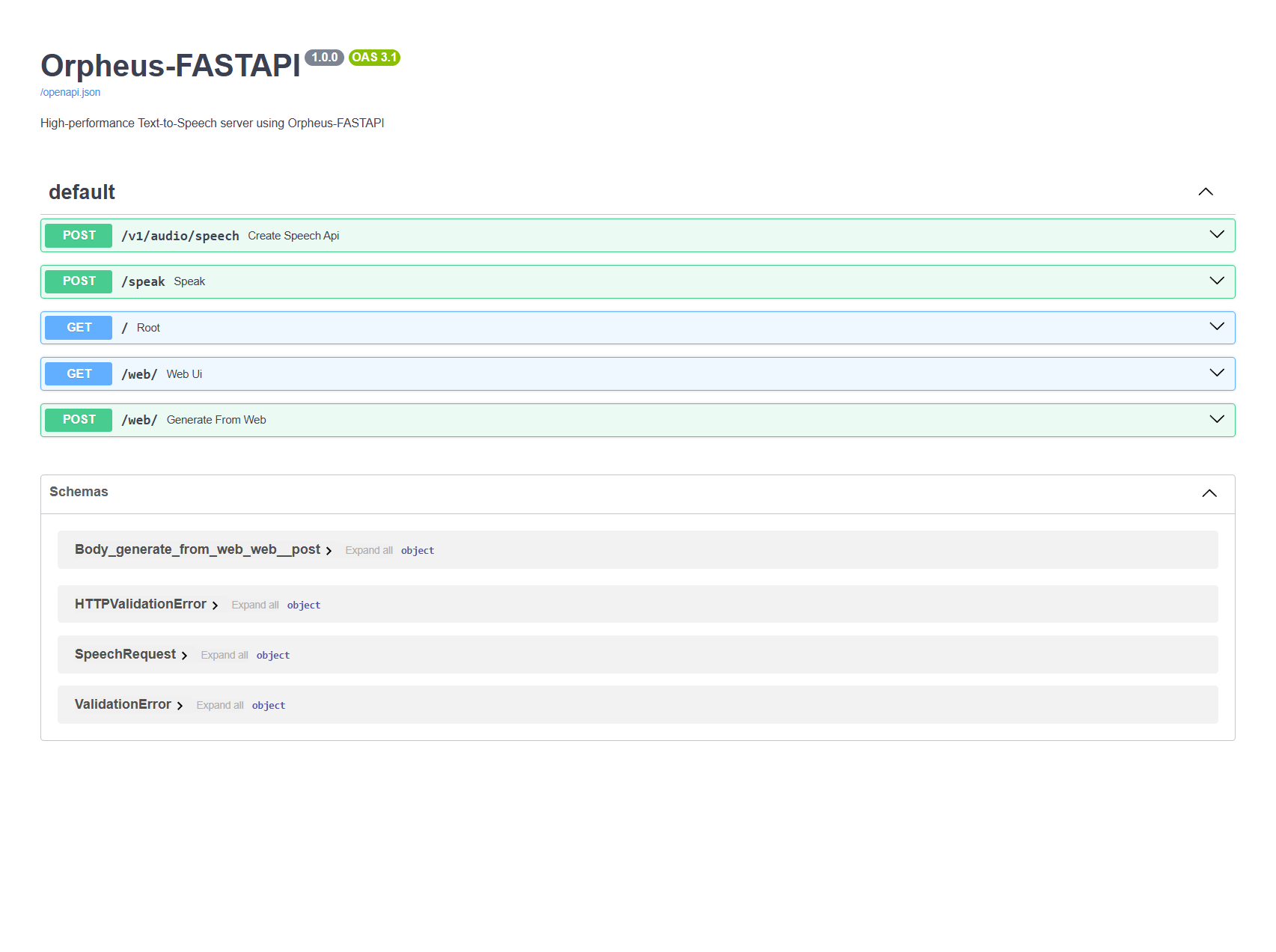
- API documentation: http://localhost:5005/docs (or http://127.0.0.1:5005/docs)
|
||
|
||
|
||
|
||
## API Usage
|
||
|
||
### OpenAI-Compatible Endpoint
|
||
|
||
The server provides an OpenAI-compatible API endpoint at `/v1/audio/speech`:
|
||
|
||
```bash
|
||
curl http://localhost:5005/v1/audio/speech \
|
||
-H "Content-Type: application/json" \
|
||
-d '{
|
||
"model": "orpheus",
|
||
"input": "Hello world! This is a test of the Orpheus TTS system.",
|
||
"voice": "tara",
|
||
"response_format": "wav",
|
||
"speed": 1.0
|
||
}' \
|
||
--output speech.wav
|
||
```
|
||
|
||
### Parameters
|
||
|
||
- `input` (required): The text to convert to speech
|
||
- `model` (optional): The model to use (default: "orpheus")
|
||
- `voice` (optional): Which voice to use (default: "tara")
|
||
- `response_format` (optional): Output format (currently only "wav" is supported)
|
||
- `speed` (optional): Speed factor (0.5 to 1.5, default: 1.0)
|
||
|
||
### Legacy API
|
||
|
||
Additionally, a simpler `/speak` endpoint is available:
|
||
|
||
```bash
|
||
curl -X POST http://localhost:5005/speak \
|
||
-H "Content-Type: application/json" \
|
||
-d '{
|
||
"text": "Hello world! This is a test.",
|
||
"voice": "tara"
|
||
}' \
|
||
-o output.wav
|
||
```
|
||
|
||
### Available Voices
|
||
|
||
#### English
|
||
- `tara`: Female, conversational, clear
|
||
- `leah`: Female, warm, gentle
|
||
- `jess`: Female, energetic, youthful
|
||
- `leo`: Male, authoritative, deep
|
||
- `dan`: Male, friendly, casual
|
||
- `mia`: Female, professional, articulate
|
||
- `zac`: Male, enthusiastic, dynamic
|
||
- `zoe`: Female, calm, soothing
|
||
|
||
#### French
|
||
- `pierre`: Male, sophisticated
|
||
- `amelie`: Female, elegant
|
||
- `marie`: Female, spirited
|
||
|
||
#### German
|
||
- `jana`: Female, clear
|
||
- `thomas`: Male, authoritative
|
||
- `max`: Male, energetic
|
||
|
||
#### Korean
|
||
- `유나`: Female, melodic
|
||
- `준서`: Male, confident
|
||
|
||
#### Hindi
|
||
- `ऋतिका`: Female, expressive
|
||
|
||
#### Mandarin
|
||
- `长乐`: Female, gentle
|
||
- `白芷`: Female, clear
|
||
|
||
#### Spanish
|
||
- `javi`: Male, warm
|
||
- `sergio`: Male, professional
|
||
- `maria`: Female, friendly
|
||
|
||
#### Italian
|
||
- `pietro`: Male, passionate
|
||
- `giulia`: Female, expressive
|
||
- `carlo`: Male, refined
|
||
|
||
### Emotion Tags
|
||
|
||
You can insert emotion tags into your text to add expressiveness:
|
||
|
||
- `<laugh>`: Add laughter
|
||
- `<sigh>`: Add a sigh
|
||
- `<chuckle>`: Add a chuckle
|
||
- `<cough>`: Add a cough sound
|
||
- `<sniffle>`: Add a sniffle sound
|
||
- `<groan>`: Add a groan
|
||
- `<yawn>`: Add a yawning sound
|
||
- `<gasp>`: Add a gasping sound
|
||
|
||
Example: `"Well, that's interesting <laugh> I hadn't thought of that before."`
|
||
|
||
## Technical Details
|
||
|
||
This server works as a frontend that connects to an external LLM inference server. It sends text prompts to the inference server, which generates tokens that are then converted to audio using the SNAC model. The system has been optimised for RTX 4090 GPUs with:
|
||
|
||
- Vectorised tensor operations
|
||
- Parallel processing with CUDA streams
|
||
- Efficient memory management
|
||
- Token and audio caching
|
||
- Optimised batch sizes
|
||
|
||
### Hardware Detection and Optimization
|
||
|
||
The system features intelligent hardware detection that automatically optimizes performance based on your hardware capabilities:
|
||
|
||
- **High-End GPU Mode** (dynamically detected based on capabilities):
|
||
- Triggered by either: 16GB+ VRAM, compute capability 8.0+, or 12GB+ VRAM with 7.0+ compute capability
|
||
- Advanced parallel processing with 4 workers
|
||
- Optimized batch sizes (32 tokens)
|
||
- High-throughput parallel file I/O
|
||
- Full hardware details displayed (name, VRAM, compute capability)
|
||
- GPU-specific optimizations automatically applied
|
||
|
||
- **Standard GPU Mode** (other CUDA-capable GPUs):
|
||
- Efficient parallel processing
|
||
- GPU-optimized parameters
|
||
- CUDA acceleration where beneficial
|
||
- Detailed GPU specifications
|
||
|
||
- **CPU Mode** (when no GPU is available):
|
||
- Conservative processing with 2 workers
|
||
- Optimized memory usage
|
||
- Smaller batch sizes (16 tokens)
|
||
- Sequential file I/O
|
||
- Detailed CPU cores, threads, and RAM information
|
||
|
||
No manual configuration is needed - the system automatically detects hardware capabilities and adapts for optimal performance across different generations of GPUs and CPUs.
|
||
|
||
### Token Processing Optimization
|
||
|
||
The token processing system has been optimized with mathematically aligned parameters:
|
||
- Uses a context window of 49 tokens (7²)
|
||
- Processes in batches of 7 tokens (Orpheus model standard)
|
||
- This square relationship ensures complete token processing with no missed tokens
|
||
- Results in cleaner audio generation with proper token alignment
|
||
- Repetition penalty fixed at 1.1 for optimal quality generation (cannot be changed)
|
||
|
||
### Long Text Processing
|
||
|
||
The system features efficient batch processing for texts of any length:
|
||
- Automatically detects longer inputs (>1000 characters)
|
||
- Splits text at logical points to create manageable chunks
|
||
- Processes each chunk independently for reliability
|
||
- Combines audio segments with smooth 50ms crossfades
|
||
- Intelligently stitches segments in-memory for consistent output
|
||
- Handles texts of unlimited length with no truncation
|
||
- Provides detailed progress reporting for each batch
|
||
|
||
**Note about long-form audio**: While the system now supports texts of unlimited length, there may be slight audio discontinuities between segments due to architectural constraints of the underlying model. The Orpheus model was designed for short to medium text segments, and our batching system works around this limitation by intelligently splitting and stitching content with minimal audible impact.
|
||
|
||
### Integration with OpenWebUI
|
||
|
||
You can easily integrate this TTS solution with [OpenWebUI](https://github.com/open-webui/open-webui) to add high-quality voice capabilities to your chatbot:
|
||
|
||
1. Start your Orpheus-FASTAPI server
|
||
2. In OpenWebUI, go to Admin Panel > Settings > Audio
|
||
3. Change TTS from Web API to OpenAI
|
||
4. Set APIBASE URL to your server address (e.g., `http://localhost:5005/v1`)
|
||
5. API Key can be set to "not-needed"
|
||
6. Set TTS Voice to any of the available voices (e.g., `tara`, `pierre`, `jana`, `유나`, etc.)
|
||
7. Set TTS Model to `tts-1`
|
||
|
||
### External Inference Server
|
||
|
||
This application requires a separate LLM inference server running the Orpheus model. For easy setup, use Docker Compose, which automatically handles this for you. Alternatively, you can use:
|
||
|
||
- [GPUStack](https://github.com/gpustack/gpustack) - GPU optimised LLM inference server (My pick) - supports LAN/WAN tensor split parallelisation
|
||
- [LM Studio](https://lmstudio.ai/) - Load the GGUF model and start the local server
|
||
- [llama.cpp server](https://github.com/ggerganov/llama.cpp) - Run with the appropriate model parameters
|
||
- Any compatible OpenAI API-compatible server
|
||
|
||
**Quantized Model Options:**
|
||
- **lex-au/Orpheus-3b-FT-Q2_K.gguf**: Fastest inference (~50% faster tokens/sec than Q8_0)
|
||
- **lex-au/Orpheus-3b-FT-Q4_K_M.gguf**: Balanced quality/speed
|
||
- **lex-au/Orpheus-3b-FT-Q8_0.gguf**: Original high-quality model
|
||
|
||
Choose based on your hardware and needs. Lower bit models (Q2_K, Q4_K_M) provide ~2x realtime performance on high-end GPUs.
|
||
|
||
[Browse all models in the collection](https://huggingface.co/collections/lex-au/orpheus-fastapi-67e125ae03fc96dae0517707)
|
||
|
||
The inference server should be configured to expose an API endpoint that this FastAPI application will connect to.
|
||
|
||
### Environment Variables
|
||
|
||
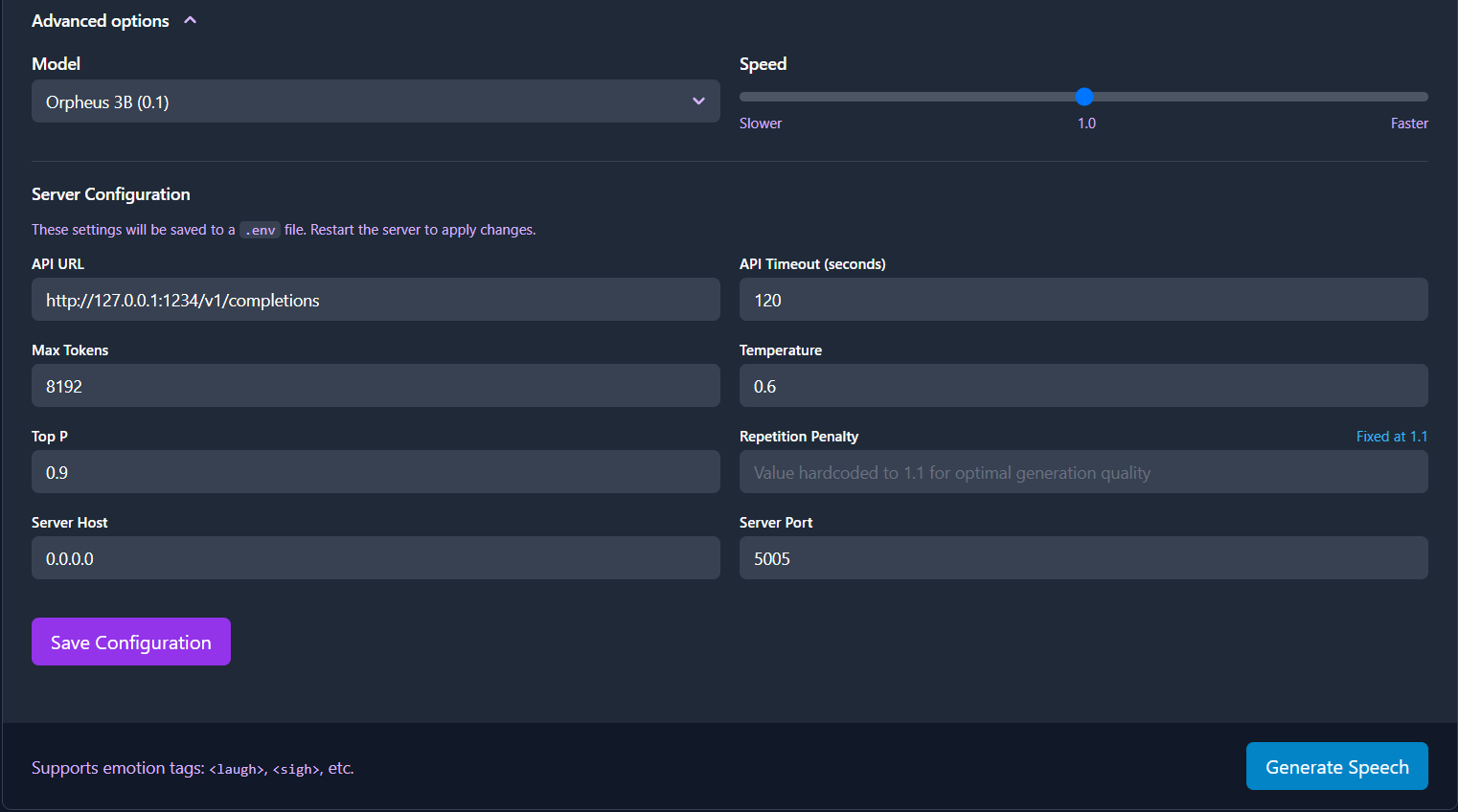
Configure in docker compose, if using docker. Not using docker; create a `.env` file:
|
||
|
||
- `ORPHEUS_API_URL`: URL of the LLM inference API (default in Docker: http://llama-cpp-server:5006/v1/completions)
|
||
- `ORPHEUS_API_TIMEOUT`: Timeout in seconds for API requests (default: 120)
|
||
- `ORPHEUS_MAX_TOKENS`: Maximum tokens to generate (default: 8192)
|
||
- `ORPHEUS_TEMPERATURE`: Temperature for generation (default: 0.6)
|
||
- `ORPHEUS_TOP_P`: Top-p sampling parameter (default: 0.9)
|
||
- `ORPHEUS_SAMPLE_RATE`: Audio sample rate in Hz (default: 24000)
|
||
- `ORPHEUS_PORT`: Web server port (default: 5005)
|
||
- `ORPHEUS_HOST`: Web server host (default: 0.0.0.0)
|
||
- `ORPHEUS_MODEL_NAME`: Model name for inference server
|
||
|
||
The system now supports loading environment variables from a `.env` file in the project root, making it easier to configure without modifying system-wide environment settings. See `.env.example` for a template.
|
||
|
||
|
||
|
||
Note: Repetition penalty is hardcoded to 1.1 and cannot be changed through environment variables as this is the only value that produces stable, high-quality output.
|
||
|
||
Make sure the `ORPHEUS_API_URL` points to your running inference server.
|
||
|
||
## Development
|
||
|
||
### Project Components
|
||
|
||
- **app.py**: FastAPI server that handles HTTP requests and serves the web UI
|
||
- **tts_engine/inference.py**: Handles token generation and API communication
|
||
- **tts_engine/speechpipe.py**: Converts token sequences to audio using the SNAC model
|
||
|
||
### Adding New Voices
|
||
|
||
To add new voices, update the `AVAILABLE_VOICES` list in `tts_engine/inference.py` and add corresponding descriptions in the HTML template.
|
||
|
||
## Using with llama.cpp
|
||
|
||
When running the Orpheus model with llama.cpp, use these parameters to ensure optimal performance:
|
||
|
||
```bash
|
||
./llama-server -m models/Modelname.gguf \
|
||
--ctx-size={{your ORPHEUS_MAX_TOKENS from .env}} \
|
||
--n-predict={{your ORPHEUS_MAX_TOKENS from .env}} \
|
||
--rope-scaling=linear
|
||
```
|
||
|
||
Important parameters:
|
||
- `--ctx-size`: Sets the context window size, should match your ORPHEUS_MAX_TOKENS setting
|
||
- `--n-predict`: Maximum tokens to generate, should match your ORPHEUS_MAX_TOKENS setting
|
||
- `--rope-scaling=linear`: Required for optimal positional encoding with the Orpheus model
|
||
|
||
For extended audio generation (books, long narrations), you may want to increase your token limits:
|
||
1. Set ORPHEUS_MAX_TOKENS to 32768 or higher in your .env file (or via the Web UI)
|
||
2. Increase ORPHEUS_API_TIMEOUT to 1800 for longer processing times
|
||
3. Use the same values in your llama.cpp parameters (if you're using llama.cpp)
|
||
|
||
## License
|
||
|
||
This project is licensed under the Apache License 2.0 - see the LICENSE.txt file for details.
|