 a308041d59
FamilyNido — a self-hosted PWA for a single household: shared calendar,
chores, meals, school agenda, health records and a family wall. One
instance per family, deployable with `docker compose` on any home
server.

Stack: .NET 10 (ASP.NET Core Minimal APIs) + EF Core 10 + PostgreSQL 16
on the backend, Angular 21 (standalone, signals, zoneless) + Tailwind
CSS v4 on the frontend, SignalR for realtime, optional OIDC alongside
local credentials, integration via a versioned `/api/v1/**` public API.

See README.md for the module overview and how to deploy.
12 KiB
🏡 FamilyNido
The digital nest for a single household — calendars, chores, meals, school, health and family conversations, all in one place. Self-hosted, ad-free, telemetry-free, one instance per family.
Built as a PWA you install on every phone, tablet and laptop in the house.
Designed to be deployed in ten minutes on any home server with docker compose.
🤖 Pair-programmed end-to-end with Claude Code (Opus 4.7). This repository is an experiment in how far a single developer can go shipping a real product side-by-side with an AI coding partner — architecture, vertical slices, tests, infra, docs and this very README.
✨ Highlights
- 🧩 Modular by design — each feature is an isolated Angular route on the frontend and a vertical slice on the backend; add, remove or extend without cross-cutting changes.
- 📱 Installable PWA — works on iPhone, Android and desktop; the manifest registers it as a native-feeling app on the home screen.
- 🔐 Private — your data lives on your hardware. Local credentials by default, OIDC (PocketID, Dex, Keycloak, Authelia…) optional.
- 🎮 Gamified chores — every completed task awards points; a per-period scoreboard makes contribution visible without nagging.
- 📅 Bring-your-own-calendar — read-only mirror of as many Google Calendar accounts as the family has (one-way: Google → FamilyNido).
- 📺 Tablet mode — a fullscreen rotating dashboard for the kitchen tablet stuck to the wall.
- 🔌 Open public API — drop tasks in from n8n, IFTTT, an iOS shortcut, a
Home Assistant automation or
curl.
📦 Modules
Flat list of everything FamilyNido ships with. Every module is opt-in: hide it from the navigation if your family doesn't use it, or extend it by adding files to its vertical slice.
📅 Calendar
The shared family calendar. Each event can be tagged to specific members so the tablet on the wall only shows "today's stuff for me". Optional one-way mirror of Google Calendar — link as many Google accounts as the family has, pick which sub-calendars to import, and a background worker pulls fresh deltas every few minutes. Edits made inside FamilyNido stay in FamilyNido; nothing is written back to Google.
💬 Wall
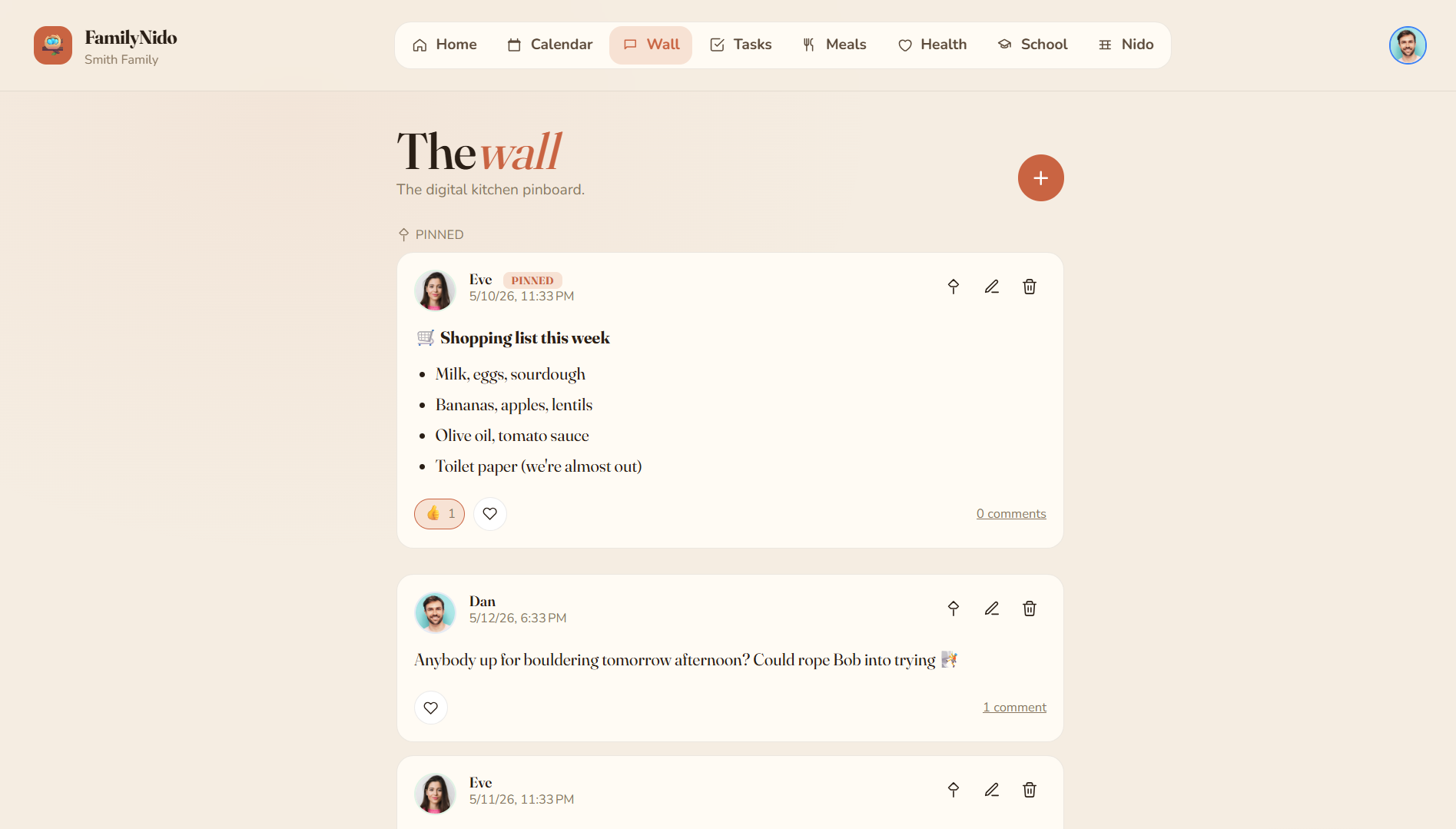
The household's message board. Markdown-formatted posts with emoji reactions, threaded comments, pin-to-top and per-user unread counts. Use it for the running shopping list, "remember to call grandma tomorrow" or sharing the photo of yesterday's school play.
✅ Tasks
The chore tracker. One-off and recurring household tasks (daily, weekly, custom), a Today tab, a 7-day Week tab and a backlog of floating tasks with no due date. Completing a task awards points to whoever ticked it off; tasks can also be pre-assigned to a specific member.
🍽️ Meals
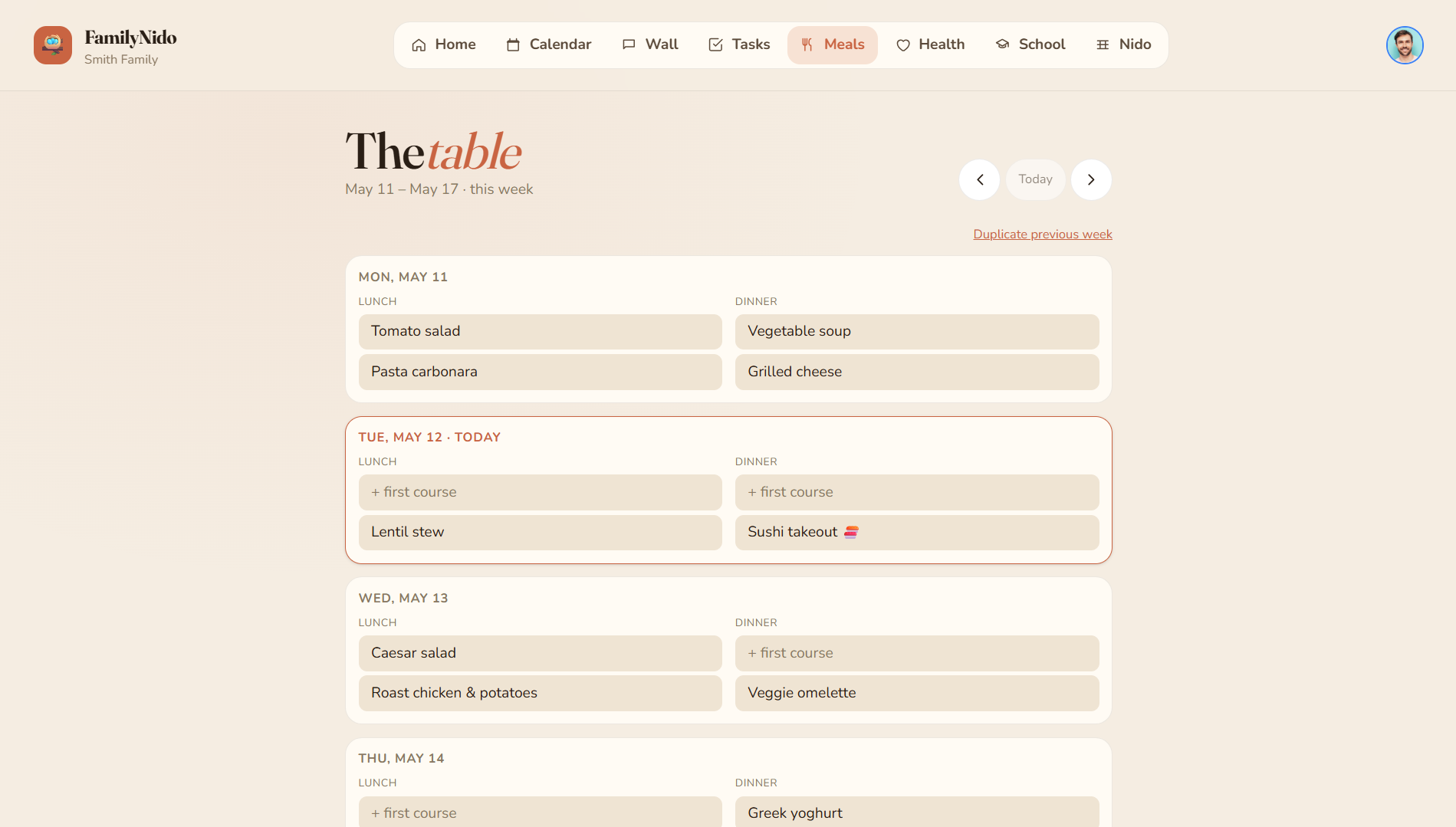
The weekly meal plan. Seven days × multiple slots (breakfast, lunch, snack, dinner). Smart suggestions based on what the family has eaten recently to keep variety up and decision fatigue down. One-click "duplicate last week" for batch planners.
🩺 Health
Per-member health records. Medical profile (blood type, allergies, chronic conditions), active medications with posology and vaccination history. So the next pediatrician visit doesn't need a frantic search across three photo libraries and four chat threads.
🎒 School
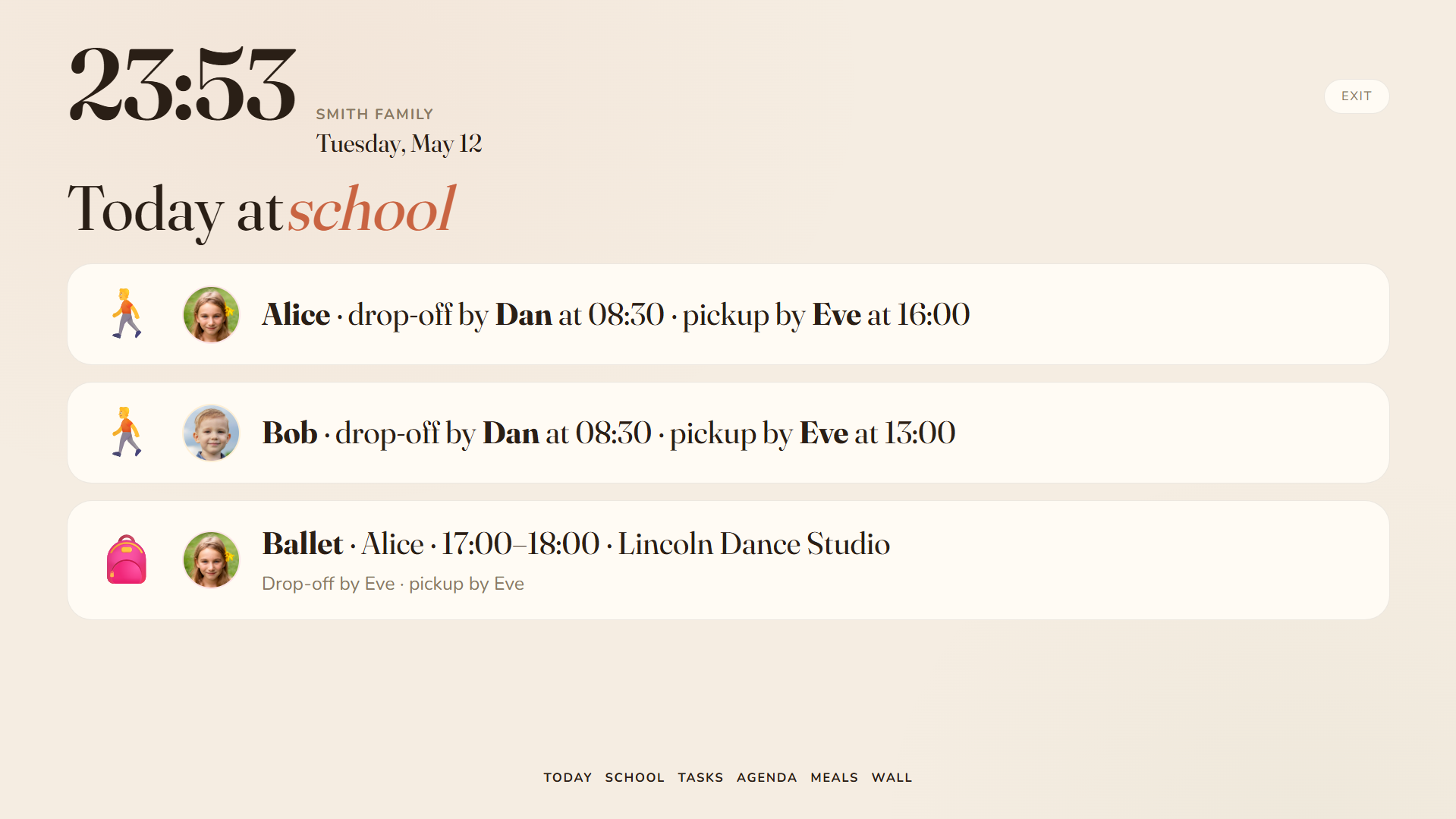
The kids' school agenda. Daily class schedule per member (with per-day overrides for substitute teachers or field trips), school holidays and extracurricular activities with recurring slots plus one-off exceptions. The tablet's "Cole" page summarises tomorrow's gear list.
🏆 Scores
The gamification layer for tasks. Each completion earns points proportional to the task's weight; the scoreboard ranks members for the current period. The point of points: making contribution visible without anybody having to count out loud.
🗓️ Member agenda
Per-member recurring patterns — "Mum works Mon–Thu 9–18", "Charlie has gymnastics Tuesdays 18:00". Used by the dashboard widgets and the tablet to answer "who's where right now?". Patterns support exceptions (cancellations, one-off swaps) without having to rewrite the rule.
🪺 Nido
The family roster. Admins add members (kids without accounts, adults with), invite adults by email through single-use signed links, promote or demote admins, upload member avatars and review pending invitations.
📺 Tablet mode
A fullscreen ambient dashboard meant for the kitchen tablet stuck to the wall. Big typography, six rotating pages (Home, Cole, Tasks, Calendar, Meals, Wall), auto-cycles every minute, refreshes every five and asks the browser to keep the screen awake. Lives outside the regular nav so it doubles as an information radiator.
🏠 Home dashboard
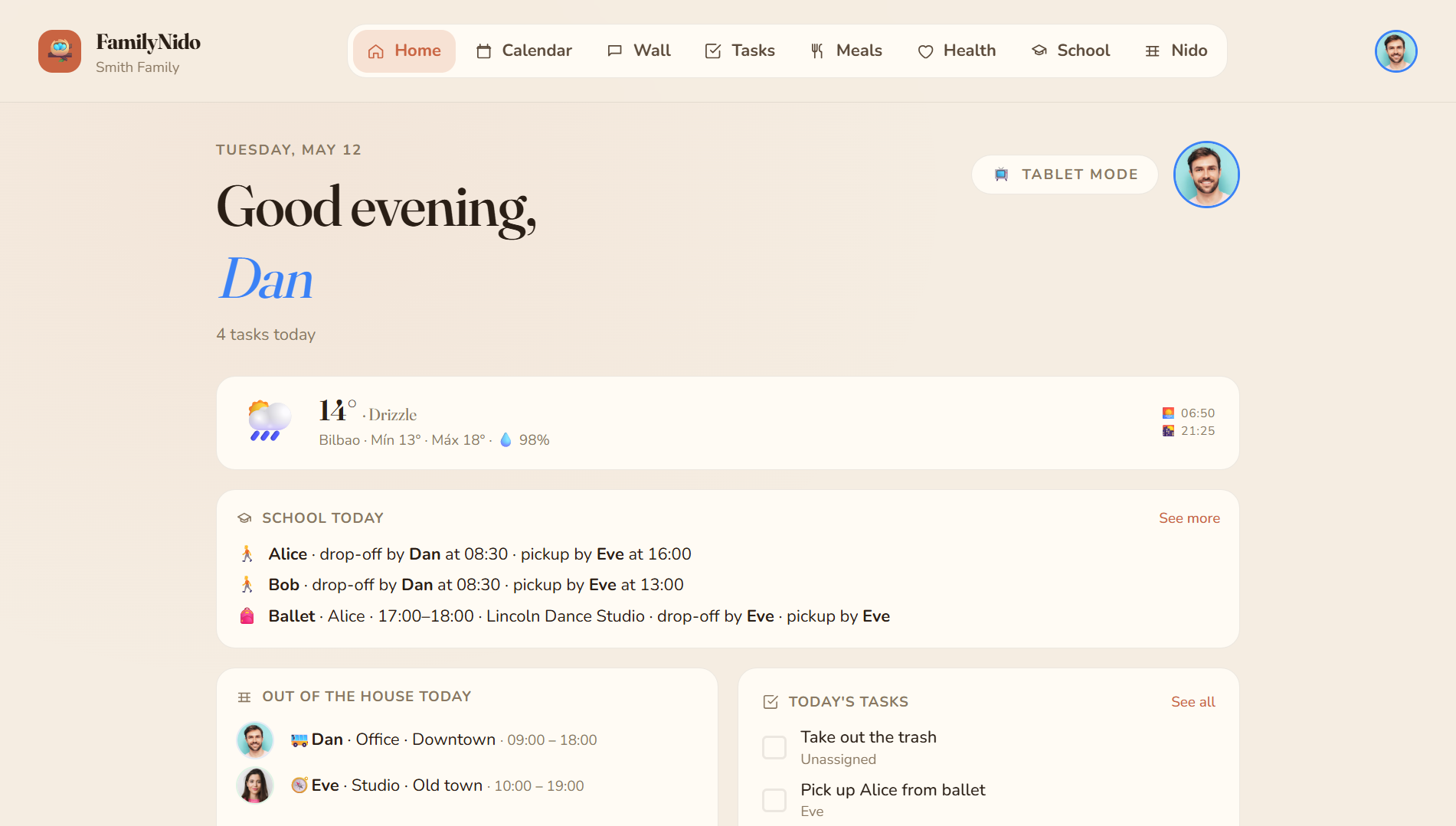
The landing screen every user opens to. Built from configurable widgets — each user picks which ones they care about (today's events, pending tasks, weather, scoreboard, school day…) and the order.
🌤️ Weather
A weather widget pinned to the family's configured location. Powered by Open-Meteo (no API key, no ads, no tracking). Surfaces on the home dashboard and the tablet.
🔔 Notifications
Daily email digests summarising what's pending plus per-event mails. Each user toggles which categories they want from the account screen. Push notifications via VAPID for browsers that support them.
🔑 Account
Personal settings — change password, switch UI language (🇪🇸 Spanish / 🇬🇧 English), tweak notification preferences, see and revoke linked credentials.
🔌 Integrations
A versioned public API at /api/v1/** authenticated by per-family API keys
(X-Api-Key header). First endpoint shipped: POST /api/v1/tasks. Wire it to
n8n, IFTTT, iOS shortcuts, Home Assistant or your own scripts. See
docs/integrations/README.md for the full
reference.
🧱 Stack
| Layer | Technology |
|---|---|
| Frontend | Angular 21 (standalone, signals, zoneless) + Tailwind CSS v4 |
| Backend | .NET 10 (ASP.NET Core Minimal APIs) + EF Core 10 |
| Database | PostgreSQL 16 |
| Auth | Local credentials by default · optional OIDC (PocketID, Dex, …) |
| Realtime | SignalR |
| Deploy | Docker Compose + external Traefik |
📁 Repository layout
FamilyNido/
├── src/
│   ├── FamilyNido.Api/           # ASP.NET Core Minimal APIs, SignalR hub, vertical slices
│   ├── FamilyNido.Domain/        # Aggregates, value objects, pure domain rules
│   └── FamilyNido.Persistence/   # EF Core DbContext, EntityTypeConfigurations, migrations
├── tests/
│   └── FamilyNido.Tests/         # xUnit + Testcontainers integration suite
├── web/
│   └── familynido-web/           # Angular app (Tailwind v4, Fraunces/Nunito)
├── deploy/
│   ├── docker-compose.prod.yml   # Production stack — pulls images from GHCR
│   ├── docker-compose.dev.yml    # Development stack — Postgres only
│   ├── api.Dockerfile
│   ├── web.Dockerfile
│   ├── nginx/default.conf
│   └── .env.example
└── docs/
    └── integrations/             # Public API reference for external integrations
🛠️ Local requirements
- .NET 10 SDK (
dotnet --version≥ 10.0) - Node.js 22+ and npm 10+
- Docker 28+ with Compose v2
- (optional) PostgreSQL 16 if you prefer not to use the Docker database
🚀 Development
1. Start the dev infrastructure
docker compose -f deploy/docker-compose.dev.yml up -d
Brings up PostgreSQL 16 on localhost:5435
(db / user / password: familynido / familynido / familynido).
The dev stack authenticates exclusively against local credentials
(POST /api/auth/local/login). The login screen hides the "Continue with
PocketID" button when Oidc:Authority is empty — the default in
appsettings.Development.json. To test the OIDC flow locally, fill in
Oidc:Authority, Oidc:ClientId and Oidc:ClientSecret and the button
reappears on the next page load.
2. Backend
cd src/FamilyNido.Api
dotnet watch run
Listens on http://localhost:5080. Applies EF Core migrations on startup.
3. Frontend
cd web/familynido-web
npm install
npm start
Listens on http://localhost:4200. /api requests are proxied to the backend
via proxy.conf.json.
4. (optional) Seed a curated demo family
If you want to explore the UI without going through the onboarding flow, the
API ships a demo seed that drops a fictitious Smith Family (two adults,
two kids) with tasks, wall posts, a populated meal plan and a school
schedule. Off by default — flip Seed:Demo:Enabled and provide a password to
turn it on:
cd src/FamilyNido.Api
Seed__Demo__Enabled=true \
Seed__Demo__AdminPassword=DemoPass123! \
dotnet watch run
Log in as dan@familynido.demo with the password you set. The seed is
Development-only (never registered in Testing or Production) and is
idempotent — if the family already exists, the seeder no-ops. To reset, wipe
the dev volume (docker compose -f deploy/docker-compose.dev.yml down -v)
and start over.
🧪 Testing
Unit + integration tests (xUnit + Testcontainers)
dotnet test
The suite spins up a throwaway Postgres container per fixture, so the only requirement is a running Docker daemon. ~100 tests, around 30 seconds.
End-to-end tests (Playwright) — click to expand
Specs live in web/familynido-web/e2e/ and drive a full stack (API + Postgres
- nginx). To run them locally:
-
Seed the two test users. The API ships an
E2ETestDataSeederthat only kicks in when the environment isTestingand the flagSeed:E2E:Enabledis set. Start the API like this:cd src/FamilyNido.Api ASPNETCORE_ENVIRONMENT=Testing \ Seed__E2E__Enabled=true \ Seed__E2E__UserAPassword=SuperSecret123! \ Seed__E2E__UserBPassword=SuperSecret123! \ dotnet runThis creates the
FamilyNido E2Efamily with tester A (admin) and tester B idempotently. The seed lives in its own family row so it never collides with real data. -
Serve the SPA behind nginx — the specs target port
:5173by default becauseng servedoesn't understand the/esand/ensubpaths produced by the i18n build. -
Run Playwright:
cd web/familynido-web
E2E_BASE_URL=http://localhost:5173 \
E2E_USER_EMAIL=e2e-a@familynido.test \
E2E_USER_PASSWORD=SuperSecret123! \
E2E_USER_B_EMAIL=e2e-b@familynido.test \
E2E_USER_B_PASSWORD=SuperSecret123! \
npm run e2e
npm run e2e:uiopens Playwright's time-travel UI for debugging.
In CI, .github/workflows/e2e.yml boots the full stack automatically and
uploads traces as an artifact whenever a spec fails.
🚢 Deployment
cp deploy/.env.example deploy/.env
# Edit deploy/.env with real values (OIDC, Postgres, VAPID, SMTP, …)
docker compose -f deploy/docker-compose.prod.yml up -d
The containers (familynido-api, familynido-web, familynido-db) ship with
Traefik labels so an external Traefik instance can expose them through your
configured TRAEFIK_HOST. Refer to deploy/README.md
for first-time server setup, Google Calendar OAuth wiring and rollback
procedure.
🔒 Security
Reports of vulnerabilities go through GitHub's Report a vulnerability button
on the Security tab — never as a public issue. Full policy and threat
model in SECURITY.md.
📄 License
MIT — see LICENSE.