
7.1 KiB
Getting Started
Quick Start
One command, nothing else to install:
docker run -p 3000:3000 ghcr.io/scub-france/docling-studio:latest-local
Open http://localhost:3000, upload a PDF, and get results. That's it.
!!! note The first analysis takes longer as Docling downloads its ML models (~400 MB). Subsequent runs are fast.
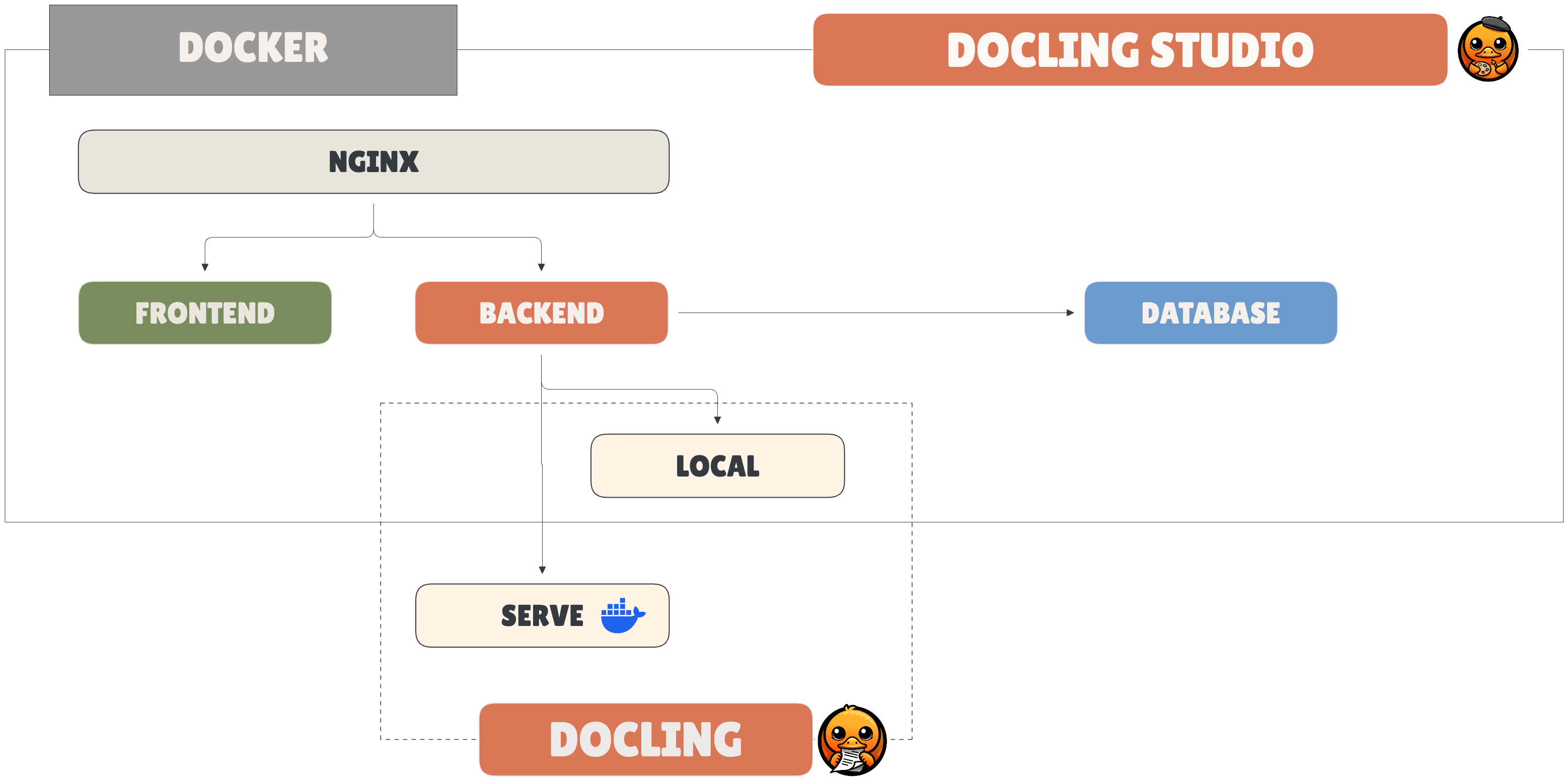 { width="600" }
Image Variants
| Variant | Image tag | Size | Description |
|---|---|---|---|
| local | latest-local |
~1.9 GB | Full — runs Docling in-process, CPU-only |
| remote | latest-remote |
~270 MB | Lightweight — delegates to an external Docling Serve instance |
For remote mode:
docker run -p 3000:3000 \
  -e DOCLING_SERVE_URL=http://your-docling-serve:5001 \
  ghcr.io/scub-france/docling-studio:latest-remote
Docker Compose
git clone https://github.com/scub-france/Docling-Studio.git
cd Docling-Studio

# Simple mode (backend + frontend only)
docker compose up --build

# With ingestion pipeline (OpenSearch + embeddings)
docker compose --profile ingestion \
  -f docker-compose.yml -f docker-compose.ingestion.yml \
  up --build
Local Development
=== "Backend (Python 3.12+)"
```bash
cd document-parser
python -m venv .venv && source .venv/bin/activate

# Remote mode (lightweight)
pip install -r requirements.txt

# Local mode (with Docling)
pip install -r requirements-local.txt

uvicorn main:app --reload --port 8000
```
=== "Frontend (Node 20+)"
```bash
cd frontend
npm install
npm run dev
```
The frontend runs on http://localhost:3000 and proxies API calls to http://localhost:8000.
Running Tests
=== "Backend"
```bash
cd document-parser
pip install pytest pytest-asyncio httpx
pytest tests/ -v
```
=== "Frontend"
```bash
cd frontend
npm run test:run
```
Pipeline Options
These options map directly to Docling's PdfPipelineOptions.
| Option | Default | Description |
|---|---|---|
do_ocr |
true |
OCR for scanned pages and embedded images |
do_table_structure |
true |
Table detection and row/column reconstruction |
table_mode |
accurate |
accurate (TableFormer) or fast |
do_code_enrichment |
false |
Specialized OCR for code blocks |
do_formula_enrichment |
false |
Math formula recognition (LaTeX output) |
do_picture_classification |
false |
Classify images by type |
do_picture_description |
false |
Generate image descriptions via VLM |
generate_picture_images |
false |
Extract detected images as separate files |
generate_page_images |
false |
Rasterize each page as an image |
images_scale |
1.0 |
Scale factor for generated images (0.1–10) |
Chunking Options
!!! note Chunking is only available in local mode. The chunking UI is hidden when using remote mode (Docling Serve).
After a document is analyzed, you can split the extracted content into semantic chunks. Chunking can be configured at analysis time or re-run later with different options via the rechunk action.
| Option | Default | Description |
|---|---|---|
chunker_type |
hybrid |
hybrid (semantic + structural), hierarchical (heading-based), or page (one chunk per page) |
max_tokens |
512 |
Maximum tokens per chunk |
merge_peers |
true |
Merge sibling elements under the same heading |
repeat_table_header |
true |
Repeat table headers when a table is split across chunks |
Each chunk includes:
- text — the chunk content
- headings — heading hierarchy leading to the chunk
- source_page — the page number the chunk originates from
- token_count — number of tokens in the chunk
- bboxes — bounding boxes of the chunk's source elements (page + coordinates)
Configuration
All configuration is done via environment variables:
| Variable | Default | Description |
|---|---|---|
CONVERSION_ENGINE |
local |
local (in-process Docling) or remote (Docling Serve) |
DOCLING_SERVE_URL |
http://localhost:5001 |
Docling Serve endpoint (remote mode only) |
DOCLING_SERVE_API_KEY |
— | API key for Docling Serve (optional) |
CORS_ORIGINS |
http://localhost:3000,... |
CORS allowed origins |
UPLOAD_DIR |
./uploads |
File storage directory |
DB_PATH |
./data/docling_studio.db |
SQLite database path |
CONVERSION_TIMEOUT |
600 |
Max seconds per Docling conversion |
BATCH_PAGE_SIZE |
10 |
Pages per batch (0 = process all at once) |
MAX_CONCURRENT_ANALYSES |
3 |
Maximum parallel analysis jobs |
DEPLOYMENT_MODE |
self-hosted |
self-hosted or huggingface (shows disclaimer banner) |
MAX_FILE_SIZE_MB |
50 |
Maximum upload file size in MB (0 = unlimited) |
MAX_PAGE_COUNT |
0 |
Maximum number of pages per document (0 = unlimited) |
RATE_LIMIT_RPM |
100 |
Max requests per minute per IP (0 = disabled) |
APP_VERSION |
dev |
Application version (set automatically by CI/Docker) |
Upload Limits
Docling Studio enforces configurable limits on uploaded documents to protect the server against oversized files and long-running analyses:
MAX_FILE_SIZE_MB(default50) — rejects uploads exceeding this size. Validated at two levels: earlyContent-Lengthcheck and streaming byte count.MAX_PAGE_COUNT(default0= unlimited) — rejects documents with more pages than allowed. Useful on shared instances or Hugging Face Spaces to cap processing time.
Both limits are exposed in the /api/health endpoint so the frontend can display them to the user before upload. Set either to 0 to disable the corresponding check.
Ingestion Pipeline (opt-in)
Docling Studio can optionally index extracted chunks into OpenSearch for vector and full-text search. This requires two additional services (OpenSearch + embedding) and is disabled by default.
To enable ingestion with Docker Compose:
docker compose --profile ingestion \
  -f docker-compose.yml -f docker-compose.ingestion.yml \
  up --build
When ingestion is enabled, the UI shows:
- An Ingest button in Studio to push chunks to OpenSearch
- An OpenSearch connection status badge in the sidebar
- Indexed / Not indexed filters on the Documents page
- A Search page for full-text and vector search across indexed documents
| Variable | Default | Description |
|---|---|---|
OPENSEARCH_URL |
— | OpenSearch endpoint (empty = ingestion disabled) |
EMBEDDING_URL |
— | Embedding service endpoint (empty = ingestion disabled) |
EMBEDDING_DIMENSION |
384 |
Vector dimension (must match embedding model) |
System Requirements
| Remote image | Local image | |
|---|---|---|
| Image size | ~270 MB | ~1.9 GB |
| Memory | 2 GB | 6 GB (recommended 8 GB+) |
| CPUs | 2 | 4 (recommended 8+) |
All Docker images are multi-arch (linux/amd64 + linux/arm64). No GPU required.