| .github | ||
| .vscode | ||
| app | ||
| ui | ||
| var | ||
| .dockerignore | ||
| .editorconfig | ||
| .gitignore | ||
| API.md | ||
| app.spec | ||
| Dockerfile | ||
| entrypoint.sh | ||
| FAQ.md | ||
| healthcheck.sh | ||
| LICENSE | ||
| pyproject.toml | ||
| README.md | ||
| sc_short.png | ||
| uv.lock | ||


YTPTube

YTPTube is a web-based GUI for yt-dlp, designed to make downloading videos from YouTube and other video platforms easier and more user-friendly. It supports downloading playlists, channels, and live streams, and includes features like scheduling downloads, sending notifications, and a built-in video player.
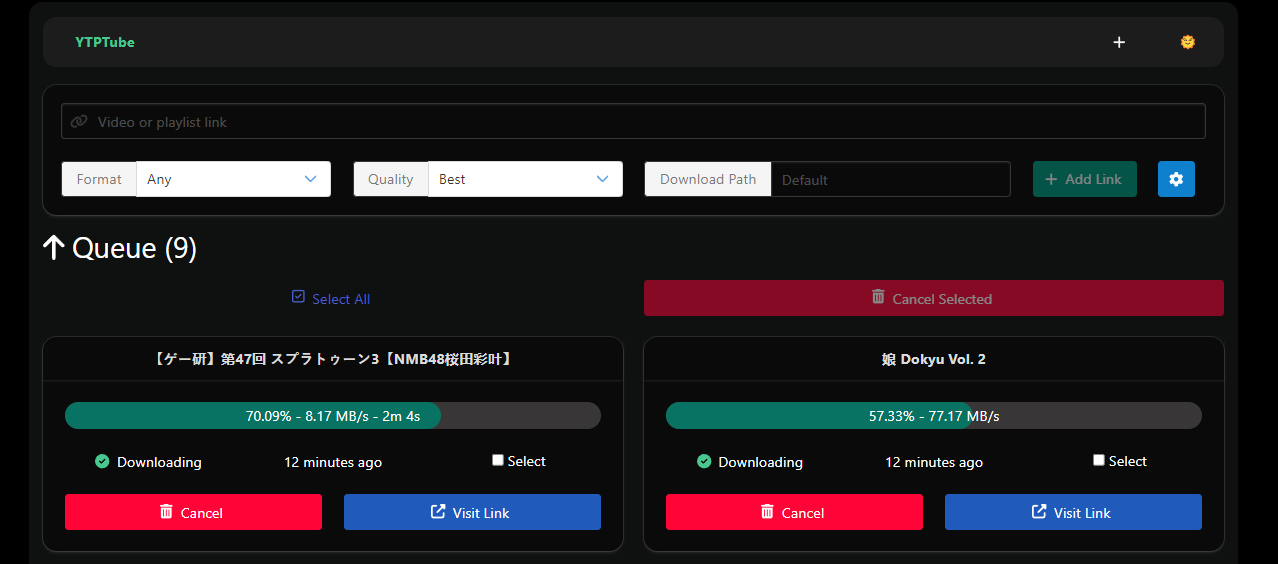
YTPTube Features.
- Multi-downloads support.
- Random beautiful background.
can be disabled or source changed. - Can handle live streams.
- Scheduler to queue channels or playlists to be downloaded automatically at a specified time.
- Send notification to targets based on selected events. includes Apprise support for non http/https URLs.
- Support per link
cli options&cookies. - Queue multiple URLs separated by comma.
- Presets system to re-use frequently used yt-dlp options.
- Simple file browser.
Disabled by default. - A built in video player with support for sidecar external subtitles.
- New
POST /api/historyendpoint that allow one or multiple links to be sent at the same time. - New
GET /api/history/add?url=http://..endpoint that allow to add single item via GET request. - Modern frontend UI.
- SQLite as database backend.
- Basic authentication support.
- Support for curl_cffi, see yt-dlp documentation
- Support basic mode for WebUI for non-technical users, which hides most of the normal features from view.
- Bundled tools in container: curl-cffi, ffmpeg, ffprobe, aria2, rtmpdump, mkvtoolsnix, mp4box.
- Automatic upcoming live stream re-queue.
- Apply
yt-dlpoptions per custom defined conditions. - Custom browser extensions, bookmarklets and iOS shortcuts to send links to YTPTube instance.
- A executable for Windows, macOS and Linux, which can be found in the release page.
Please read the FAQ for more information.
Installation
Run using docker command
mkdir -p ./{config,downloads} && docker run -d --rm --user "$UID:${GID-$UID}" --name ytptube \
-p 8081:8081 -v ./config:/config:rw -v ./downloads:/downloads:rw \
ghcr.io/arabcoders/ytptube:latest
Then you can access the WebUI at http://localhost:8081.
Note
If you are using
podmaninstead ofdocker, you can use the same command, but you need to change the user to0:0it will appears to be running as root, but it will run as the user who started the container.
Using compose file
The following is an example of a compose.yaml file that can be used to run YTPTube.
services:
  ytptube:
    user: "${UID:-1000}:${UID:-1000}" # change this to your user id and group id, for example: "1000:1000"
    image: ghcr.io/arabcoders/ytptube:latest
    container_name: ytptube
    restart: unless-stopped
    ports:
      - "8081:8081"
    volumes:
      - ./config:/config:rw
      - ./downloads:/downloads:rw
    tmpfs:
      - /tmp
Important
Make sure to change the
userline to match your user id and group id
$ mkdir -p ./{config,downloads} && docker compose -f compose.yaml up -d
Then you can access the WebUI at http://localhost:8081.
Note
you can use podman-compose instead of docker-compose, as it supports the same syntax. However, you should change the user to
0:0it will appears to be running as root, but it will run as the user who started the container.
Unraid
For Unraid users You can install the Community Applications plugin, and search for ytptube it comes
pre-configured.
API Documentation
For simple API documentation, you can refer to the API documentation.
Disclaimer
This project is not affiliated with YouTube, yt-dlp, or any other service. It's a personal project that was created to make downloading videos from the internet easier. It's not intended to be used for piracy or any other illegal activities.
Social contact
If you have short or quick questions, you are free to join my discord server and ask the question. keep in mind it's solo project, as such it might take me a bit of time to reply.
Donation
If you feel like donating and appreciate my work, you can do so by donating to children charity. For example Make-A-Wish.