 a9f827ef42
Reported on Discord by Netti93: with Tidal configured for "HiRes only"
and "Allow Quality Fallback" disabled, tracks were still downloading
successfully — as m4a 320kbps files. Some "successful" downloads were
less than half the file size of the same track pulled via Tidarr/tiddl
from the same Tidal account.

Root cause: Tidal's API silently degrades to the best quality your
account + the track + your region permits. Setting
`session.audio_quality = Quality.hi_res_lossless` and calling
`track.get_stream()` on a track that's only available in AAC returns
an AAC stream with no error. The downloader wrote the m4a file to
disk, the ~7MB size sailed past the 100KB stub threshold, and the
download reported success.

The pre-existing "verify quality wasn't silently downgraded" block
only LOGGED a warning when this happened; it did not fail the tier.
Two knock-on effects:

- Users with "HiRes only, no fallback" got m4a files anyway, which
  defeats the setting entirely.
- The worker-level fallback chain (hires → lossless → high → low)
  couldn't advance past the first tier, because every tier
  "succeeded" at whatever Tidal happened to serve.

Fix: after `track.get_stream()`, compare `stream.audio_quality`
against the tier we asked for using a rank-based ordering:

    LOW < HIGH < LOSSLESS < HI_RES < HI_RES_LOSSLESS

- Same tier or higher → accept (so the occasional Tidal upgrade
  doesn't get rejected just because it's not an exact match).
- Lower tier → reject THIS tier. The loop `continue`s and the next
  fallback tier is tried, or the whole download fails honestly
  when the user has fallback disabled. The existing final-error
  log already has a hint directing users to enable fallback if
  they want automatic Lossless substitution.
- Unrecognized `audioQuality` value (e.g. a new Tidal tier we
  haven't mapped) → reject conservatively, so the next fallback
  tier gets a chance and the diagnostic log names the unknown
  value.

Why the rank-based approach instead of strict equality:

Tidal's API doesn't technically promise an exact-tier match on
serving; on tracks that are flagged in its catalog as a higher
tier, it can serve higher than the session setting. Rejecting
higher-than-asked quality would be user-hostile. And the `HI_RES`
(legacy MQA) value — not in tidalapi's modern `Quality` enum but
possibly still present on old catalog entries — needs to rank
below `HI_RES_LOSSLESS`: users asking for true lossless HiRes
should reject MQA since MQA is a lossy format.

tidalapi's `Quality` enum is a `str` subclass whose VALUES (not
member names) match what the Tidal API returns in the
`audioQuality` field (e.g. `Quality.hi_res_lossless.value ==
'HI_RES_LOSSLESS'`, `Quality.low_320k.value == 'HIGH'`). Both
sides of the comparison are coerced to `str` before use, so the
check is robust to whichever tidalapi version exposes the served
quality as an enum or a plain string.

The check is extracted as `_verify_stream_tier(stream, q_info,
q_key) -> (ok, reason)` at module scope — a pure function with no
I/O, unit-tested independently. Ten tests: match, three upgrade
cases (LOSSLESS → HI_RES_LOSSLESS, LOSSLESS → HI_RES, LOW → any
higher), three downgrade cases (the reported HiRes → AAC, HiRes
Lossless → MQA HiRes, Lossless → AAC), one unrecognized-tier case,
and two defensive paths for older tidalapi builds without
`audio_quality` on the stream object and for QUALITY_MAP entries
that lack `tidal_quality` (e.g. tidalapi wasn't importable at
module load). Test stub updated to use uppercase `Quality` values
matching real tidalapi so case-sensitivity regressions get caught.

Also removed the old codec-string-based warning block — the new
tier check is strictly stronger, and keeping the warning around
would just be dead code waiting to drift out of sync.

Deliberately NOT tackling in this PR (documented as follow-ups):

- Bit-depth verification of HiRes FLAC files via mutagen. The
  `stream.audio_quality` tier check catches the main "HiRes
  requested, got AAC" case; bit-depth would only matter if Tidal
  labeled a stream HI_RES_LOSSLESS but served a 16-bit FLAC
  (`Stream.bit_depth` isn't reliable for this — tidalapi defaults
  missing `bitDepth` fields to 16, so a trust-the-stream check
  would spuriously reject valid HiRes whenever Tidal omits the
  field). A proper fix runs mutagen post-download to inspect the
  actual file, then decides whether to delete + retry the next
  tier — a whole new failure mode with design trade-offs that
  deserve their own PR. The support logs don't show this
  happening.

- The "manual remap still says Not Found" symptom. Might be
  downstream of this same bug (silent-AAC "success" hitting a
  later rejection), might be a separate task-state issue. Not
  guessing without logs from the retry path.

- Quality-aware stub threshold. 100KB is a reasonable floor for
  real stub/preview detection and there's no evidence the
  universal threshold is misfiring in the wild.

Field-verified status: desk-verified via unit tests and empirical
checks against a live tidalapi import (confirming the `Quality`
enum's str-subclass behavior). Not yet smoke-tested end-to-end
against a real Tidal account with a HiRes-only-no-fallback
setting — Netti93 or anyone else with that config should notice
either the fix working (non-HiRes tracks fail honestly with a
clear log line) or any regression before wider release.

Files:
- core/tidal_download_client.py — new `_verify_stream_tier` helper
  and `_QUALITY_RANK` table at module scope, called in the
  download loop after the stream is fetched and before any
  bandwidth is spent. Removed the old inline codec-based warning
  since the new check supersedes it.
- tests/test_tidal_stream_tier_verification.py — ten tests covering
  match / upgrade / downgrade / unknown / defensive paths.
- tests/test_tidal_search_shortening.py — fake `Quality` values
  brought in line with tidalapi's real values so both files share
  a consistent stub regardless of pytest collection order.
- webui/static/helper.js — WHATS_NEW entry under 2.40 describing
  the rank-based tier comparison.

Reported on Discord by Netti93 — the "same account works via
Tidarr" comparison narrowed the cause to SoulSync's download path
rather than an account/region issue.
|
||
|---|---|---|
| .github/workflows | ||
| api | ||
| assets | ||
| config | ||
| core | ||
| database | ||
| docs | ||
| scripts | ||
| services | ||
| Support | ||
| templates | ||
| tests | ||
| tools | ||
| utils | ||
| webui | ||
| .dockerignore | ||
| .gitattributes | ||
| .gitignore | ||
| advanced_settings_screenshot.png | ||
| beatport_unified_scraper.py | ||
| docker-compose.yml | ||
| Dockerfile | ||
| entrypoint.sh | ||
| gunicorn.conf.py | ||
| gunicorn.dev.conf.py | ||
| license.txt | ||
| pyproject.toml | ||
| README.md | ||
| requirements-dev.txt | ||
| requirements.txt | ||
| web_server.py | ||
| wsgi.py | ||

SoulSync - Intelligent Music Discovery & Automation Platform
Spotify-quality music discovery for self-hosted libraries. Automates downloads, curates playlists, monitors artists, and organizes your collection with zero manual effort.
IMPORTANT: Configure file sharing in slskd to avoid Soulseek bans. Set up shared folders at
http://localhost:5030/shares.
Community: Discord | Reddit | Website: ssync.net | Support: GitHub Issues | Donate: Ko-fi
What It Does
SoulSync bridges streaming services to your music library with automated discovery:
- Monitors artists → Automatically detects new releases from your watchlist
- Generates playlists → Release Radar, Discovery Weekly, Seasonal, Decade/Genre mixes, Cache-powered discovery
- Downloads missing tracks → From Soulseek, Deezer, Tidal, Qobuz, HiFi, YouTube, or any combination via Hybrid mode
- Verifies downloads → AcoustID fingerprinting for all download sources
- Enriches metadata → 10 enrichment workers (Spotify, MusicBrainz, iTunes, Deezer, Discogs, AudioDB, Last.fm, Genius, Tidal, Qobuz)
- Tags consistently → Picard-style MusicBrainz release preflight ensures all album tracks get the same release ID
- Organizes files → Custom templates for clean folder structures
- Manages library → Plex, Jellyfin, Navidrome, or SoulSync Standalone (no media server required)
- Scrobbles plays → Automatic scrobbling to Last.fm and ListenBrainz from your media server
Key Features
Discovery Engine
Release Radar — New tracks from watchlist artists, personalized by listening history
Discovery Weekly — 50 tracks from similar artists with serendipity weighting
Seasonal Playlists — Halloween, Christmas, Valentine's, Summer, Spring, Autumn (hemisphere-aware)
Personalized Playlists (12+ types)
- Recently Added, Top Tracks, Forgotten Favorites
- Decade Playlists (1960s-2020s), Genre Playlists (15+ categories)
- Because You Listen To, Daily Mixes, Hidden Gems, Popular Picks, Discovery Shuffle, Familiar Favorites
- Custom Playlist Builder (1-5 seed artists → similar artists → random albums → shuffled tracks)
Cache-Powered Discovery (zero API calls)
- Undiscovered Albums — albums by your most-played artists that aren't in your library
- New In Your Genres — recently released albums matching your top genres
- From Your Labels — popular albums on labels already in your library
- Deep Cuts — low-popularity tracks from artists you listen to
- Genre Explorer — genre landscape pills with artist counts, tap for Genre Deep Dive modal
ListenBrainz — Import recommendation and community playlists
Beatport — Full electronic music integration with genre browser (39+ genres)
Multi-Source Downloads
6 Download Sources: Soulseek, Deezer, Tidal, Qobuz, HiFi, YouTube — use any single source or Hybrid mode with drag-to-reorder priority
Deezer Downloads — ARL token authentication, FLAC lossless / MP3 320 / MP3 128 with automatic quality fallback and Blowfish decryption
Tidal Downloads — Device-flow OAuth, quality tiers from AAC 96kbps to FLAC 24-bit/96kHz Hi-Res
Qobuz Downloads — Email/password auth, quality up to Hi-Res Max (FLAC 24-bit/192kHz)
HiFi Downloads — Free lossless via public API instances, no account required
Soulseek — FLAC priority with quality profiles, peer quality scoring, source reuse for album consistency
YouTube — Audio extraction with cookie-based bot detection bypass
Hybrid Mode — Enable any combination of sources, drag to set priority order, automatic fallback chain
Playlist Sources: Spotify, Tidal, YouTube, Deezer, Beatport charts, ListenBrainz, Spotify Link (no API needed)
Post-Download
- Lossy copy creation: MP3, Opus, AAC with configurable bitrate (Opus capped at 256kbps)
- Hi-Res FLAC downsampling to 16-bit/44.1kHz CD quality
- Blasphemy Mode — delete original FLAC after conversion
- Synchronized lyrics (LRC) via LRClib
- ReplayGain analysis — optional track-level loudness tagging via ffmpeg, runs before lossy copy so both files get tagged
- Picard-style album consistency — pre-flight MusicBrainz release lookup ensures all tracks get the same release ID
Listening Stats & Scrobbling
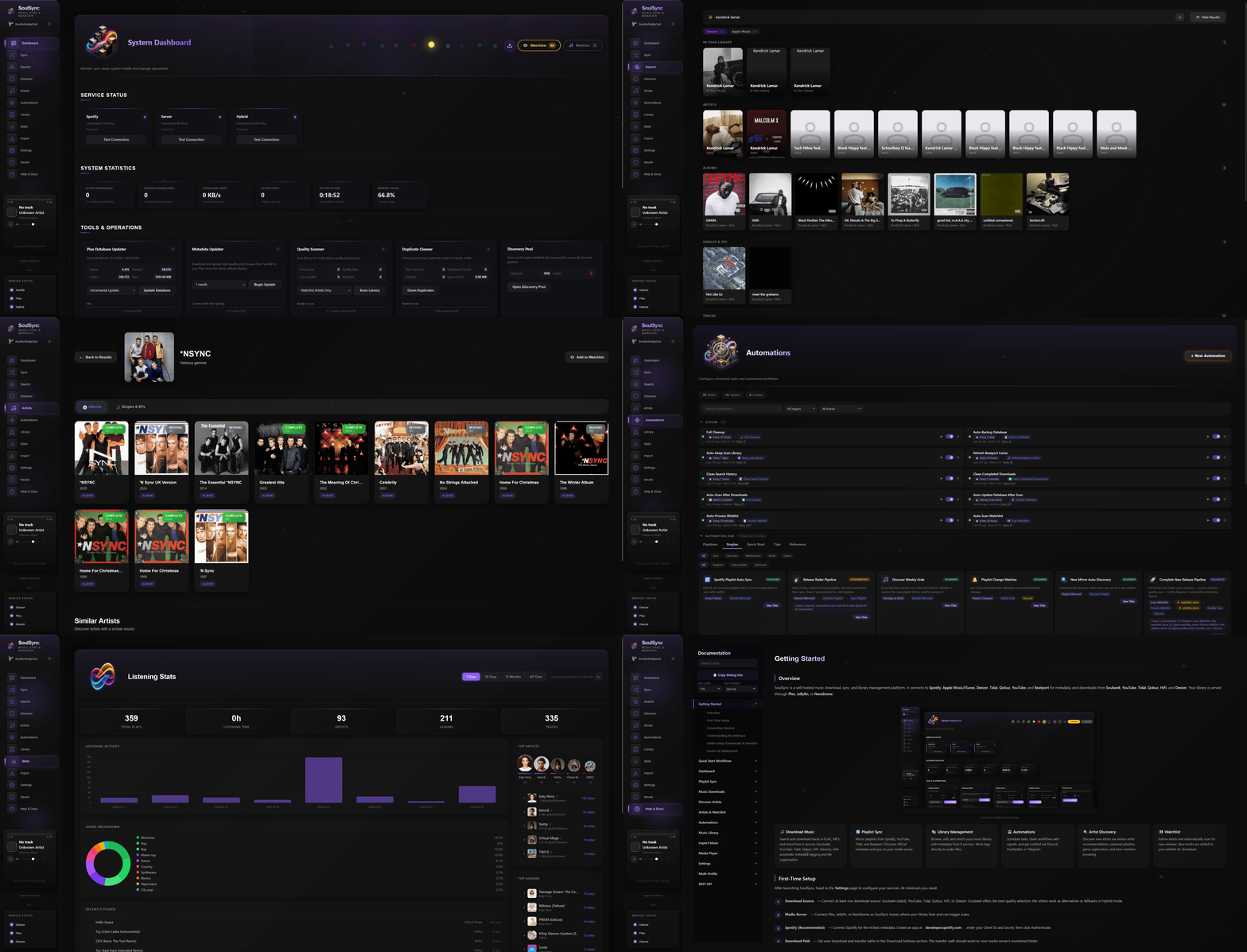
Listening Stats Page — Full dashboard with Chart.js visualizations
- Overview cards: total plays, listening time, unique artists/albums/tracks
- Timeline bar chart, genre breakdown donut with legend
- Top artists visual bubbles, top albums and tracks with play buttons and cover art
- Library health: format breakdown bar, enrichment coverage rings, database storage chart
- Time range filters: 7 days, 30 days, 12 months, all time
Scrobbling — Automatic Last.fm and ListenBrainz scrobbling from Plex, Jellyfin, or Navidrome
Audio Verification
AcoustID Fingerprinting (optional) — Verifies downloaded files match expected tracks
- Runs for all download sources (Soulseek, Tidal, Qobuz, HiFi, Deezer, YouTube)
- Catches wrong versions (live, remix, cover) even from streaming API sources
- Fail-open design: verification errors never block downloads
Metadata & Enrichment
10 Background Enrichment Workers: Spotify, MusicBrainz, iTunes, Deezer, Discogs, AudioDB, Last.fm, Genius, Tidal, Qobuz
- Each worker independently processes artists, albums, and tracks
- Pause/resume controls on dashboard, auto-pause during database scans
- Error items don't auto-retry in infinite loops (fixed in v2.1)
Multi-Source Metadata
- Primary source selectable: Spotify, iTunes/Apple Music, Deezer, or Discogs
- Spotify no longer auto-overrides — user chooses their preferred source in Settings
- Spotify auth still enables playlists, followed artists, and enrichment
- MusicBrainz enrichment with Picard-style album consistency
Hydrabase (optional P2P metadata network) — replaces iTunes as the metadata source when connected. Federated lookup with community-matched results, falls back automatically if disconnected. Dev-mode feature, enable in Settings → Connections.
Genre Whitelist — filter junk genre tags (artist names, radio show names, playlist names) from all 10 enrichment sources. 272 curated default genres, fully customizable. Off by default for backward compatibility.
Post-Processing Tag Embedding
- Granular per-service tag toggles (18+ MusicBrainz tags, Spotify/iTunes/Deezer IDs, AudioDB mood/style, Tidal/Qobuz ISRCs, Last.fm tags, Genius URLs)
- Multi-artist tagging options: configurable separator (comma/semicolon/slash), multi-value ARTISTS tag for Navidrome/Jellyfin multi-artist linking, optional "move featured artists to title" mode
- Album art embedding, cover.jpg download
- Spotify rate limit protection across all API calls
Advanced Matching Engine
- Version-aware matching: strictly rejects remixes when you want the original (and vice versa)
- Unicode and accent handling (KoЯn, Bjork, A$AP Rocky)
- Fuzzy matching with weighted confidence scoring (title, artist, duration)
- Album variation detection (Deluxe, Remastered, Taylor's Version, etc.)
- Streaming source match validation: same confidence scoring applied to Tidal/Qobuz/HiFi/Deezer results as Soulseek
- Short title protection: prevents "Love" from matching "Loveless"
Automation
Automation Engine — Visual drag-and-drop builder for custom workflows
- Triggers: Schedule, Daily/Weekly Time, Track Downloaded, Batch Complete, Playlist Changed, Discovery Complete, Signal Received, Library Scan Complete, Watchlist Match, Wishlist Item Added, and more
- Actions: Process Wishlist, Scan Watchlist, Refresh Mirrored, Discover Playlist, Sync Playlist, Scan Library, Database Update, Quality Scan, Full Cleanup, and 10+ more
- Then Actions (up to 3 per automation): Fire Signal (chain to other automations), Discord/Telegram/Pushbullet notifications, audible chimes
- Signal Chains — One automation fires
signal:foo, another listens for it. Cycle detection + chain depth limit + cooldown prevent runaway chains. - Playlist Pipeline — Single automation for full playlist lifecycle: refresh → discover → sync → download missing. No manual signal wiring.
- Pipelines — Pre-built one-click deployments (New Music, Nightly Operations, Full Library Maintenance, etc.) that install a linked group of automations at once
- Automation Groups — Drag-and-drop organization, bulk enable/disable, rename, right-click context menus
Watchlist — Monitor unlimited artists with per-artist configuration
- Release type filters: Albums, EPs, Singles
- Content filters: Live, Remixes, Acoustic, Compilations
- Auto-discover similar artists, periodic scanning
Wishlist — Failed downloads automatically queued for retry with auto-processing
Mirrored Playlists — Mirror from Spotify, Tidal, YouTube, Deezer and keep synced
- Auto-refresh detects source changes via URL/ID tracking in playlist metadata
- Discovery pipeline matches source tracks to user's primary metadata source (Spotify/iTunes/Deezer/Discogs)
- Auto Wing It fallback — tracks that fail all metadata APIs get stub metadata from the raw source title and flow through the normal download pipeline anyway
- Followed Spotify playlists that hit 403 errors fall back to public embed scraper
- Unmatch button on found tracks with DB persistence for mirrored playlists
Local Profiles — Multiple configuration profiles with isolated settings, watchlists, and playlists
Library Management
Dashboard — Service status, system stats, activity feed, enrichment worker controls
- Unified glass UI design across all tool cards, service cards, and stat cards
Library Page — Artist grid with staggered card animations, per-artist enrichment coverage rings
- Artist Radio button — play random track with auto-queue radio mode
- Play buttons on Last.fm top tracks sidebar
Enhanced Library Manager — Toggle between Standard and Enhanced views
- Inline metadata editing, per-service manual matching
- Write Tags to File (MP3/FLAC/OGG/M4A), tag preview with diff
- Server sync after tag writes (Plex, Jellyfin, Navidrome)
- Bulk operations, sortable columns, multi-disc support
Library Maintenance — 10+ automated repair jobs
- Track Number, Dead Files, Duplicates, Metadata Gaps, Album Completeness, Missing Cover Art, AcoustID Scanner, Orphan Files, Fake Lossless, Library Reorganize, Lossy Converter, MBID Mismatch, Album Tag Consistency, Live/Commentary Cleaner
- Enrichment workers auto-pause during database scans
- One-click Fix All with findings dashboard
Database Storage Visualization — Donut chart showing per-table storage breakdown
Live Log Viewer — Real-time terminal-style log viewer on Settings → Logs. Color-coded levels (DEBUG/INFO/WARNING/ERROR), live filter + search, switch between log files (app, post-processing, AcoustID, source reuse). Auto-scroll, copy, clear. Updates via WebSocket every 0.5s.
Import System — Tag-first matching, auto-grouped album cards, staging folder workflow
- Auto-Import worker: recursive scan, single file support, AcoustID fingerprinting fallback
- Confidence-gated: 90%+ auto-imports, 70-90% queued for review
SoulSync Standalone Mode — Use SoulSync without Plex, Jellyfin, or Navidrome
- Downloads and imports write directly to the library database
- Filesystem scanner for incremental and deep scan of Transfer folder
- Pre-populated enrichment IDs from download context (Spotify, Deezer, MusicBrainz)
- Select in Settings → Connections → Standalone
Template Organization — $albumartist/$album/$track - $title and 10+ variables
Built-in Media Player
- Stream tracks from your library with queue system
- Now Playing modal with album art ambient glow and Web Audio visualizer
- Smart Radio mode — auto-queue similar tracks by genre, mood, and style
- Repeat modes, shuffle, keyboard shortcuts, Media Session API
Mobile Responsive
- Comprehensive mobile layouts for Stats, Automations, Hydrabase, Issues, Help pages
- Artist hero section, enhanced library track table with bottom sheet action popover
- Enrichment rings, filter bars, and discover cards all adapt to narrow screens
Installation
Docker (Recommended)
curl -O https://raw.githubusercontent.com/Nezreka/SoulSync/main/docker-compose.yml
docker-compose up -d
# Access at http://localhost:8008
Release Channels
SoulSync publishes two Docker image tracks so you can choose your level of stability.
Stable — :latest (recommended for most users). Hand-promoted from the dev branch to main when a batch of changes is ready for release. Published to Docker Hub. Your docker-compose.yml pulls this by default — no changes needed.
docker pull boulderbadgedad/soulsync:latest
Nightly — :dev. Rebuilt every night from the dev branch (and on every push to dev). Published to GitHub Container Registry. Gets new features and bug fixes before they reach :latest, at the cost of occasional instability as changes settle. Good for early adopters, contributors validating their own merges, and anyone helping shake out bugs on Discord before a stable release.
To switch, edit docker-compose.yml:
image: ghcr.io/nezreka/soulsync:dev
Then run docker-compose pull && docker-compose up -d.
Pinned dev builds are also published as ghcr.io/nezreka/soulsync:dev-YYYYMMDD-<sha> if you want to stick with an exact known-good snapshot.
Version-tagged releases (e.g. :2.3, :2.4) are permanent tags published on both registries when a stable release is promoted:
docker pull boulderbadgedad/soulsync:2.4
# or
docker pull ghcr.io/nezreka/soulsync:2.4
| You are... | Use |
|---|---|
| A typical user who wants things to work | :latest |
| Pinning to a specific version for stability | :2.3, :2.4, etc. |
| An early adopter who wants new features early and is OK reporting bugs | :dev |
| A contributor testing post-merge behavior | :dev or a pinned dev build |
Unraid
SoulSync is available as an Unraid template. Install from Community Applications or manually add the template from:
https://raw.githubusercontent.com/Nezreka/SoulSync/main/templates/soulsync.xml
PUID/PGID are exposed in the template — set them to match your Unraid permissions (default: 99/100 for nobody/users).
The template points at boulderbadgedad/soulsync:latest (stable) by default. To use the nightly :dev channel on Unraid, edit the container's Repository field to ghcr.io/nezreka/soulsync:dev after installing from the template.
Python (No Docker)
git clone https://github.com/Nezreka/SoulSync
cd SoulSync
pip install -r requirements.txt
gunicorn -c gunicorn.conf.py wsgi:application
# Open http://localhost:8008
For local development and tests:
pip install -r requirements-dev.txt
pytest
gunicorn -c gunicorn.dev.conf.py wsgi:application
Setup Guide
Prerequisites
- slskd running and accessible (Download) — required for Soulseek downloads
- Spotify API credentials (Dashboard) — optional but recommended for discovery
- Media Server (optional): Plex, Jellyfin, or Navidrome
- Deezer ARL token (optional): For Deezer downloads — get from browser cookies after logging into deezer.com
- Tidal account (optional): For Tidal downloads — authenticate via device flow in Settings
- Qobuz account (optional): For Qobuz downloads — email/password login in Settings
Step 1: Set Up slskd
SoulSync talks to slskd through its API. See the slskd setup guide for API key configuration.
- Add an API key in slskd's
settings.ymlunderweb > authentication > api_keys - Restart slskd
- Paste the key into SoulSync's Settings → Downloads → Soulseek section
Configure file sharing in slskd to avoid Soulseek bans. Set up shared folders at http://localhost:5030/shares.
Step 2: Set Up Spotify API (Optional)
Spotify gives you the best discovery features. Without it, SoulSync falls back to iTunes/Deezer for metadata.
- Create an app at developer.spotify.com/dashboard
- Add Redirect URI:
http://127.0.0.1:8888/callback - Copy Client ID and Client Secret into SoulSync Settings
More detail in Support/DOCKER-OAUTH-FIX.md.
Step 3: Configure SoulSync
Open SoulSync at http://localhost:8008 and go to Settings.
Download Source: Choose your preferred source (Soulseek, Deezer, Tidal, Qobuz, HiFi, YouTube, or Hybrid)
Paths:
- Input Folder: Container path to slskd's download folder (e.g.,
/app/downloads) - Output Folder: Where organized music goes (e.g.,
/app/Transfer) - Import Folder: Optional folder for importing existing music (e.g.,
/app/Staging)
Media Server (optional): Use your machine's actual IP (not localhost — that means inside the container)
Step 4: Docker Path Mapping
| What | Container Path | Host Path |
|---|---|---|
| Config | /app/config |
Your config folder |
| Logs | /app/logs |
Your logs folder |
| Database | /app/data |
Named volume (recommended) |
| Input | /app/downloads |
Same folder slskd downloads to |
| Output | /app/Transfer |
Where organized music goes |
| Import | /app/Staging |
Optional folder for importing music |
Important: Use a named volume for the database (soulsync_database:/app/data). Direct host path mounts to /app/data can overwrite Python module files.
Comparison
| Feature | SoulSync | Lidarr | Headphones | Beets |
|---|---|---|---|---|
| Custom Discovery Playlists (15+) | ✓ | ✗ | ✗ | ✗ |
| Cache-Powered Discovery (zero API) | ✓ | ✗ | ✗ | ✗ |
| Listening Stats Dashboard | ✓ | ✗ | ✗ | ✗ |
| Last.fm/ListenBrainz Scrobbling | ✓ | ✗ | ✗ | ✗ |
| 6 Download Sources | ✓ | ✗ | ✗ | ✗ |
| Deezer Downloads (FLAC) | ✓ | ✗ | ✗ | ✗ |
| Tidal Downloads (Hi-Res) | ✓ | ✗ | ✗ | ✗ |
| Qobuz Downloads (Hi-Res Max) | ✓ | ✗ | ✗ | ✗ |
| Soulseek Downloads | ✓ | ✗ | ✗ | ✗ |
| Beatport Integration | ✓ | ✗ | ✗ | ✗ |
| Audio Fingerprint Verification | ✓ | ✗ | ✗ | ✓ |
| 9 Enrichment Workers | ✓ | ✗ | ✗ | Plugin |
| Picard-Style Album Tagging | ✓ | ✗ | ✗ | ✗ |
| Visual Automation Builder | ✓ | ✗ | ✗ | ✗ |
| Enhanced Library Manager | ✓ | ✗ | ✗ | ✗ |
| Library Maintenance Suite (10+ jobs) | ✓ | ✗ | ✗ | ✓ |
| Multi-Profile Support | ✓ | ✗ | ✗ | ✗ |
| Mobile Responsive | ✓ | ✓ | ✗ | ✗ |
| Built-in Media Player + Radio | ✓ | ✗ | ✗ | ✗ |
Architecture
Scale: ~120,000 lines across Python backend and JavaScript frontend, 80+ API endpoints, handles 10,000+ album libraries
Integrations: Spotify, iTunes/Apple Music, Deezer, Tidal, Qobuz, YouTube, Soulseek (slskd), HiFi, Beatport, ListenBrainz, MusicBrainz, AcoustID, AudioDB, Last.fm, Genius, LRClib, music-map.com, Plex, Jellyfin, Navidrome
Stack: Python 3.11, Flask, SQLite (WAL mode), vanilla JavaScript SPA, Chart.js
Core Components:
- Matching Engine — version-aware fuzzy matching with streaming source bypass
- Download Orchestrator — routes between 6 sources with hybrid fallback and batch processing
- Discovery System — personalized playlists, cache-powered sections, seasonal content
- Metadata Pipeline — 9 enrichment workers, Picard-style album consistency, dual-source fallback
- Album Consistency — pre-flight MusicBrainz release lookup before album downloads
- Automation Engine — event-driven workflows with signal chains and pipeline deployment
- SoulID System — deterministic cross-instance artist/album/track identifiers via track-verified API lookup
Contributing
Branch workflow
SoulSync uses a dev → main flow:
main— release branch.:latestimages auto-build from this. Only receives merges fromdev.dev— integration branch. Nightly:devimages build from here. PRs land here first for validation before being promoted tomain.- Feature branches — branched from
dev. PRs targetdev.
Opening a PR
- Fork and clone the repo
- Branch off
dev:git checkout -b fix/your-change dev - Make your changes and commit
- Push and open a PR against
dev(notmain) - CI (
build-and-test.yml) runs ruff lint + compile + pytest on your branch — wait for green - A maintainer reviews and merges
Running locally
pip install -r requirements-dev.txt
python -m ruff check .       # must be 0 errors
python -m pytest             # all tests must pass
gunicorn -c gunicorn.dev.conf.py wsgi:application
Ruff config lives in pyproject.toml. The ruleset is intentionally lenient — it catches real bugs (undefined names, import shadowing, closure-in-loop) without style nits.
Reporting bugs / requesting features
Open an issue on GitHub. For user-side support, the Discord community is the fastest place to ask.