
logo by @hernandito
# Your next YouTube media manager ## Table of contents: - [What it does](#what-it-does) - [Features](#features) - [Screenshots](#screenshots) - [Installation](#installation) - [Unraid](#unraid) - [Docker](#docker) - [Authentication](#authentication) - [Frequently asked questions](https://github.com/kieraneglin/pinchflat/wiki/Frequently-Asked-Questions) - [Documentation](https://github.com/kieraneglin/pinchflat/wiki) - [EFF donations](#eff-donations) - [Pre-release disclaimer](#pre-release-disclaimer) - [Development](#development) ## What it does Pinchflat is a self-hosted app for downloading YouTube content built using [yt-dlp](https://github.com/yt-dlp/yt-dlp). It's designed to be lightweight, self-contained, and easy to use. You set up rules for how to download content from YouTube channels or playlists and it'll do the rest, checking periodically for new content. It's perfect for people who want to download content for use in with a media center app (Plex, Jellyfin, Kodi) or for those who want to archive media! It's _not_ great for downloading one-off videos - it's built to download large amounts of content and keep it up to date. It's also not meant for consuming content in-app - Pinchflat downloads content to disk where you can then watch it with a media center app or VLC. If it doesn't work for your use case, please make a feature request! You can also check out these great alternatives: [Tube Archivist](https://github.com/tubearchivist/tubearchivist), [ytdl-sub](https://github.com/jmbannon/ytdl-sub), and [TubeSync](https://github.com/meeb/tubesync) ## Features - Self-contained - just one Docker container with no external dependencies - Powerful naming system so content is stored where and how you want it - Easy-to-use web interface with presets to get you started right away - First-class support for media center apps like Plex, Jellyfin, and Kodi - Automatically downloads new content from channels and playlists - Uses a novel approach to download new content more quickly than other apps - Supports downloading audio content - Custom rules for handling YouTube Shorts and livestreams - Advanced options like setting cutoff dates and filtering by title - Reliable hands-off operation ## Screenshots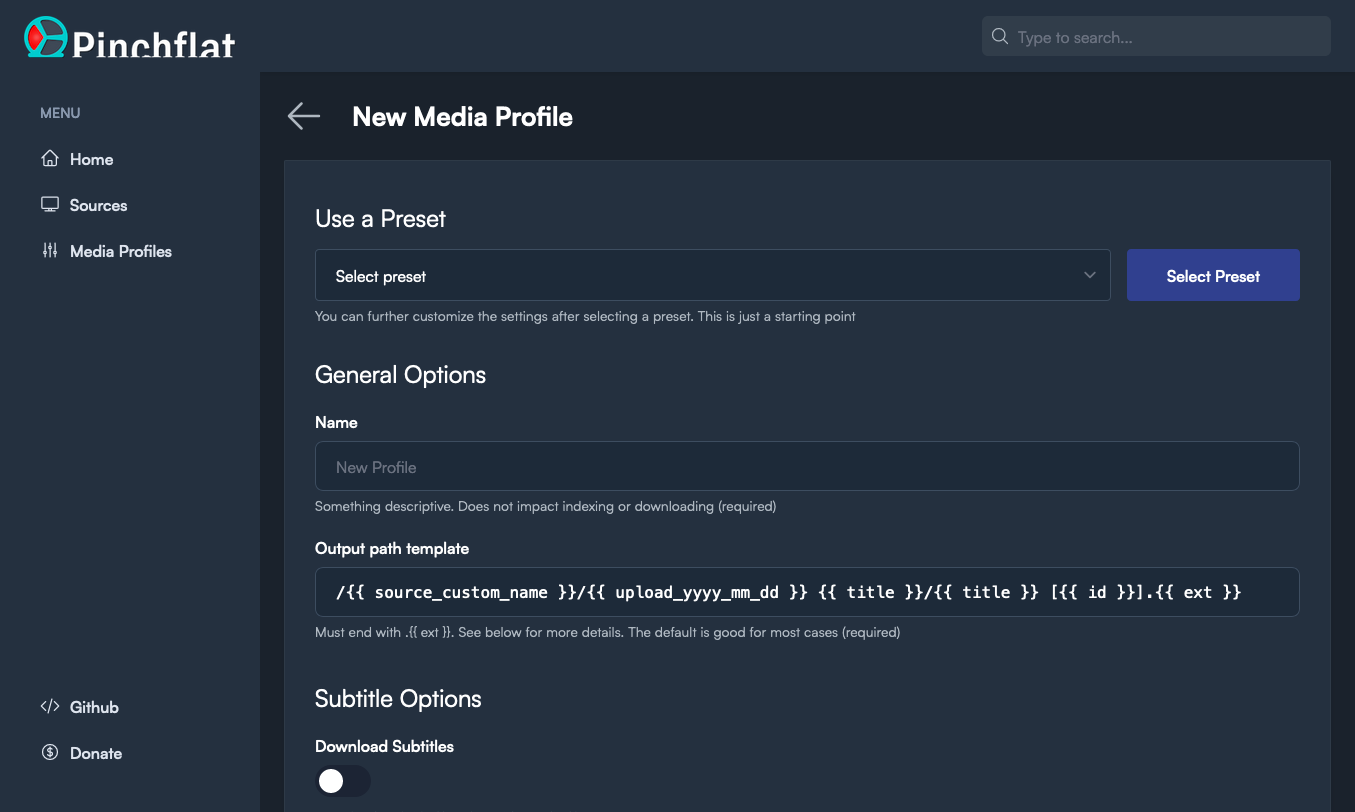
 ## Installation
### Unraid
Simply search for Pinchflat in the Community Apps store!
### Docker
1. Create two directories on your host machine: one for storing config and one for storing downloaded media. Make sure they're both writable by the user running the Docker container.
2. Prepare the docker image in one of the two ways below:
- **From Docker Hub:** `docker pull keglin/pinchflat:latest`, or;
- **Building locally:** `docker build . --file selfhosted.Dockerfile -t keglin/pinchflat:latest`
3. Run the container:
```bash
# Be sure to replace /host/path/to/config and /host/path/to/downloads below with
# the paths to the directories you created in step 1
docker run \
-p 8945:8945 \
-v /host/path/to/config:/config \
-v /host/path/to/downloads:/downloads \
keglin/pinchflat:latest
```
NOTE: it's recommended to not run the container as root. Doing so can create permission issues if other apps need to work with the downloaded media. If you need to run any command as root, you can run `su` from the container's shell as there is no password set for the root user.
## Authentication
HTTP basic authentication is optionally supported. To use it, set the `BASIC_AUTH_USERNAME` and `BASIC_AUTH_PASSWORD` environment variables when starting the container. No authentication will be required unless you set _both_ of these.
## EFF donations
A portion of all donations to Pinchflat will be donated to the [Electronic Frontier Foundation](https://www.eff.org/). The EFF defends your online liberties and [backed](https://github.com/github/dmca/blob/9a85e0f021f7967af80e186b890776a50443f06c/2020/11/2020-11-16-RIAA-reversal-effletter.pdf) `youtube-dl` when Google took them down. [See here](https://github.com/kieraneglin/pinchflat/wiki/EFF-Donation-Receipts) for a list of donation receipts.
## Pre-release disclaimer
This is pre-release software and anything can break at any time. I make not guarantees about the stability of this software, forward-compatibility of updates, or integrity (both related to and independent of Pinchflat). Essentially, use at your own risk and expect there will be rough edges for now.
## Development
Pinchflat is written in Elixir - a functional programming language that runs on the Erlang VM. It uses the Phoenix web framework and SQLite for the database. The frontend is mostly normal server-rendered HTML with a little Alpine.js as-needed.
Elixir is a personal favourite of mine and is ideal for building fault-tolerant systems. It's also a joy to work with and has a great community. If you're interested in contributing, I'd be happy to help you get started with Elixir - just open an issue with some questions and we can chat!
### Local setup
- `docker compose build --no-cache`
- `docker compose up -d && docker attach pinchflat-phx-1`
- After a few minutes the app should be accessible at `localhost:4008`
- Please let me know if you run into any hiccups here - I haven't had to bootstrap the app from scratch in a long time and I might have forgotten something
- Media downloads and config will be stored in the `tmp` directory. Not the OS's `/tmp` directory, but the one in the root of the project
### Running tests and linting
- Open a shell with `docker compose exec phx bash`
- Run `mix test` to run the tests
- Run `mix check` to do a full testing, linting, and static analysis pass
### Top tips
- Look for any module that ends in `*_worker.ex` - these are where the interesting stuff happens and you can trace back from there to see how the app works. `lib/pinchflat/slow_indexing/media_collection_indexing_worker.ex` is a good place to start
## License
See `LICENSE` file
## Installation
### Unraid
Simply search for Pinchflat in the Community Apps store!
### Docker
1. Create two directories on your host machine: one for storing config and one for storing downloaded media. Make sure they're both writable by the user running the Docker container.
2. Prepare the docker image in one of the two ways below:
- **From Docker Hub:** `docker pull keglin/pinchflat:latest`, or;
- **Building locally:** `docker build . --file selfhosted.Dockerfile -t keglin/pinchflat:latest`
3. Run the container:
```bash
# Be sure to replace /host/path/to/config and /host/path/to/downloads below with
# the paths to the directories you created in step 1
docker run \
-p 8945:8945 \
-v /host/path/to/config:/config \
-v /host/path/to/downloads:/downloads \
keglin/pinchflat:latest
```
NOTE: it's recommended to not run the container as root. Doing so can create permission issues if other apps need to work with the downloaded media. If you need to run any command as root, you can run `su` from the container's shell as there is no password set for the root user.
## Authentication
HTTP basic authentication is optionally supported. To use it, set the `BASIC_AUTH_USERNAME` and `BASIC_AUTH_PASSWORD` environment variables when starting the container. No authentication will be required unless you set _both_ of these.
## EFF donations
A portion of all donations to Pinchflat will be donated to the [Electronic Frontier Foundation](https://www.eff.org/). The EFF defends your online liberties and [backed](https://github.com/github/dmca/blob/9a85e0f021f7967af80e186b890776a50443f06c/2020/11/2020-11-16-RIAA-reversal-effletter.pdf) `youtube-dl` when Google took them down. [See here](https://github.com/kieraneglin/pinchflat/wiki/EFF-Donation-Receipts) for a list of donation receipts.
## Pre-release disclaimer
This is pre-release software and anything can break at any time. I make not guarantees about the stability of this software, forward-compatibility of updates, or integrity (both related to and independent of Pinchflat). Essentially, use at your own risk and expect there will be rough edges for now.
## Development
Pinchflat is written in Elixir - a functional programming language that runs on the Erlang VM. It uses the Phoenix web framework and SQLite for the database. The frontend is mostly normal server-rendered HTML with a little Alpine.js as-needed.
Elixir is a personal favourite of mine and is ideal for building fault-tolerant systems. It's also a joy to work with and has a great community. If you're interested in contributing, I'd be happy to help you get started with Elixir - just open an issue with some questions and we can chat!
### Local setup
- `docker compose build --no-cache`
- `docker compose up -d && docker attach pinchflat-phx-1`
- After a few minutes the app should be accessible at `localhost:4008`
- Please let me know if you run into any hiccups here - I haven't had to bootstrap the app from scratch in a long time and I might have forgotten something
- Media downloads and config will be stored in the `tmp` directory. Not the OS's `/tmp` directory, but the one in the root of the project
### Running tests and linting
- Open a shell with `docker compose exec phx bash`
- Run `mix test` to run the tests
- Run `mix check` to do a full testing, linting, and static analysis pass
### Top tips
- Look for any module that ends in `*_worker.ex` - these are where the interesting stuff happens and you can trace back from there to see how the app works. `lib/pinchflat/slow_indexing/media_collection_indexing_worker.ex` is a good place to start
## License
See `LICENSE` file