 d1bf23b1a2
Introduces two master feature flags that select which UI surface is
exposed, replacing the previous "delete legacy pages" approach with a
softer isolation:

- STUDIO_MODE_ENABLED  (default false) — legacy OCR-debug surface
- RAG_PIPELINE_ENABLED (default true)  — new doc-centric ingestion + viz

At least one master must be enabled (validated server-side at startup).
Sub-flags (inspect / linked / ask) are effective only when the RAG
pipeline master is on.

CHUNKS_MODE_ENABLED renamed to LINKED_MODE_ENABLED in anticipation of
T3 (Linked view replaces the Chunks tab). The DocMode union value
'chunks' is preserved for now and will be renamed in T3 alongside the
route segment, to keep this PR scoped.

Router-level guard added: requests to a route whose surface is disabled
are redirected to the other surface's landing page (or /home as a
defensive fallback). Logic extracted into a pure resolveSurface helper
with full test coverage.

i18n strings that pointed users to "Studio" rewritten to be surface-
agnostic ("from the library" / "depuis la bibliothèque") since Studio
is hidden by default in 0.6.1.

Backend:
- infra/settings.py: add studio_mode_enabled + rag_pipeline_enabled;
  rename chunks_mode_enabled → linked_mode_enabled; add at-least-one
  master validation in __post_init__
- api/schemas.py: HealthResponse exposes both master flags + renamed
  sub-flag
- main.py: health endpoint wires the new fields
- tests: surface-flag + renamed sub-flag assertions

Frontend:
- features/feature-flags/store: add studioMode + ragPipeline registry
  entries; rename chunksMode → linkedMode; sub-flags now require
  ragPipeline enabled; modeFlags() maps linkedModeEnabled → key 'chunks'
  (transitional)
- shared/routing/resolveSurface: pure helper + tests
- app/router: beforeEach guard consumes resolveSurface
- shared/i18n: Studio-pointing strings rewritten (en + fr) + test sync
- features/reasoning: stale "from StudioPage" comment generalized
|
||
|---|---|---|
| .github | ||
| docs | ||
| document-parser | ||
| e2e | ||
| embedding-service | ||
| experiments/reasoning-trace | ||
| frontend | ||
| .dockerignore | ||
| .editorconfig | ||
| .env.example | ||
| .gitignore | ||
| .trivyignore.yaml | ||
| CHANGELOG.md | ||
| CODE_OF_CONDUCT.md | ||
| CONTRIBUTING.md | ||
| docker-compose.dev.yml | ||
| docker-compose.ingestion.yml | ||
| docker-compose.yml | ||
| Dockerfile | ||
| LICENSE | ||
| mkdocs.yml | ||
| nginx.conf.template | ||
| README.md | ||
| SECURITY.md | ||
Docling Studio





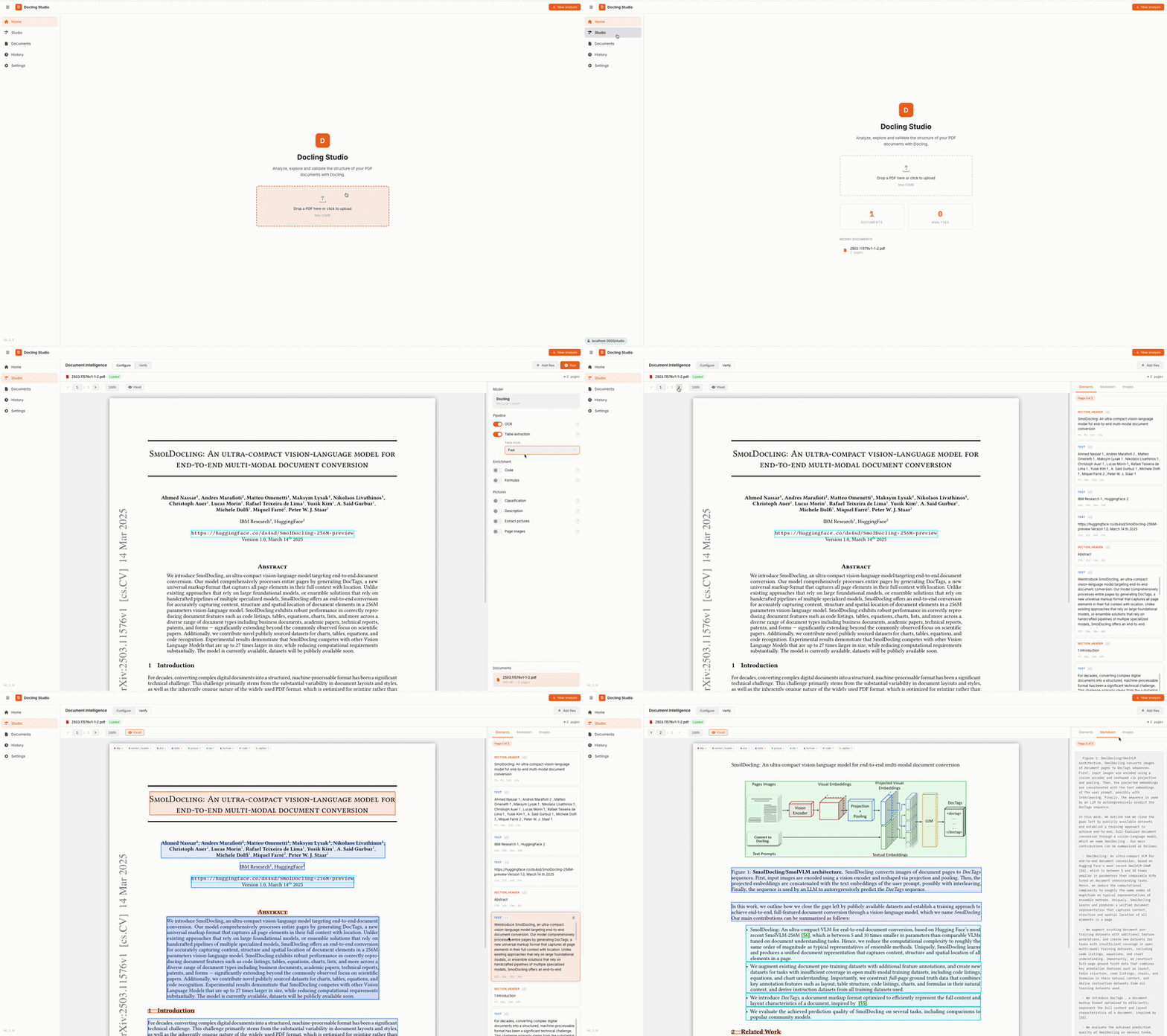
A visual document analysis studio powered by Docling. Upload a PDF, configure the extraction pipeline, and visualize the results — text, tables, images, formulas, bounding boxes — all from your browser.
Star History
Features
- Home page with quick upload and recent documents
- PDF viewer with page navigation, bounding box overlay, and resizable results panel
- Configurable Docling pipeline — OCR, table extraction, code/formula enrichment, picture classification & description, image generation
- Bounding box visualization — color-coded element overlay directly on the PDF
- Per-page results — right panel syncs with the current PDF page
- Chunking — split extracted content into semantic chunks (hierarchical, hybrid, or page-based) with configurable token limits and inline editing
- Ingestion pipeline — Docling → chunking → embedding → OpenSearch vector indexing (one-click from Studio)
- Graph storage (Neo4j) — full DoclingDocument tree (sections, paragraphs, tables, pages, chunks) mirrored as a graph with
PARENT_OF,NEXT,ON_PAGE,HAS_CHUNK,DERIVED_FROMrelations, with an in-app graph view powered by Cytoscape.js - Markdown & HTML export of extracted content
- Document management — upload, list, delete, search, filter by indexing status
- Analysis history — re-visit and open past analyses
- Upload limits — configurable max file size and max page count per document
- Rate limiting — configurable requests per minute per IP
- Dark / Light theme and FR / EN localization
Architecture
┌────────────┐         ┌──────────────────────┐
│  Frontend  │────────▶│   Document Parser    │
│  Vue 3     │  /api/* │ FastAPI + Docling    │
│  port 3000 │         │ SQLite + file storage│
└────────────┘         │   port 8000          │
                       └──────────────────────┘
| Service | Stack | Role |
|---|---|---|
| frontend | Vue 3, TypeScript, Vite, Pinia | UI, PDF viewer, results display |
| document-parser | FastAPI, Docling, SQLite, pdf2image | REST API, document parsing, storage |
Backend structure (hexagonal architecture — ports & adapters)
document-parser/
├── main.py                   # FastAPI app, CORS, lifespan
├── domain/                   # Pure domain — no HTTP, no DB
│   ├── models.py             # Document, AnalysisJob dataclasses
│   ├── ports.py              # Abstract protocols (converter, chunker)
│   └── value_objects.py      # ConversionResult, PageDetail, ChunkResult
├── api/                      # HTTP layer (FastAPI routers)
│   ├── schemas.py            # Pydantic DTOs (camelCase serialization)
│   ├── documents.py          # /api/documents endpoints
│   └── analyses.py           # /api/analyses endpoints
├── persistence/              # Data layer (SQLite via aiosqlite)
│   ├── database.py           # Connection management, schema init
│   ├── document_repo.py      # Document CRUD
│   └── analysis_repo.py      # AnalysisJob CRUD
├── services/                 # Use case orchestration
│   ├── document_service.py   # Upload, delete, preview
│   └── analysis_service.py   # Async Docling processing
└── tests/                    # 377 tests (pytest)
Frontend structure (feature-based)
frontend/src/
├── app/                      # App shell, router, global styles
├── pages/                    # Route-level pages
│   ├── HomePage.vue          # Landing page with upload & stats
│   ├── StudioPage.vue        # PDF viewer + config + results
│   ├── DocumentsPage.vue     # Document management
│   ├── HistoryPage.vue       # Past analyses
│   └── SettingsPage.vue      # Theme, language, API URL
├── features/                 # Feature modules
│   ├── analysis/             # Analysis store, API, bbox, UI components
│   ├── document/             # Document store, API, upload, list
│   ├── history/              # History store, API, navigation
│   └── settings/             # Settings store
└── shared/                   # Shared utilities (types, i18n, http, format)
Quick Start
One command, nothing else to install:
docker run -p 3000:3000 ghcr.io/scub-france/docling-studio:latest-local
Open http://localhost:3000, upload a PDF, and get results. That's it.
Note: The first analysis takes longer as Docling downloads its ML models (~400 MB). Subsequent runs are fast.
Image variants
| Variant | Image tag | Size | Description |
|---|---|---|---|
| local | latest-local |
~1.9 GB | Full — runs Docling in-process, CPU-only |
| remote | latest-remote |
~270 MB | Lightweight — delegates to an external Docling Serve instance |
For remote mode:
docker run -p 3000:3000 \
  -e DOCLING_SERVE_URL=http://your-docling-serve:5001 \
  ghcr.io/scub-france/docling-studio:latest-remote
Docker Compose
git clone https://github.com/scub-france/Docling-Studio.git
cd Docling-Studio

# Simple mode (backend + frontend only)
docker compose up --build

# With ingestion pipeline (OpenSearch + embeddings)
docker compose --profile ingestion -f docker-compose.yml -f docker-compose.ingestion.yml up --build
Local Development
Backend (Python 3.12+):
cd document-parser
python -m venv .venv && source .venv/bin/activate

# Remote mode (lightweight)
pip install -r requirements.txt

# Local mode (with Docling)
pip install -r requirements-local.txt

uvicorn main:app --reload --port 8000
Frontend (Node 20+):
cd frontend
npm install
npm run dev
Running Tests
# Backend (377 tests)
cd document-parser
pip install pytest pytest-asyncio httpx
pytest tests/ -v

# Frontend (156 tests)
cd frontend
npm run test:run
Pipeline Options
These options map directly to Docling's PdfPipelineOptions. See the Docling documentation for details on each feature.
| Option | Default | Description |
|---|---|---|
do_ocr |
true |
OCR for scanned pages and embedded images |
do_table_structure |
true |
Table detection and row/column reconstruction |
table_mode |
accurate |
accurate (TableFormer) or fast |
do_code_enrichment |
false |
Specialized OCR for code blocks |
do_formula_enrichment |
false |
Math formula recognition (LaTeX output) |
do_picture_classification |
false |
Classify images by type (chart, photo, diagram…) |
do_picture_description |
false |
Generate image descriptions via VLM |
generate_picture_images |
false |
Extract detected images as separate files |
generate_page_images |
false |
Rasterize each page as an image |
images_scale |
1.0 |
Scale factor for generated images (0.1–10) |
Configuration
All configuration is done via environment variables. See .env.example.
| Variable | Default | Description |
|---|---|---|
CONVERSION_ENGINE |
local |
local (in-process Docling) or remote (Docling Serve) |
DOCLING_SERVE_URL |
http://localhost:5001 |
Docling Serve endpoint (remote mode only) |
DOCLING_SERVE_API_KEY |
— | API key for Docling Serve (optional) |
CORS_ORIGINS |
http://localhost:3000,... |
CORS allowed origins (comma-separated) |
UPLOAD_DIR |
./uploads |
File storage directory |
DB_PATH |
./data/docling_studio.db |
SQLite database path |
CONVERSION_TIMEOUT |
600 |
Max seconds for a single Docling conversion |
BATCH_PAGE_SIZE |
10 |
Pages per batch (0 = process all at once) |
MAX_FILE_SIZE_MB |
50 |
Maximum upload file size in MB (0 = unlimited) |
MAX_PAGE_COUNT |
0 |
Maximum number of pages per document (0 = unlimited) |
NGINX_MAX_BODY_SIZE |
200M |
Nginx request body limit — nginx format (200M, 0 = unlimited). Must be ≥ MAX_FILE_SIZE_MB. |
RATE_LIMIT_RPM |
100 |
Max requests per minute per IP (0 = disabled) |
Upload Limits
Docling Studio enforces configurable limits on uploaded documents to protect the server against oversized files and long-running analyses:
MAX_FILE_SIZE_MB(default50) — rejects uploads exceeding this size. Validated at two levels: earlyContent-Lengthcheck and streaming byte count.MAX_PAGE_COUNT(default0= unlimited) — rejects documents with more pages than allowed. Useful on shared instances or Hugging Face Spaces to cap processing time.NGINX_MAX_BODY_SIZE(default200M) — nginx-level body cap, applied before the request reaches the backend. Defaults to200MsoMAX_FILE_SIZE_MBis always the effective limit. Use nginx format (50M,1G,0for unlimited).
Both application limits are exposed in the /api/health endpoint so the frontend can display them to the user before upload. Set either to 0 to disable the corresponding check.
Ingestion Pipeline (opt-in)
Docling Studio can optionally index extracted chunks into OpenSearch for vector and full-text search. This requires two additional services (OpenSearch + embedding) and is disabled by default.
To enable ingestion with Docker Compose:
docker compose --profile ingestion \
  -f docker-compose.yml -f docker-compose.ingestion.yml \
  up --build
When ingestion is enabled, the UI shows:
- An Ingest button in Studio to push chunks to OpenSearch
- An OpenSearch connection status badge in the sidebar
- Indexed / Not indexed filters on the Documents page
- A Search page for full-text and vector search across indexed documents
| Variable | Default | Description |
|---|---|---|
OPENSEARCH_URL |
— | OpenSearch endpoint (empty = ingestion disabled) |
EMBEDDING_URL |
— | Embedding service endpoint (empty = ingestion disabled) |
EMBEDDING_DIMENSION |
384 |
Vector dimension (must match embedding model) |
Graph storage with Neo4j (opt-in)
Docling Studio can mirror the full DoclingDocument tree into a Neo4j graph: sections, paragraphs, tables, figures, pages, and chunks all become first-class nodes connected by HAS_ROOT, PARENT_OF, NEXT, ON_PAGE, HAS_CHUNK, and DERIVED_FROM edges. This enables queries that are impossible with a flat chunk store — navigating a document's outline, finding all tables under a given section, or tracing a chunk back to its source elements.
Enable Neo4j with the ingestion profile (it ships alongside OpenSearch):
docker compose --profile ingestion \
  -f docker-compose.yml -f docker-compose.ingestion.yml \
  up --build
The Neo4j Browser is available at http://localhost:7474 (user neo4j, password changeme by default).
Schema at a glance
graph TD
    D[Document] -->|HAS_ROOT| SH[SectionHeader]
    D -->|HAS_CHUNK| C[Chunk]
    SH -->|PARENT_OF| P[Paragraph]
    SH -->|PARENT_OF| T[Table]
    P -->|NEXT| T
    P -->|ON_PAGE| PG[Page]
    T -->|ON_PAGE| PG
    C -->|DERIVED_FROM| P
    C -->|DERIVED_FROM| T
Example Cypher queries
Find all "Methods" sections across documents (impossible in vector-only stores):
MATCH (d:Document)-[:HAS_ROOT]->(:Element)-[:PARENT_OF*]->(s:SectionHeader)
WHERE toLower(s.text) CONTAINS 'method'
RETURN d.title, s.text, s.level
Get the parent section and sibling elements of a chunk (context for RAG):
MATCH (c:Chunk {id: $chunk_id})-[:DERIVED_FROM]->(e:Element)
MATCH (e)<-[:PARENT_OF]-(parent:Element)-[:PARENT_OF]->(sibling:Element)
RETURN parent, collect(sibling) AS siblings
List all tables from documents ingested from an invoices/ path:
MATCH (d:Document)-[:HAS_ROOT]->(:Element)-[:PARENT_OF*]->(t:Table)
WHERE d.source_uri CONTAINS 'invoices/'
RETURN d.title, t.caption, t.cells_json
| Variable | Default | Description |
|---|---|---|
NEO4J_URI |
— | Neo4j Bolt endpoint (empty = graph storage disabled) |
NEO4J_USER |
neo4j |
Neo4j username |
NEO4J_PASSWORD |
changeme |
Neo4j password |
The in-app Graph tab (under Results) renders the per-document graph with Cytoscape.js (see ADR-001 for the library choice). Documents with more than 200 pages return HTTP 413 from GET /api/documents/{id}/graph; pagination ships in v0.6.
Live Reasoning (opt-in, R&D)
Docling Studio can run docling-agent's Chunkless RAG loop against an analyzed document and return a full reasoning trace — the path the agent walked through the document outline, with the section reference / rationale / answer for each iteration. The trace is overlaid on the document graph so you can see how the agent navigated the structure.
Disabled by default — pulls heavy deps (docling-agent, mellea, ~60 MB) and needs a reachable Ollama instance with the target model already pulled.
Enable
export REASONING_ENABLED=true
export OLLAMA_HOST=http://localhost:11434      # default
export REASONING_MODEL_ID=gpt-oss:20b           # any model already pulled in Ollama
# Optional, future-proof — only "ollama" is realizable today (see Architecture below):
export LLM_PROVIDER_TYPE=ollama
Then pip install docling-agent mellea (or use the local Docker image which bundles them) and restart the backend. The frontend reads reasoningAvailable from /api/health and hides the Reasoning sidebar entry when the runner isn't wired — so users never click through to a 503.
| Variable | Default | Description |
|---|---|---|
REASONING_ENABLED |
false |
Master switch — true to enable the live runner |
OLLAMA_HOST |
http://localhost:11434 |
Ollama daemon URL |
REASONING_MODEL_ID |
gpt-oss:20b |
Default model id (per-call override allowed via the API) |
LLM_PROVIDER_TYPE |
ollama |
LLM backend selector — only ollama is supported today |
Architecture
The reasoning subsystem is wired through a ReasoningRunner port (document-parser/domain/ports.py) and an LLMProvider abstraction:
domain/ports.pydefinesReasoningRunner,LLMProvider,ReasoningParseError(no third-party imports)domain/value_objects.pydefinesLLMProviderType,ReasoningResult,ReasoningIterationinfra/llm/ollama_provider.pyimplementsLLMProviderfor Ollamainfra/docling_agent_reasoning.pyimplementsReasoningRunnerusing docling-agent + mellea — all upstream coupling is here, including the_rag_loopworkaround tracked at docling-agent#26api/reasoning.pyconsumesapp.state.reasoning_runner— zero coupling to docling-agent
This makes alternate LLM backends a question of adding new LLMProvider adapters once docling-agent (or a replacement) supports them upstream.
CI / Release
GitHub Actions pipelines (see .github/workflows/):
| Workflow | Trigger | What it does |
|---|---|---|
| CI | push to main, pull requests |
Lint + type check + Backend tests + Frontend tests + build |
| Release | push tag v* |
Build & push two multi-arch Docker images (remote + local) to ghcr.io |
| Docs | push to main (docs changes) |
Build & deploy MkDocs to GitHub Pages |
We follow Semantic Versioning with a simplified Git Flow. See CONTRIBUTING.md for the full release process.
Performance & System Requirements
| Document type | Pages | Approx. time (CPU) |
|---|---|---|
| Simple report | 5–10 | ~30s–1 min |
| Research paper | 10–30 | ~1–2 min |
| Large document | 100+ | ~2–5 min |
Docker Desktop settings
| Remote image | Local image | |
|---|---|---|
| Image size | ~270 MB | ~1.9 GB |
| Memory | 2 GB | 6 GB (recommended 8 GB+) |
| CPUs | 2 | 4 (recommended 8+) |
Platform support
All Docker images are multi-arch (linux/amd64 + linux/arm64). No GPU required.
Tech Stack
- Frontend: Vue 3, TypeScript, Vite, Pinia, DOMPurify
- Backend: FastAPI, Docling 2.x, SQLite (aiosqlite), pdf2image
- CI: GitHub Actions
- Infra: Docker Compose + Nginx
Contributing
Contributions are welcome! Please open an issue first to discuss what you'd like to change.
License
MIT — Pier-Jean Malandrino