 ac4a98e204
Both matrix targets were sharing the same cache scope, causing overwrites and cache misses. Scope caches per target. |
||
|---|---|---|
| .github/workflows | ||
| docs | ||
| document-parser | ||
| frontend | ||
| .dockerignore | ||
| .editorconfig | ||
| .env.example | ||
| .gitignore | ||
| CHANGELOG.md | ||
| CONTRIBUTING.md | ||
| docker-compose.yml | ||
| Dockerfile | ||
| LICENSE | ||
| mkdocs.yml | ||
| nginx.conf | ||
| README.md | ||
Docling Studio




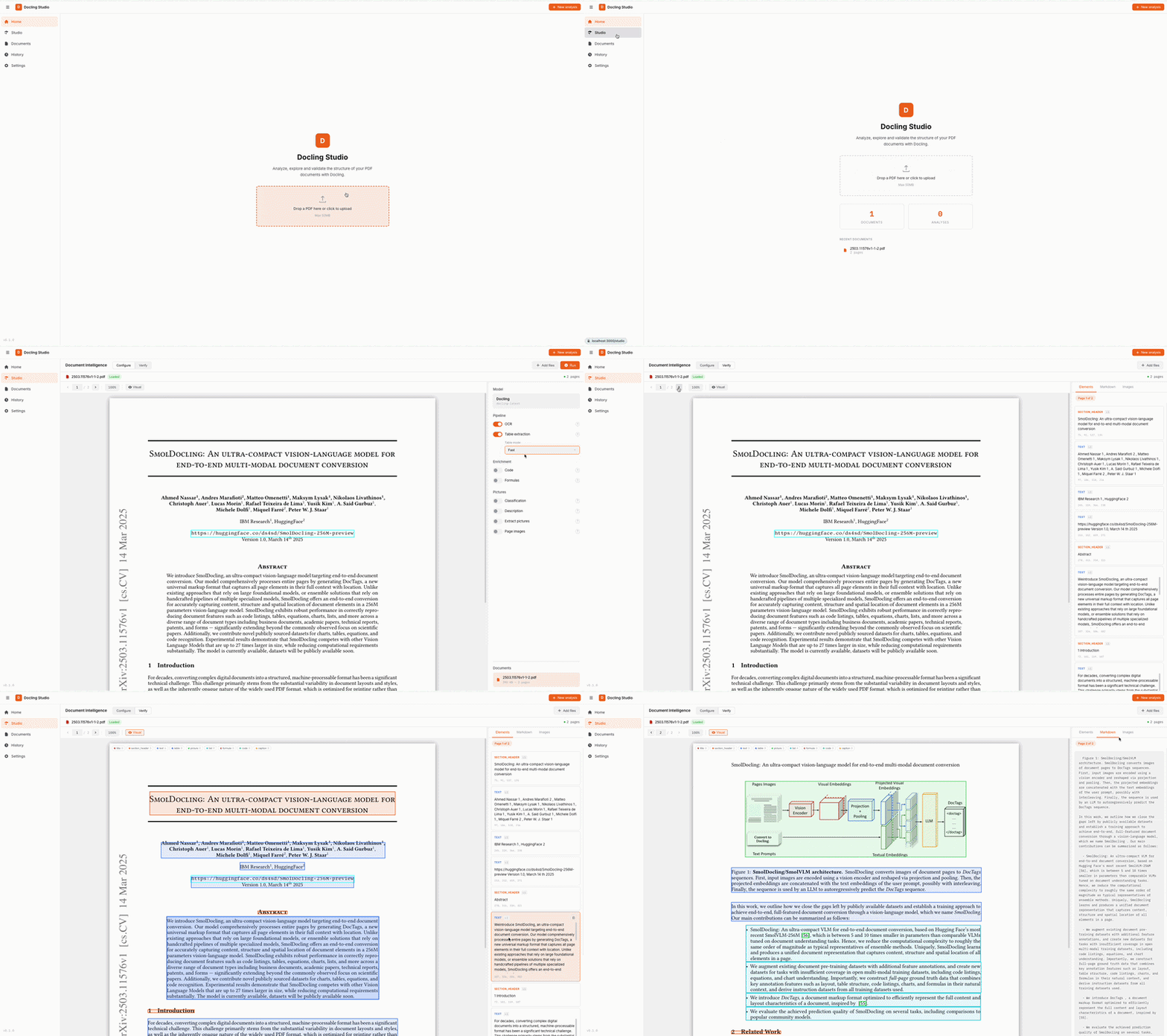
A visual document analysis studio powered by Docling. Upload a PDF, configure the extraction pipeline, and visualize the results — text, tables, images, formulas, bounding boxes — all from your browser.
Features
- Home page with quick upload and recent documents
- PDF viewer with page navigation, bounding box overlay, and resizable results panel
- Configurable Docling pipeline — OCR, table extraction, code/formula enrichment, picture classification & description, image generation
- Bounding box visualization — color-coded element overlay directly on the PDF
- Per-page results — right panel syncs with the current PDF page
- Markdown & HTML export of extracted content
- Document management — upload, list, delete
- Analysis history — re-visit and open past analyses
- Dark / Light theme and FR / EN localization
Architecture
┌────────────┐         ┌──────────────────────┐
│  Frontend  │────────▶│   Document Parser    │
│  Vue 3     │  /api/* │ FastAPI + Docling    │
│  port 3000 │         │ SQLite + file storage│
└────────────┘         │   port 8000          │
                       └──────────────────────┘
| Service | Stack | Role |
|---|---|---|
| frontend | Vue 3, TypeScript, Vite, Pinia | UI, PDF viewer, results display |
| document-parser | FastAPI, Docling, SQLite, pdf2image | REST API, document parsing, storage |
Backend structure (clean architecture)
document-parser/
├── main.py                   # FastAPI app, CORS, lifespan
├── domain/                   # Pure domain — no HTTP, no DB
│   ├── models.py             # Document, AnalysisJob dataclasses
│   ├── parsing.py            # Docling conversion & page extraction
│   └── bbox.py               # Bounding box coordinate normalization
├── api/                      # HTTP layer (FastAPI routers)
│   ├── schemas.py            # Pydantic DTOs (camelCase serialization)
│   ├── documents.py          # /api/documents endpoints
│   └── analyses.py           # /api/analyses endpoints
├── persistence/              # Data layer (SQLite via aiosqlite)
│   ├── database.py           # Connection management, schema init
│   ├── document_repo.py      # Document CRUD
│   └── analysis_repo.py      # AnalysisJob CRUD
├── services/                 # Use case orchestration
│   ├── document_service.py   # Upload, delete, preview
│   └── analysis_service.py   # Async Docling processing
└── tests/                    # 99 tests (pytest)
Frontend structure (feature-based)
frontend/src/
├── app/                      # App shell, router, global styles
├── pages/                    # Route-level pages
│   ├── HomePage.vue          # Landing page with upload & stats
│   ├── StudioPage.vue        # PDF viewer + config + results
│   ├── DocumentsPage.vue     # Document management
│   ├── HistoryPage.vue       # Past analyses
│   └── SettingsPage.vue      # Theme, language, API URL
├── features/                 # Feature modules
│   ├── analysis/             # Analysis store, API, bbox, UI components
│   ├── document/             # Document store, API, upload, list
│   ├── history/              # History store, API, navigation
│   └── settings/             # Settings store
└── shared/                   # Shared utilities (types, i18n, http, format)
Quick Start
Docling Studio ships two Docker image variants:
| Variant | Image tag | Size | Description |
|---|---|---|---|
| remote | latest-remote |
~270 MB | Lightweight — delegates to an external Docling Serve instance |
| local | latest-local |
~1.9 GB | Full — runs Docling in-process, CPU-only (downloads ML models on first run) |
Docker — remote mode (fastest)
docker run -p 3000:3000 \
  -e DOCLING_SERVE_URL=http://your-docling-serve:5001 \
  ghcr.io/scub-france/docling-studio:latest-remote
Docker — local mode (self-contained)
docker run -p 3000:3000 ghcr.io/scub-france/docling-studio:latest-local
Note: The first analysis takes longer as Docling downloads its ML models (~400 MB). Subsequent runs are fast.
Docker Compose (for development)
git clone https://github.com/scub-france/Docling-Studio.git
cd Docling-Studio

# Local mode (default)
docker compose up --build

# Remote mode
CONVERSION_MODE=remote DOCLING_SERVE_URL=http://your-docling-serve:5001 docker compose up --build
Local Development
Backend (Python 3.12+):
cd document-parser
python -m venv .venv && source .venv/bin/activate

# Remote mode (lightweight)
pip install -r requirements.txt

# Local mode (with Docling)
pip install -r requirements-local.txt

uvicorn main:app --reload --port 8000
Frontend (Node 20+):
cd frontend
npm install
npm run dev
Running Tests
# Backend (99 tests)
cd document-parser
pip install pytest pytest-asyncio httpx
pytest tests/ -v

# Frontend (81 tests)
cd frontend
npm run test:run
Pipeline Options
These options map directly to Docling's PdfPipelineOptions. See the Docling documentation for details on each feature.
| Option | Default | Description |
|---|---|---|
do_ocr |
true |
OCR for scanned pages and embedded images |
do_table_structure |
true |
Table detection and row/column reconstruction |
table_mode |
accurate |
accurate (TableFormer) or fast |
do_code_enrichment |
false |
Specialized OCR for code blocks |
do_formula_enrichment |
false |
Math formula recognition (LaTeX output) |
do_picture_classification |
false |
Classify images by type (chart, photo, diagram…) |
do_picture_description |
false |
Generate image descriptions via VLM |
generate_picture_images |
false |
Extract detected images as separate files |
generate_page_images |
false |
Rasterize each page as an image |
images_scale |
1.0 |
Scale factor for generated images (0.1–10) |
Configuration
All configuration is done via environment variables. See .env.example.
| Variable | Default | Description |
|---|---|---|
CONVERSION_ENGINE |
local |
local (in-process Docling) or remote (Docling Serve) |
DOCLING_SERVE_URL |
http://localhost:5001 |
Docling Serve endpoint (remote mode only) |
DOCLING_SERVE_API_KEY |
— | API key for Docling Serve (optional) |
CORS_ORIGINS |
http://localhost:3000,... |
CORS allowed origins (comma-separated) |
UPLOAD_DIR |
./uploads |
File storage directory |
DB_PATH |
./data/docling_studio.db |
SQLite database path |
CONVERSION_TIMEOUT |
600 |
Max seconds for a single Docling conversion |
CI / Release
GitHub Actions pipelines (see .github/workflows/):
| Workflow | Trigger | What it does |
|---|---|---|
| CI | push to main, pull requests |
Lint + type check + Backend tests + Frontend tests + build |
| Release | push tag v* |
Build & push two multi-arch Docker images (remote + local) to ghcr.io |
| Docs | push to main (docs changes) |
Build & deploy MkDocs to GitHub Pages |
We follow Semantic Versioning with a simplified Git Flow. See CONTRIBUTING.md for the full release process.
Performance & System Requirements
| Document type | Pages | Approx. time (CPU) |
|---|---|---|
| Simple report | 5–10 | ~30s–1 min |
| Research paper | 10–30 | ~1–2 min |
| Large document | 100+ | ~2–5 min |
Docker Desktop settings
| Remote image | Local image | |
|---|---|---|
| Image size | ~270 MB | ~1.9 GB |
| Memory | 2 GB | 6 GB (recommended 8 GB+) |
| CPUs | 2 | 4 (recommended 8+) |
Platform support
All Docker images are multi-arch (linux/amd64 + linux/arm64). No GPU required.
Tech Stack
- Frontend: Vue 3, TypeScript, Vite, Pinia, DOMPurify
- Backend: FastAPI, Docling 2.x, SQLite (aiosqlite), pdf2image
- CI: GitHub Actions
- Infra: Docker Compose + Nginx
Contributing
Contributions are welcome! Please open an issue first to discuss what you'd like to change.
License
MIT — Pier-Jean Malandrino