 06bfe9b2ba
The backend container only exposes port 8000 internally (expose, not ports). The health check and Karate tests must go through the nginx proxy on port 3000, the only port published to the host. |
||
|---|---|---|
| .github | ||
| docs | ||
| document-parser | ||
| e2e | ||
| frontend | ||
| .dockerignore | ||
| .editorconfig | ||
| .env.example | ||
| .gitignore | ||
| CHANGELOG.md | ||
| CONTRIBUTING.md | ||
| docker-compose.yml | ||
| Dockerfile | ||
| LICENSE | ||
| mkdocs.yml | ||
| nginx.conf | ||
| README.md | ||
Docling Studio





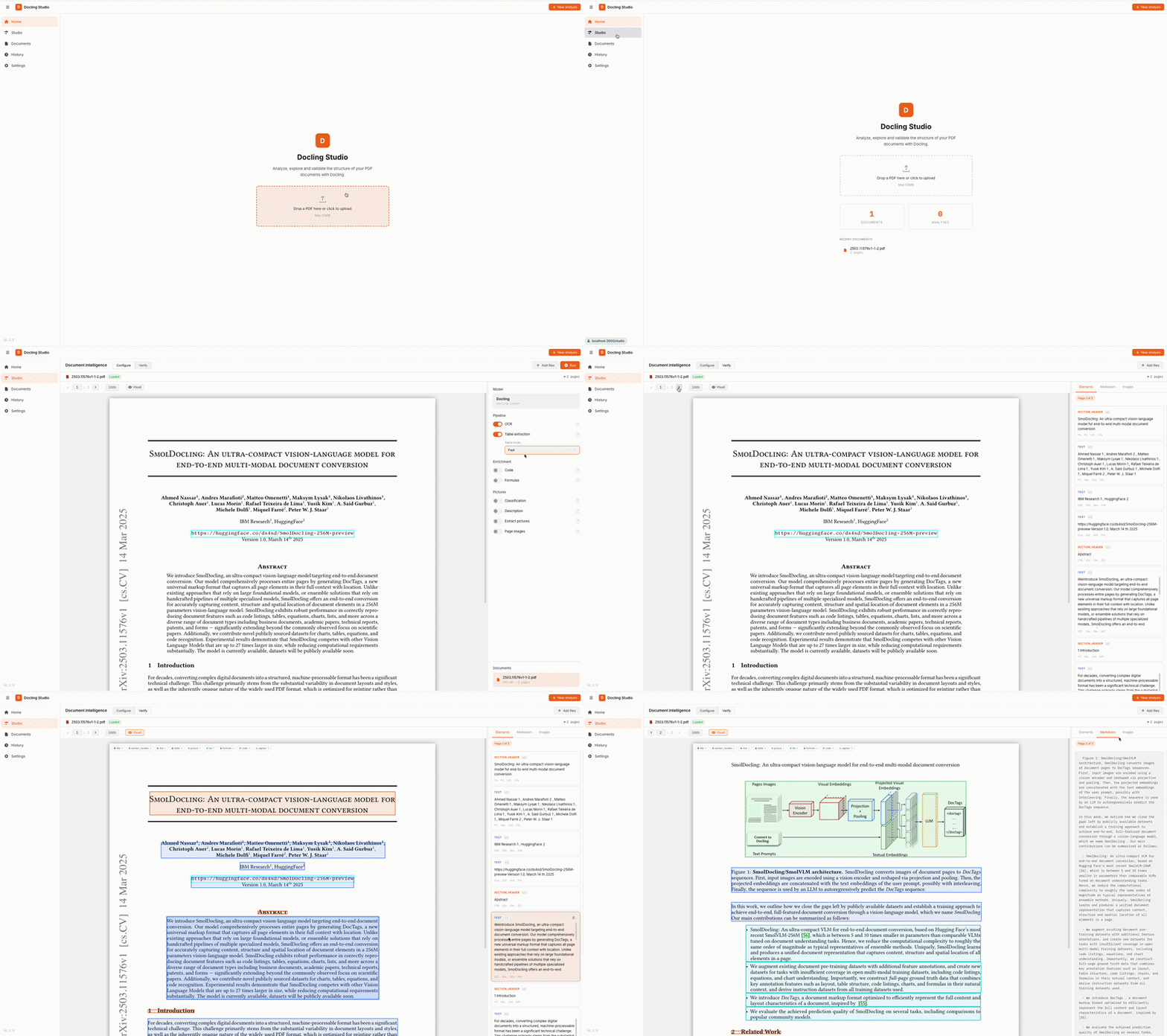
A visual document analysis studio powered by Docling. Upload a PDF, configure the extraction pipeline, and visualize the results — text, tables, images, formulas, bounding boxes — all from your browser.
Features
- Home page with quick upload and recent documents
- PDF viewer with page navigation, bounding box overlay, and resizable results panel
- Configurable Docling pipeline — OCR, table extraction, code/formula enrichment, picture classification & description, image generation
- Bounding box visualization — color-coded element overlay directly on the PDF
- Per-page results — right panel syncs with the current PDF page
- Markdown & HTML export of extracted content
- Document management — upload, list, delete
- Analysis history — re-visit and open past analyses
- Dark / Light theme and FR / EN localization
Architecture
┌────────────┐         ┌──────────────────────┐
│  Frontend  │────────▶│   Document Parser    │
│  Vue 3     │  /api/* │ FastAPI + Docling    │
│  port 3000 │         │ SQLite + file storage│
└────────────┘         │   port 8000          │
                       └──────────────────────┘
| Service | Stack | Role |
|---|---|---|
| frontend | Vue 3, TypeScript, Vite, Pinia | UI, PDF viewer, results display |
| document-parser | FastAPI, Docling, SQLite, pdf2image | REST API, document parsing, storage |
Backend structure (clean architecture)
document-parser/
├── main.py                   # FastAPI app, CORS, lifespan
├── domain/                   # Pure domain — no HTTP, no DB
│   ├── models.py             # Document, AnalysisJob dataclasses
│   ├── ports.py              # Abstract protocols (converter, chunker)
│   └── value_objects.py      # ConversionResult, PageDetail, ChunkResult
├── api/                      # HTTP layer (FastAPI routers)
│   ├── schemas.py            # Pydantic DTOs (camelCase serialization)
│   ├── documents.py          # /api/documents endpoints
│   └── analyses.py           # /api/analyses endpoints
├── persistence/              # Data layer (SQLite via aiosqlite)
│   ├── database.py           # Connection management, schema init
│   ├── document_repo.py      # Document CRUD
│   └── analysis_repo.py      # AnalysisJob CRUD
├── services/                 # Use case orchestration
│   ├── document_service.py   # Upload, delete, preview
│   └── analysis_service.py   # Async Docling processing
└── tests/                    # 199 tests (pytest)
Frontend structure (feature-based)
frontend/src/
├── app/                      # App shell, router, global styles
├── pages/                    # Route-level pages
│   ├── HomePage.vue          # Landing page with upload & stats
│   ├── StudioPage.vue        # PDF viewer + config + results
│   ├── DocumentsPage.vue     # Document management
│   ├── HistoryPage.vue       # Past analyses
│   └── SettingsPage.vue      # Theme, language, API URL
├── features/                 # Feature modules
│   ├── analysis/             # Analysis store, API, bbox, UI components
│   ├── document/             # Document store, API, upload, list
│   ├── history/              # History store, API, navigation
│   └── settings/             # Settings store
└── shared/                   # Shared utilities (types, i18n, http, format)
Quick Start
Docling Studio ships two Docker image variants:
| Variant | Image tag | Size | Description |
|---|---|---|---|
| remote | latest-remote |
~270 MB | Lightweight — delegates to an external Docling Serve instance |
| local | latest-local |
~1.9 GB | Full — runs Docling in-process, CPU-only (downloads ML models on first run) |
Docker — remote mode (fastest)
docker run -p 3000:3000 \
  -e DOCLING_SERVE_URL=http://your-docling-serve:5001 \
  ghcr.io/scub-france/docling-studio:latest-remote
Docker — local mode (self-contained)
docker run -p 3000:3000 ghcr.io/scub-france/docling-studio:latest-local
Note: The first analysis takes longer as Docling downloads its ML models (~400 MB). Subsequent runs are fast.
Docker Compose (for development)
git clone https://github.com/scub-france/Docling-Studio.git
cd Docling-Studio

# Local mode (default)
docker compose up --build

# Remote mode
CONVERSION_MODE=remote DOCLING_SERVE_URL=http://your-docling-serve:5001 docker compose up --build
Local Development
Backend (Python 3.12+):
cd document-parser
python -m venv .venv && source .venv/bin/activate

# Remote mode (lightweight)
pip install -r requirements.txt

# Local mode (with Docling)
pip install -r requirements-local.txt

uvicorn main:app --reload --port 8000
Frontend (Node 20+):
cd frontend
npm install
npm run dev
Running Tests
# Backend (199 tests)
cd document-parser
pip install pytest pytest-asyncio httpx
pytest tests/ -v

# Frontend (129 tests)
cd frontend
npm run test:run
Pipeline Options
These options map directly to Docling's PdfPipelineOptions. See the Docling documentation for details on each feature.
| Option | Default | Description |
|---|---|---|
do_ocr |
true |
OCR for scanned pages and embedded images |
do_table_structure |
true |
Table detection and row/column reconstruction |
table_mode |
accurate |
accurate (TableFormer) or fast |
do_code_enrichment |
false |
Specialized OCR for code blocks |
do_formula_enrichment |
false |
Math formula recognition (LaTeX output) |
do_picture_classification |
false |
Classify images by type (chart, photo, diagram…) |
do_picture_description |
false |
Generate image descriptions via VLM |
generate_picture_images |
false |
Extract detected images as separate files |
generate_page_images |
false |
Rasterize each page as an image |
images_scale |
1.0 |
Scale factor for generated images (0.1–10) |
Configuration
All configuration is done via environment variables. See .env.example.
| Variable | Default | Description |
|---|---|---|
CONVERSION_ENGINE |
local |
local (in-process Docling) or remote (Docling Serve) |
DOCLING_SERVE_URL |
http://localhost:5001 |
Docling Serve endpoint (remote mode only) |
DOCLING_SERVE_API_KEY |
— | API key for Docling Serve (optional) |
CORS_ORIGINS |
http://localhost:3000,... |
CORS allowed origins (comma-separated) |
UPLOAD_DIR |
./uploads |
File storage directory |
DB_PATH |
./data/docling_studio.db |
SQLite database path |
CONVERSION_TIMEOUT |
600 |
Max seconds for a single Docling conversion |
CI / Release
GitHub Actions pipelines (see .github/workflows/):
| Workflow | Trigger | What it does |
|---|---|---|
| CI | push to main, pull requests |
Lint + type check + Backend tests + Frontend tests + build |
| Release | push tag v* |
Build & push two multi-arch Docker images (remote + local) to ghcr.io |
| Docs | push to main (docs changes) |
Build & deploy MkDocs to GitHub Pages |
We follow Semantic Versioning with a simplified Git Flow. See CONTRIBUTING.md for the full release process.
Performance & System Requirements
| Document type | Pages | Approx. time (CPU) |
|---|---|---|
| Simple report | 5–10 | ~30s–1 min |
| Research paper | 10–30 | ~1–2 min |
| Large document | 100+ | ~2–5 min |
Docker Desktop settings
| Remote image | Local image | |
|---|---|---|
| Image size | ~270 MB | ~1.9 GB |
| Memory | 2 GB | 6 GB (recommended 8 GB+) |
| CPUs | 2 | 4 (recommended 8+) |
Platform support
All Docker images are multi-arch (linux/amd64 + linux/arm64). No GPU required.
Tech Stack
- Frontend: Vue 3, TypeScript, Vite, Pinia, DOMPurify
- Backend: FastAPI, Docling 2.x, SQLite (aiosqlite), pdf2image
- CI: GitHub Actions
- Infra: Docker Compose + Nginx
Contributing
Contributions are welcome! Please open an issue first to discuss what you'd like to change.
License
MIT — Pier-Jean Malandrino