| .. | ||
| fan-speed-control.pl | ||
| fan-speed-control.service | ||
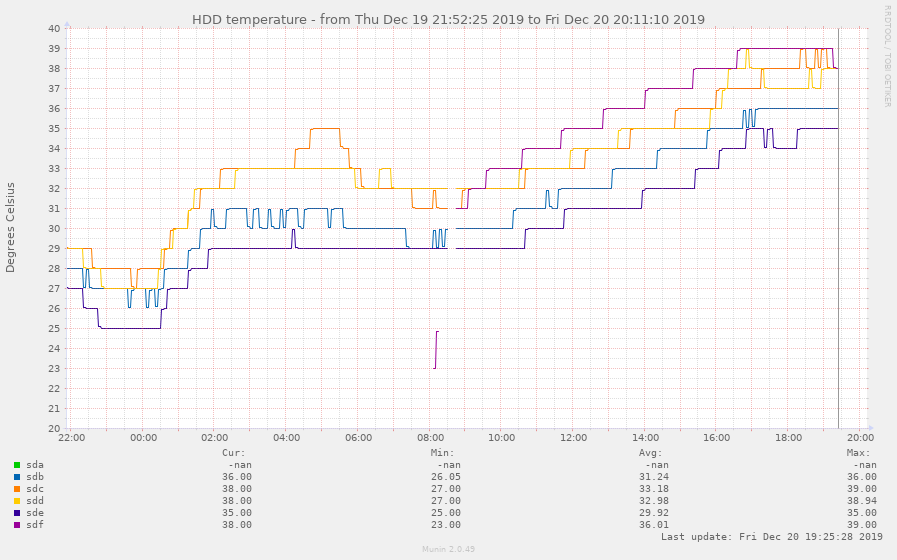
| hddtemp_smartctl-pinpoint=1576762993,1576823788.png | ||
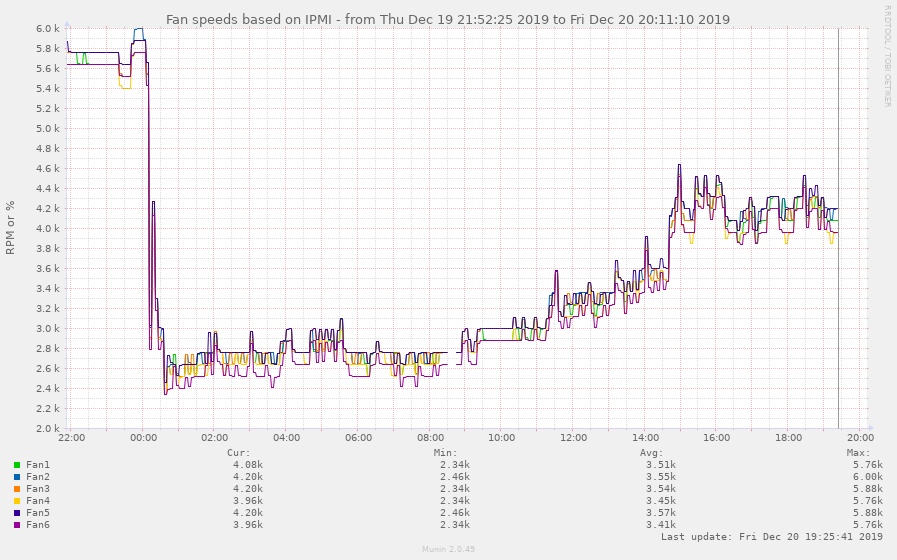
| ipmi_fans-pinpoint=1576762993,1576823788.png | ||
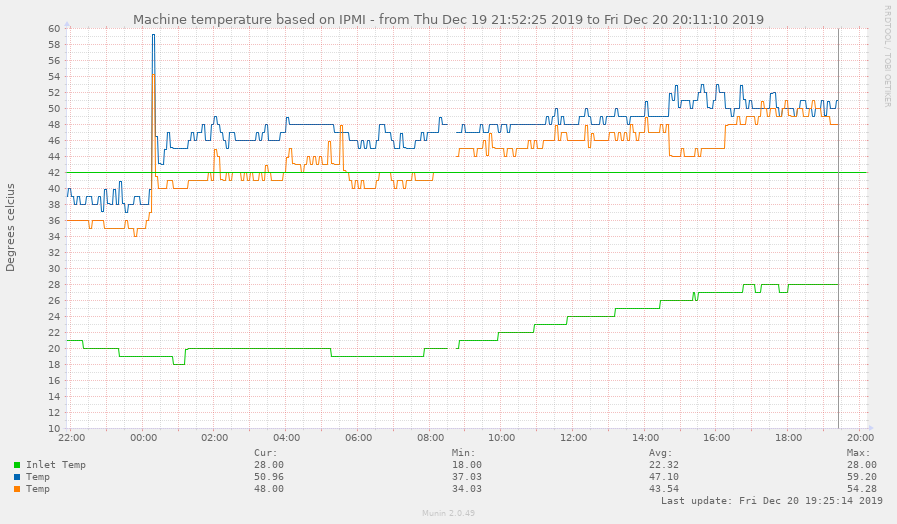
| ipmi_temp-pinpoint=1576762993,1576823788.png | ||
| readme.md | ||
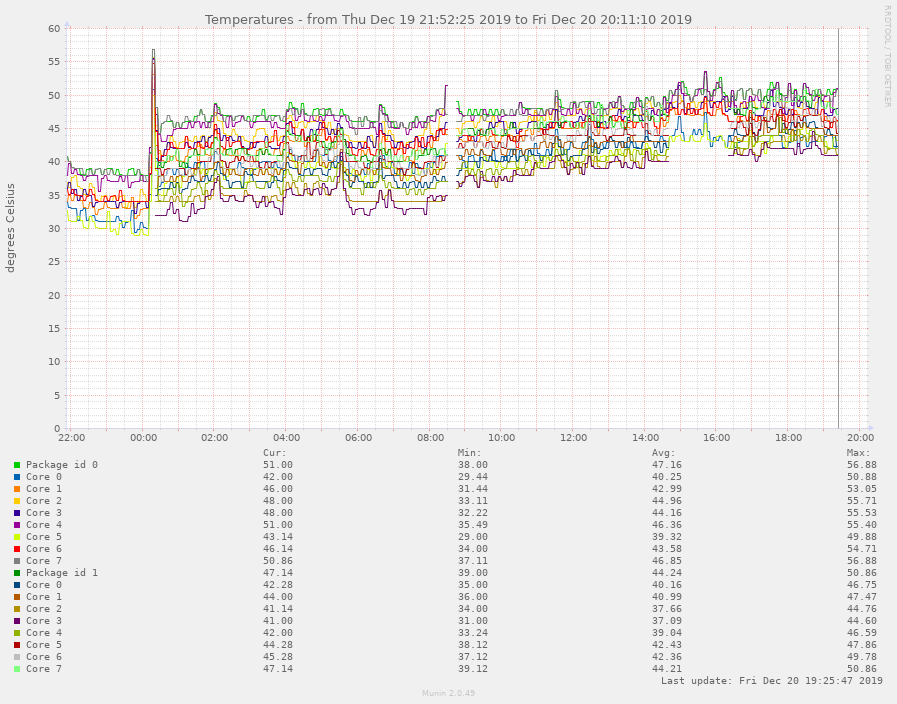
| sensors_temp-pinpoint=1576762993,1576823788.png | ||



fan speed controller for dell R710, R520 etc
Dells don't like having third party cards installed, and ramp up the fan speed to jetliner taking off. But you can override this.
This speed controller uses ipmi raw commands that seem to be similar
across a wide range of dell server generations (google searches for
ipmitool raw 0x30 0x30 0x01 0x00 show it works for R710, R730, T130,
and I run this on my R520
This script monitoring the ambient air temperature (you will likely need to modify the $ipmi_inlet_sensorname variable to find the correct sensor), the hdd temperatures, the core and socket temperatures (weighted so one core shooting up if all the others are still cold - let the heatsink do its job).
It uses setpoints and temperature ranges you can tune to your heart's content. I use it to keep the fans low but increasing to a soft volume up to 40 degrees, ramp it up quickly to 50degrees, then very quickly towards full speed much beyond that. It also has an ambient air temperature threshold of 32degrees where it gives up and delegates control back to the firmware. Don't run your bedroom IT closet at 32 degrees yeah?
It's got a signal handler so it defaults to default behaviour when killed by SIGINT/SIGTERM.
I run it on my proxmox hypervisor directly, hence not needing any ipmi passwords. I will start and stop it through proxmox's systemd system once I have it firmly debugged.
I wrote it the night before Australia's hottest December day on record (hey we like our coal fondling prime-ministers). It seems to be coping so far now that it has reached that predicted peak (I don't believe it's only 26 in my un-air conditioned study).
Howto: Manually setting the fan speed of the Dell R610/R710
- Enable IPMI in iDrac
- Install ipmitool on linux, win or mac os
- Run the following command to issue IPMI commands:
ipmitool -I lanplus -H <iDracip> -U root -P <rootpw> <command>
Enable manual/static fan speed:
raw 0x30 0x30 0x01 0x00
Set fan speed:
(Use i.e http://www.hexadecimaldictionary.com/hexadecimal/0x14/ to calculate speed from decimal to hex)
3000 RPM: raw 0x30 0x30 0x02 0xff 0x10
2160 RPM: raw 0x30 0x30 0x02 0xff 0x0a
1560 RPM: raw 0x30 0x30 0x02 0xff 0x09
Note: The RPM may differ from model to model
Disable / Return to automatic fan control:
raw 0x30 0x30 0x01 0x01
Other: List all output from IPMI
sdr elist all
Example of a command:
ipmitool -I lanplus -H 192.168.0.120 -U root -P calvin raw 0x30 0x30 0x02 0xff 0x10
Disclaimer
TLDR; I take NO responsibility if you mess up anything.
All of this was inspired by this Reddit post by /u/whitekidney