 f907440f6b
Backend:
- Add smart provider fallback when selected model's provider isn't configured
- Automatically switch to a model from a configured provider instead of failing
- Log warning when fallback occurs for visibility

Frontend (AISettings.tsx):
- Add helper functions to check if model's provider is configured
- Group model dropdown: configured providers first, unconfigured marked with ⚠️
- Add inline warning when selecting model from unconfigured provider
- Validate on save that model's provider is configured (or being added)
- Warn before clearing last configured provider (would disable AI)
- Warn before clearing provider that current model uses
- Add patrol interval validation (must be 0 or >= 10 minutes)
- Show red border + inline error for invalid patrol intervals 1-9
- Update patrol interval hint: '(0=off, 10+ to enable)'

These changes prevent confusing '500 Internal Server Error' and
'AI is not enabled or configured' errors when model/provider mismatch.
|
||
|---|---|---|
| .github | ||
| cmd | ||
| deploy/helm/pulse | ||
| dev/oidc | ||
| docs | ||
| frontend-modern | ||
| internal | ||
| pkg | ||
| scripts | ||
| security | ||
| testing-tools | ||
| tests/integration | ||
| .dockerignore | ||
| .env.example | ||
| .gitattributes | ||
| .gitguardian.yaml | ||
| .gitignore | ||
| .golangci.yml | ||
| ARCHITECTURE.md | ||
| artifacthub-repo.yml | ||
| CONTRIBUTING.md | ||
| cr.yaml | ||
| DEV-QUICK-START.md | ||
| docker-compose.yml | ||
| docker-entrypoint.sh | ||
| Dockerfile | ||
| go.mod | ||
| go.sum | ||
| install.sh | ||
| LICENSE | ||
| Makefile | ||
| mock.env | ||
| README.md | ||
| SECURITY.md | ||
| VERSION | ||

Pulse
Real-time monitoring for Proxmox VE, Proxmox Mail Gateway, PBS, and Docker infrastructure.



🚀 Overview
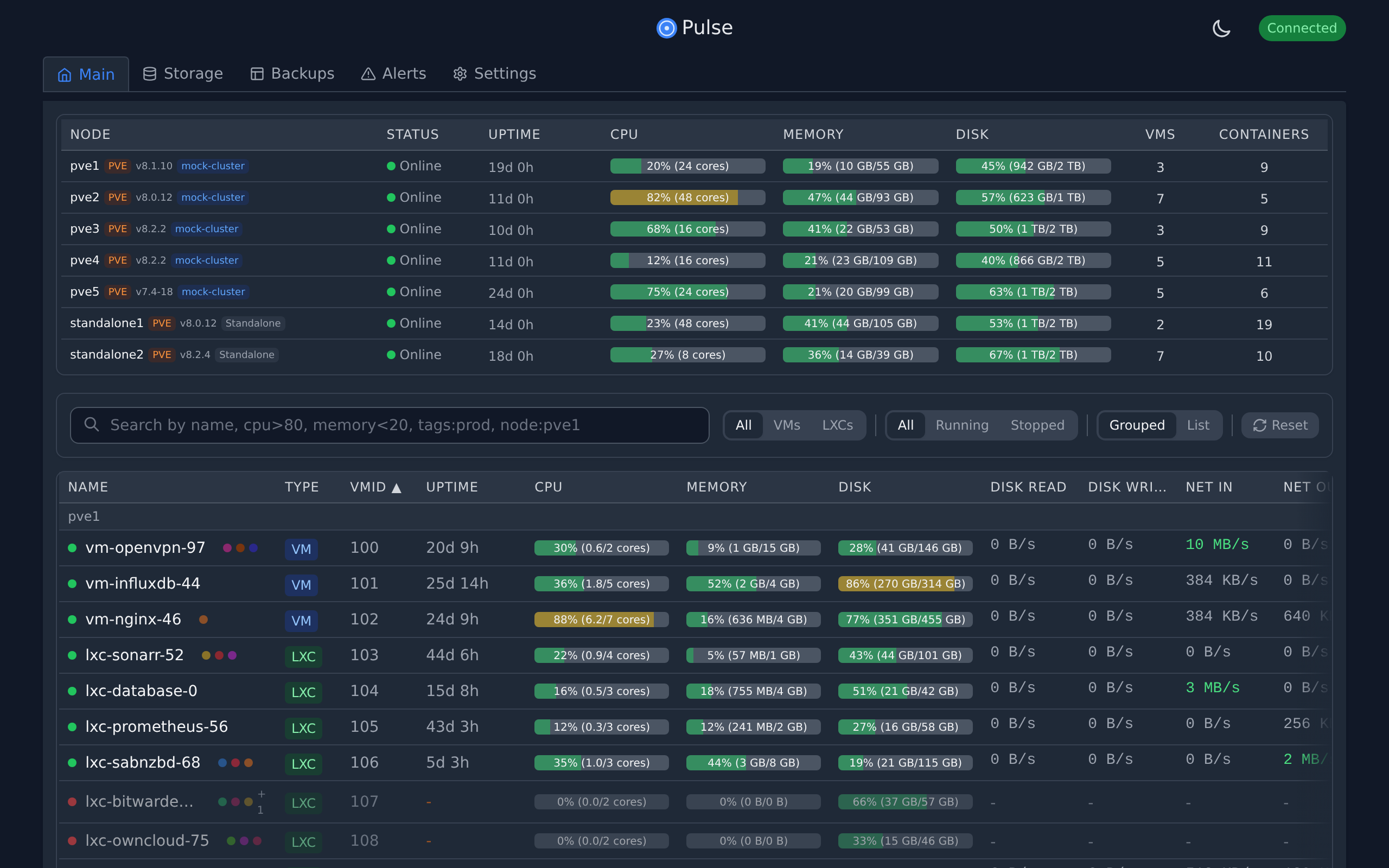
Pulse is a modern, unified dashboard for monitoring your infrastructure across Proxmox, Docker, and Kubernetes. It consolidates metrics, alerts, and AI-powered insights from all your systems into a single, beautiful interface.
Designed for homelabs, sysadmins, and MSPs who need a "single pane of glass" without the complexity of enterprise monitoring stacks.
✨ Features
Core Monitoring
- Unified Monitoring: View health and metrics for PVE, PBS, PMG, Docker, and Kubernetes in one place
- Smart Alerts: Get notified via Discord, Slack, Telegram, Email, and more
- Auto-Discovery: Automatically finds Proxmox nodes on your network
- Metrics History: Persistent storage with configurable retention
- Backup Explorer: Visualize backup jobs and storage usage
Pulse AI (New in 5.0)
- Chat Assistant: Ask questions about your infrastructure in natural language
- Patrol Mode: Automated health checks with proactive issue detection
- Auto-Fix: Automatically resolve common issues with AI-guided remediation
- Predictive Intelligence: Forecast problems before they happen
Multi-Platform
- Proxmox VE/PBS/PMG: Full monitoring and management
- Kubernetes: Complete K8s cluster monitoring via agents
- Docker/Podman: Container and Swarm service monitoring
- OCI Containers: Proxmox 9.1+ native container support
Security & Operations
- Secure by Design: Credentials encrypted at rest, strict API scoping
- One-Click Updates: Easy upgrades for supported deployments
- OIDC/SSO: Enterprise authentication support
- Privacy Focused: No telemetry, all data stays on your server
⚡ Quick Start
Option 1: Proxmox LXC (Recommended)
Run this one-liner on your Proxmox host to create a lightweight LXC container:
curl -fsSL https://github.com/rcourtman/Pulse/releases/latest/download/install.sh | bash
Option 2: Docker
docker run -d \
  --name pulse \
  -p 7655:7655 \
  -v pulse_data:/data \
  --restart unless-stopped \
  rcourtman/pulse:latest
Access the dashboard at http://<your-ip>:7655.
📚 Documentation
- Installation Guide: Detailed instructions for Docker, Kubernetes, and bare metal.
- Configuration: Setup authentication, notifications, and advanced settings.
- Security: Learn about Pulse's security model and best practices.
- API Reference: Integrate Pulse with your own tools.
- Architecture: High-level system design and data flow.
- Troubleshooting: Solutions to common issues.
🌐 Community Integrations
Community-maintained integrations and addons:
- Home Assistant Addons - Run Pulse Agent and Pulse Server as Home Assistant addons.
❤️ Support Pulse Development
Pulse is maintained by one person. Sponsorships help cover the costs of the demo server, development tools, and domains. If Pulse saves you time, please consider supporting the project!


📄 License
MIT © Richard Courtman